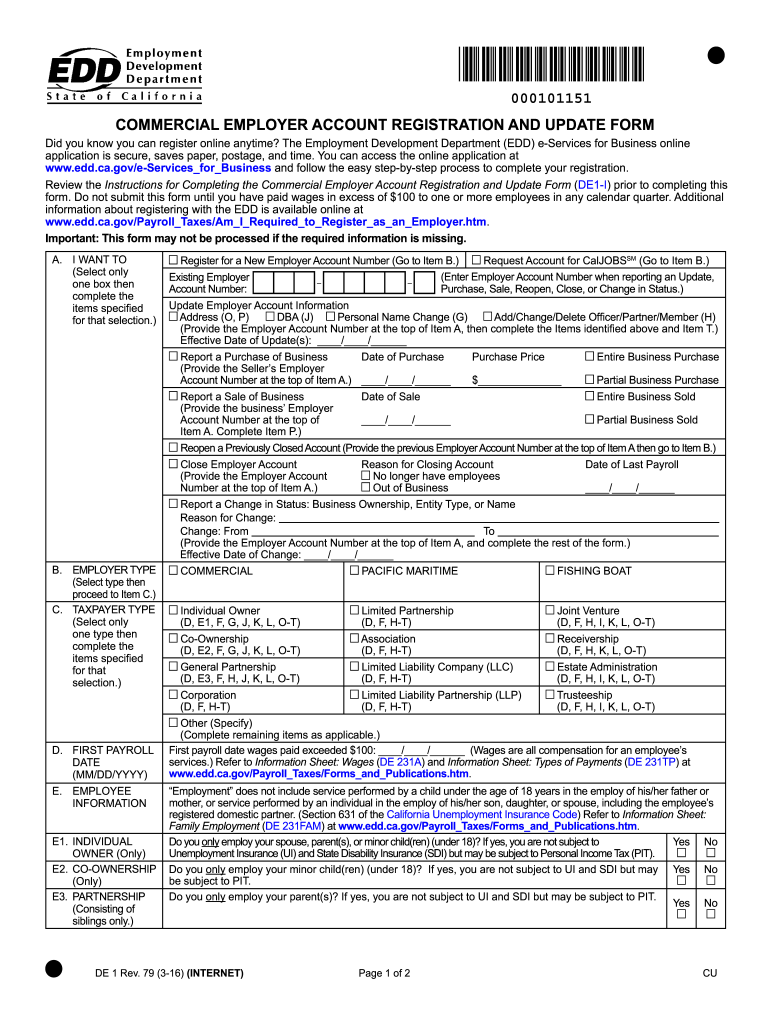
Ion Receivership (D, E2, F, G, J, K, L, O-T) (D, F, H-T) (D, F, H, K, L, O-T) General Partnership Limited Liability Company (LLC) Estate Administration (D, E3, F, H, J, K, L, O-T) (D, F, H-T) (D, F, H, I, K, L, O-T) Corporation Limited Liability Partnership (LLP) Trusteeship (D, F, H-T) (D, F, H-T) (D, F, H, I, K, L, O-T) Other (Specify) (Complete remaining items as applicable.) First payroll date wages paid exceeded $100: ____/____/______ (Wages are all compensation for an employee’s services.
Loading

Open form follow the instructions

Easily sign the form with your finger

Send filled & signed form or save
How to fill out the CA DE 1 online
The CA DE 1 form is essential for registering and updating employer accounts with the Employment Development Department (EDD) in California. This guide provides clear, step-by-step instructions to assist users in completing the form accurately and efficiently online.
Follow the steps to fill out the CA DE 1 online form.
- Press the ‘Get Form’ button to access the CA DE 1 form and open it in your preferred online document editor.
- In section A, select only one box indicating your intention—whether to register for a new employer account number, request account for CalJOBS, update account information, report a purchase or sale of business, or to close an employer account. Make sure to provide the Employer Account Number when relevant.
- In section B, choose your employer type, then proceed to section C to select your taxpayer type. Complete any additional items specified based on your selection.
- Fill out the 'First Payroll Date' in section D, providing the date when wages paid exceeded $100. This is significant for UI and SDI considerations.
- In section E, provide detailed information about the owners and partners, adding necessary taxpayer information as per your business structure (individual, co-ownership, partnership, etc.).
- Complete sections F through P with relevant details about the location of employee services, corporate officer information, mailing addresses, and business operations.
- In section Q, ensure you enter a valid email address to facilitate communication. Indicate if you consent to e-mail contact for future correspondence.
- Describe your industry activity in section R. You must select from the listed options and provide specific details about your business services.
- Fill out section S if applicable, providing a contact person for your employer account. Complete a Power of Attorney Declaration if necessary.
- Finally, review your entries for accuracy and completeness before signing the declaration in section T. Ensure that all required information is provided to avoid processing delays.
- Save your changes, download the completed form, print a copy for your records, and share it as necessary. Submit the form to the provided mailing address.
Start your online registration or update process by completing the CA DE 1 form today.
Experience a faster way to fill out and sign forms on the web. Access the most extensive library of templates available.
Related content
Review the Instructions for Completing the Commercial Employer Account Registration and...
I gather a past medical history and anesthetic history, do a physical exam, and explain...
CA$1 Dólares canadenses. R$ 3.93 Reais brasileiros ; CA$10 Dólares canadenses. R$ 39.25...
Get answers to your most pressing questions about US Legal Forms API.
How to fill out California DE4 form?
Filling out the California DE 4 form involves providing accurate information about your personal allowances and additional withholdings to be deducted from your paycheck. Start by completing your personal details, including your Social Security number and filing status. It's crucial to understand how your choices affect your withholding to avoid issues later. For precise guidance, you can access user-friendly resources provided by US Legal Forms.
How to answer EDD unemployment questions?
When responding to EDD unemployment questions, provide clear and accurate information regarding your employment history and current job status. Be honest about any reasons for unemployment, such as layoffs or other circumstances. Familiarizing yourself with CA DE 1 guidelines can help in understanding what information is relevant and necessary. Seeking guidance from US Legal Forms can further assist you in navigating these questions effectively.
What is my California EIN number?
Your California EIN number is a unique identifier assigned to your business by the IRS for tax purposes. You can find it on your federal tax returns, IRS correspondence, or any official document that references your business's federal tax identification. If you cannot locate your EIN, you may contact the IRS directly or check resources available on the US Legal Forms platform for assistance. Having your California EIN number is vital for tax compliance.
Is the EDD number the same as the EIN number?
No, the EDD number and the EIN number are not the same. The EIN, or Employer Identification Number, is issued by the IRS for federal tax purposes, while the EDD number is specific to California and relates to state payroll taxes. Both numbers serve different functions for your business, so it's important to keep them separate and use them appropriately. Make sure to obtain both numbers to ensure your business runs smoothly.
What is DE1 in California?
CA DE 1 refers to the report form that California employers must submit to the Employment Development Department to report their payroll taxes. It provides essential information about your business, including employee wages and contributions. Completing the CA DE 1 form accurately ensures compliance with California state tax laws and helps you avoid penalties. Understanding this form is crucial for maintaining proper payroll records.
Can I go to the EDD office in person?
Yes, you can visit an EDD office in person if you require in-depth assistance or support. However, it is suggested to check the office hours and appointment requirements before heading out. Due to potential changes in operations, it's wise to confirm any current policies regarding in-person visits. For many inquiries, especially those related to the CA DE 1, you might find online resources at uslegalforms sufficient.
How to get a California employer identification number?
To obtain a California employer identification number (EIN), visit the California Secretary of State’s website. You can complete the application online or download the forms for mailing. It's essential to gather all required information beforehand, such as your business structure and details about your business. Utilizing uslegalforms can help streamline this process as they offer templates and guidance related to the CA DE 1.
How do I speak to a live person at EDD unemployment?
To reach a live person at EDD unemployment, call their designated customer service line. Follow the prompts carefully, and listen for options that allow you to connect directly with a representative. If you encounter any difficulties, try calling during off-peak hours for a better chance of immediate assistance. Remember, you can also visit uslegalforms for helpful tools related to the CA DE 1.
How do I talk to a representative at EDD?
To speak with a representative at EDD, you should call their customer service number during business hours. Be prepared for potential wait times, especially during peak hours. You may have to provide your personal information for verification before receiving assistance. Additionally, consider visiting the EDD website for useful resources that might help with your inquiry regarding the CA DE 1.
What is the unemployment tax rate in California?
The unemployment tax rate in California varies depending on your business's history and the fund's overall status. Typically, new employers start with a standard rate, which may change based on experience ratings over time. Keeping informed about these rates is vital for financial planning. You can learn more about these rates and other tax obligations on USLegalForms, which provides valuable insights and resources.
Use professional pre-built templates to fill in and sign documents online faster. Get access to thousands of forms.
If you believe that this page should be taken down, please follow our DMCA take down process here.