We use cookies to improve security, personalize the user experience, enhance our marketing activities (including cooperating with our marketing partners) and for other business use.
Click "here" to read our Cookie Policy. By clicking "Accept" you agree to the use of cookies. Read less
Read more
Accept
Loading
Form preview
  • US Legal Forms
  • Form Library
  • Independent Agency Forms
  • Independent Agency OPM Forms
  • Fers Ri 92-19 2012

Get Fers Ri 92-19 2012-2025

Duty interrupts creditable civilian service under subchapter I of chapter 84 of title 5, and is followed by reemployment in accordance with chapter 43 of title 38 that occurs on or after August 1, 1990. Instruction Page 1, RI 92-19 Revised May 2012 Item 2: Item 4: Persons who performed active military service after December 31, 1956, must have paid a deposit to receive credit under the Federal Employees Retirement System (FERS) for their military service. You must have paid your deposit to .

How it works

  1. Open form

    Open form follow the instructions

  2. Easily sign form

    Easily sign the form with your finger

  3. Share form

    Send filled & signed form or save

How to fill out the FERS RI 92-19 online

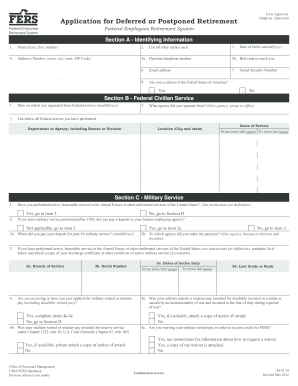
This guide provides a comprehensive overview on completing the FERS RI 92-19 form online for individuals applying for deferred or postponed retirement under the Federal Employees Retirement System (FERS). It is designed to assist users of all experience levels with clear and step-by-step instructions.

Follow the steps to complete the FERS RI 92-19 form online.

  1. Press the ‘Get Form’ button to access the FERS RI 92-19 application form and open it in the online editor.
  2. In Section A, fill out your identifying information. Include your name, date of birth, Social Security number, and a valid mailing address for correspondence. Be sure to review for accuracy.
  3. In Section B, provide details about your federal civilian service. List the agency where you last worked, and include the dates of your service.
  4. In Section C, indicate your military service. If applicable, note whether you paid a deposit for post-1956 military service and fulfill the item requirements if you are receiving military retired pay.
  5. Section D requires you to disclose any previous applications filed under the FERS or Civil Service Retirement System and any workers' compensation you have received.
  6. In Section E, provide marital information. If applicable, list the names of any former spouses that may have entitlement to survivor annuities.
  7. Section F deals with your annuity election. Carefully read the required options and make your selection regarding any survivor annuities.
  8. Complete Section H for payment instructions. Indicate your preference for how annuity payments will be made, whether via direct deposit to a bank account or other means.
  9. Finally, in Section I, sign and date your application certifying that all information is complete and truthful.
  10. Once you have completed the form, save your changes, and download or print the completed application for your records before submitting it to the appropriate address.

Complete your FERS RI 92-19 application online to ensure a smooth submission process for your deferred or postponed retirement.

Get form

Experience a faster way to fill out and sign forms on the web. Access the most extensive library of templates available.
Get form

Related content

Application for Deferred or Postponed Retirement...
Are you waiving your military retired pay in order to receive credit for FERS? Office of...
Learn more
LIVESTOCK AND MEAT STATISTICS
Shipments of stocker and feeder cattle and calves, by class and weight. From 8 specified...
Learn more

Related links form

Court Form DR 31 2014 Court Form DR 31 2013 InTec LLC Capability Statement Intel ISEF Official Abstract and Certification 2012

Questions & Answers

Get answers to your most pressing questions about US Legal Forms API.

Contact support

While both postponed and deferred retired status involve delaying benefits, postponed retirement allows you to take retirement while deferring the start of your payments. Deferred retirement, on the other hand, means you leave service and plan to claim your retirement at a later date, usually after reaching a certain minimum age. Understanding these differences can empower your retirement decisions within the framework of FERS RI 92-19.

Yes, you can retire at 55 with 30 years of federal service under the FERS plan, but you might face penalties if you haven't reached the minimum retirement age. This early retirement option offers flexibility for individuals who have built a substantial career. Familiarizing yourself with FERS RI 92-19 can help you navigate the specifics around benefits and any potential impacts on your retirement.

A deferred annuity in the federal government context refers to the retirement benefit you receive after leaving federal employment and choosing to delay your annuity payments until a later date. It's designed for employees who may not meet immediate retirement requirements but wish to preserve their benefit rights for future use. For more details about options, including FERS RI 92-19, consider consulting resources that clarify these terms.

In the case of postponed retirement, you are not eligible for the FERS annuity supplement until you begin receiving your annuity. This means you must wait until you reach a certain age before receiving these benefits. It is important to plan your retirement strategy carefully to ensure you fully understand the timelines associated with FERS RI 92-19.

A FERS annuity supplement is a payment that bridges the gap between your retirement and the age when Social Security benefits kick in. It aims to provide you with income during the early years of retirement, especially for those retiring before age 62. This supplement can significantly enhance your financial stability, particularly when considering options within the framework of FERS RI 92-19.

When discussing FERS retirement, deferred retirement occurs when a federal employee leaves the service and chooses to delay benefits until reaching minimum retirement age. Conversely, postponed retirement happens when you choose to retire but delay receiving benefits to a later date. Understanding these distinctions is critical for managing your retirement income effectively, and the FERS RI 92-19 guidelines provide helpful insight.

Calculating your FERS pension involves using a formula based on your years of service and your highest three years of average salary. The basic formula is: 1% of your high-3 average salary multiplied by your years of service for those retiring at age 62 or older. For higher computation, refer to the FERS RI 92-19, which explains how pensions work and how to maximize your benefits effectively.

To fill out OPM form RI 79 9 for retirees online, you’ll first need to access the OPM website and navigate to the form. Complete all fields diligently, ensuring your information is accurate and matches your official records. It is beneficial to review the FERS RI 92-19 to understand how your retirement benefits may influence your submission.

Filling out form RI 79 9 requires accurate completion of personal information, employment history, and any relevant medical details. It is important to follow the instructions provided with the form carefully. You should verify all entries before submission to avoid potential issues. Referencing FERS RI 92-19 can offer additional insights into the retirement specifics tied to your application.

To submit an OPM retirement application, gather all required documents and complete the necessary forms, including the application for retirement. You can then submit your application either online through the OPM website or by mailing it to the appropriate OPM address. The FERS RI 92-19 can provide valuable clarity on your retirement benefits, so make sure to review it as you prepare your application.

Get This Form Now!

Use professional pre-built templates to fill in and sign documents online faster. Get access to thousands of forms.
Get form
If you believe that this page should be taken down, please follow our DMCA take down processhere.

Industry-leading security and compliance

US Legal Forms protects your data by complying with industry-specific security standards.
  • In businnes since 1997
    25+ years providing professional legal documents.
  • Accredited business
    Guarantees that a business meets BBB accreditation standards in the US and Canada.
  • Secured by Braintree
    Validated Level 1 PCI DSS compliant payment gateway that accepts most major credit and debit card brands from across the globe.
Get FERS RI 92-19
Get form
Form Packages
Adoption
Bankruptcy
Contractors
Divorce
Home Sales
Employment
Identity Theft
Incorporation
Landlord Tenant
Living Trust
Name Change
Personal Planning
Small Business
Wills & Estates
Packages A-Z
Form Categories
Affidavits
Bankruptcy
Bill of Sale
Corporate - LLC
Divorce
Employment
Identity Theft
Internet Technology
Landlord Tenant
Living Wills
Name Change
Power of Attorney
Real Estate
Small Estates
Wills
All Forms
Forms A-Z
Form Library
Customer Service
Terms of Service
Privacy Notice
Legal Hub
Content Takedown Policy
Bug Bounty Program
About Us
Help Portal
Legal Resources
Blog
Affiliates
Contact Us
Delete My Account
Site Map
Industries
Forms in Spanish
Localized Forms
State-specific Forms
Forms Kit
Legal Guides
Real Estate Handbook
All Guides
Prepared for You
Notarize
Incorporation services
Our Customers
For Consumers
For Small Business
For Attorneys
Our Sites
US Legal Forms
USLegal
FormsPass
pdfFiller
signNow
airSlate WorkFlow
DocHub
Instapage
Social Media
Call us now toll free:
+1 833 426 79 33
As seen in:
  • USA Today logo picture
  • CBC News logo picture
  • LA Times logo picture
  • The Washington Post logo picture
  • AP logo picture
  • Forbes logo picture
© Copyright 1997-2025
airSlate Legal Forms, Inc.
3720 Flowood Dr, Flowood, Mississippi 39232
Form Packages
Adoption
Bankruptcy
Contractors
Divorce
Home Sales
Employment
Identity Theft
Incorporation
Landlord Tenant
Living Trust
Name Change
Personal Planning
Small Business
Wills & Estates
Packages A-Z
Form Categories
Affidavits
Bankruptcy
Bill of Sale
Corporate - LLC
Divorce
Employment
Identity Theft
Internet Technology
Landlord Tenant
Living Wills
Name Change
Power of Attorney
Real Estate
Small Estates
Wills
All Forms
Forms A-Z
Form Library
Customer Service
Terms of Service
Privacy Notice
Legal Hub
Content Takedown Policy
Bug Bounty Program
About Us
Help Portal
Legal Resources
Blog
Affiliates
Contact Us
Delete My Account
Site Map
Industries
Forms in Spanish
Localized Forms
State-specific Forms
Forms Kit
Legal Guides
Real Estate Handbook
All Guides
Prepared for You
Notarize
Incorporation services
Our Customers
For Consumers
For Small Business
For Attorneys
Our Sites
US Legal Forms
USLegal
FormsPass
pdfFiller
signNow
airSlate WorkFlow
DocHub
Instapage
Social Media
Call us now toll free:
+1 833 426 79 33
As seen in:
  • USA Today logo picture
  • CBC News logo picture
  • LA Times logo picture
  • The Washington Post logo picture
  • AP logo picture
  • Forbes logo picture
© Copyright 1997-2025
airSlate Legal Forms, Inc.
3720 Flowood Dr, Flowood, Mississippi 39232