Loading
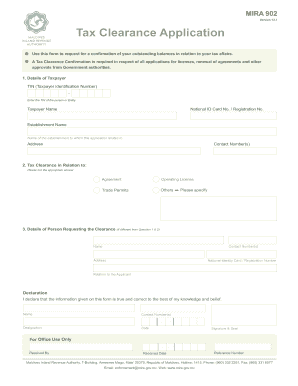
Get Tax Clearance Form Mira
How it works
-

Open form follow the instructions
-

Easily sign the form with your finger
-

Send filled & signed form or save
How to fill out the Tax Clearance Form Mira online
Filling out the Tax Clearance Form Mira is a crucial step for individuals or entities seeking confirmation of their tax affairs. This guide will provide you with clear, step-by-step instructions for successfully completing the form online.
Follow the steps to complete the Tax Clearance Form Mira.
- Click the ‘Get Form’ button to access the Tax Clearance Form Mira and begin the filling process.
- In the 'Details of Taxpayer' section, enter your Taxpayer Identification Number (TIN). This is a unique number assigned to you or your business for tax purposes.
- In the 'Tax Clearance in Relation to' section, select the appropriate option by ticking the box next to 'Agreement', 'Operating License', 'Trade Permits', or 'Others'. If you select 'Others', please specify the nature of your request.
- If the person requesting the clearance is different from the taxpayer, provide their details in the 'Details of Person Requesting the Clearance' section. Include their name, contact number(s), address, National Identity/Card Registration Number, and their relation to the applicant.
- Complete the declaration section by affirming that the information provided is truthful and correct. Input your name, contact number(s), designation, and the date of completion.
- Once you have filled out all sections of the form, review your information for accuracy. Then save the changes, download, print, or share the completed form as required.
Complete your Tax Clearance Form Mira online to ensure a smooth process for your tax-related applications.
Related links form
To complete the tax clearance online, go to our Online Services portal at .cdtfa.ca.gov, select the Login/Register tab, and then select the Request a Sales Tax Clearance function. Alternatively, you can submit a written request for a tax clearance to your local CDTFA office.