Loading
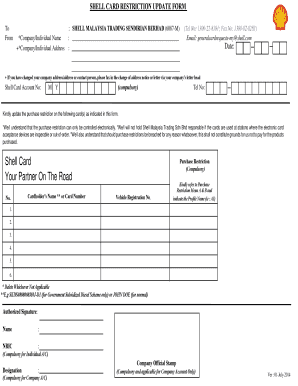
Get Shell Card Request Update Form 2019
How it works
-

Open form follow the instructions
-

Easily sign the form with your finger
-

Send filled & signed form or save
How to fill out the Shell Card Request Update Form 2019 online
Filling out the Shell Card Request Update Form 2019 online is a straightforward process that can help users keep their account information up to date. This guide will provide step-by-step instructions on how to complete each section of the form effectively.
Follow the steps to complete the form accurately
- Click ‘Get Form’ button to obtain the form and open it in the editor.
- Begin by entering your company or individual name in the designated field. Ensure that the name is clear and correctly spelled to avoid any discrepancies.
- In the next section, provide your complete company or individual address. This should include all necessary details such as street address, city, and postal code.
- Enter your contact number in the designated field. This should be a reliable phone number where you can be reached if there are any inquiries regarding your request.
- Input the Shell Card Account Number, which is a compulsory field. Make sure this number is accurate to facilitate updates.
- Indicate any purchase restrictions that you wish to apply for the specified card(s). It is important to refer to the Purchase Restriction Menu A & B for appropriate profiles.
- For each card that requires an update, fill in the cardholder's name or card number and the vehicle registration number as required.
- An authorized signature is required at the end of the form. If it’s an individual account, the NRIC number must be provided. For company accounts, include the designation and official company stamp.
- Review all entered information to ensure that it is complete and accurate, then proceed to save any changes made to the form.
- Finally, choose to download, print, or share the form as necessary to complete your submission.
Complete your Shell Card Request Update Form online today for a smooth and efficient update process!
Your new Shell Credit Card will be ready to make purchases in just a few minutes no matter which method you use to activate it. The issuer does not have a certain time limit within which you need to activate your card, but it's best to do it as soon as possible.