Loading
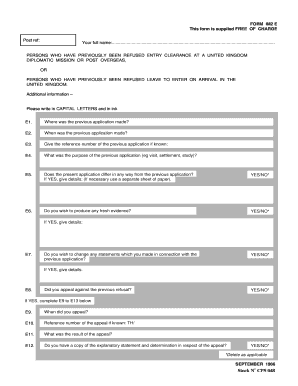
Get Form Im2 E This Form Is Supplied Free Of Charge Post Ref
How it works
-

Open form follow the instructions
-

Easily sign the form with your finger
-

Send filled & signed form or save
How to fill out the FORM IM2 E This Form Is Supplied FREE OF CHARGE Post Ref online
This guide provides clear and comprehensive instructions on how to fill out the FORM IM2 E, designed for users with previous entry clearance refusals in the United Kingdom. Follow the step-by-step process to ensure correct completion of the form.
Follow the steps to accurately complete the FORM IM2 E.
- Press the ‘Get Form’ button to access the form and open it in your document editor.
- Begin filling in your full name in the designated space at the top of the form. Make sure to write in capital letters and use ink.
- For E1, indicate where the previous application was made. Provide the location accurately.
- In E2, specify the date when the previous application was submitted.
- If known, enter the reference number of the previous application in E3.
- In E4, state the purpose of the previous application, such as visit, settlement, or study.
- For E5, answer whether the current application differs from the previous one. If yes, provide details as required.
- In E6, indicate if you wish to produce any fresh evidence and provide details if applicable.
- In E7, indicate if you want to change any statements made in the previous application and detail your changes.
- For E8, state whether you appealed against the previous refusal, answering yes or no. If yes, complete E9 to E13.
- In E9, provide the date when the appeal was filed.
- If known, enter the reference number of the appeal in E10.
- State the result of the appeal in E11.
- E12 asks if you have a copy of the explanatory statement and determination for the appeal. Provide your answer.
- If you answered yes to E12, E13 requires you to provide any comments regarding the reasons for the previous refusal.
- Finally, declare the information provided is correct in the signature section and enter the date. Ensure you sign and date the form before submission.
- Once completed, review your form for any errors. You can then save changes, download, print, or share the completed form as needed.
Complete your FORM IM2 E online today for a smooth application process.
Industry-leading security and compliance
US Legal Forms protects your data by complying with industry-specific security standards.
-
In businnes since 199725+ years providing professional legal documents.
-
Accredited businessGuarantees that a business meets BBB accreditation standards in the US and Canada.
-
Secured by BraintreeValidated Level 1 PCI DSS compliant payment gateway that accepts most major credit and debit card brands from across the globe.