Loading
Get Request For Addition Deletion To Existing Assignment Account
How it works
-

Open form follow the instructions
-

Easily sign the form with your finger
-

Send filled & signed form or save
How to fill out the Request For Addition Deletion To Existing Assignment Account online
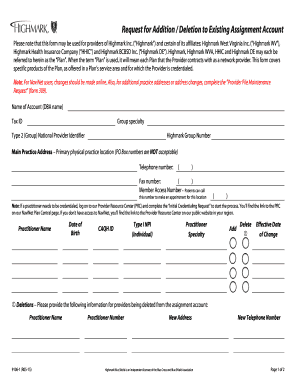
Filling out the Request For Addition Deletion To Existing Assignment Account form online is a crucial step for providers looking to manage their assignment accounts effectively. This guide will walk you through each section of the form to ensure you complete it accurately and efficiently.
Follow the steps to complete your form correctly.
- Press the ‘Get Form’ button to access the form and open it in your chosen editor.
- In the first section, enter the name of your account as it appears in official records, followed by your Tax ID and group specialty.
- Next, provide your Type 2 National Provider Identifier and Highmark Group Number to identify your practice within the network.
- Fill in the primary physical practice address. Ensure this is a full address, as P.O. Box numbers are not acceptable.
- Enter your main telephone number and fax number in the designated fields. This information is essential for communication.
- List the Member Access Number, which patients will use to make appointments for your location.
- Complete the practitioner information section, including the practitioner's name, date of birth, CAQH ID, Type I NPI, and practitioner specialty. Decide whether you are adding or deleting a provider by selecting the appropriate option.
- If deleting a provider, fill in their name, practitioner number, new address, and new telephone number to finalize the deletion.
- Indicate your preference for E-Subscribe. If you wish to receive electronic communications, check the box and provide an email address.
- Review the Assignment Account Agreement carefully. Ensure that all involved parties are aware of and understand the terms before signing.
- Sign the form as the authorized representative of the group, entering your title and telephone number.
- Once all sections are complete, you can save changes, download, print, or share the form as necessary.
Complete your Request For Addition Deletion To Existing Assignment Account online today to streamline your practice's operations.