Bifocal Trifocal Progressive I hereby understand that without prior authorization form EyeMed Vision Care LLC for services rendered, I may be denied reimbursement for submitted vision care services for which I am not eligible. I hereby authorize any insurance company, organization employer, ophthalmologist, optometrist, and optician to release any information with respect to this claim. I certify that the information furnished by me in support of this claim is true and correct. Member/Guardian/.

Open form follow the instructions

Easily sign the form with your finger

Send filled & signed form or save
How to fill out the OH EyeMed Claim Form online
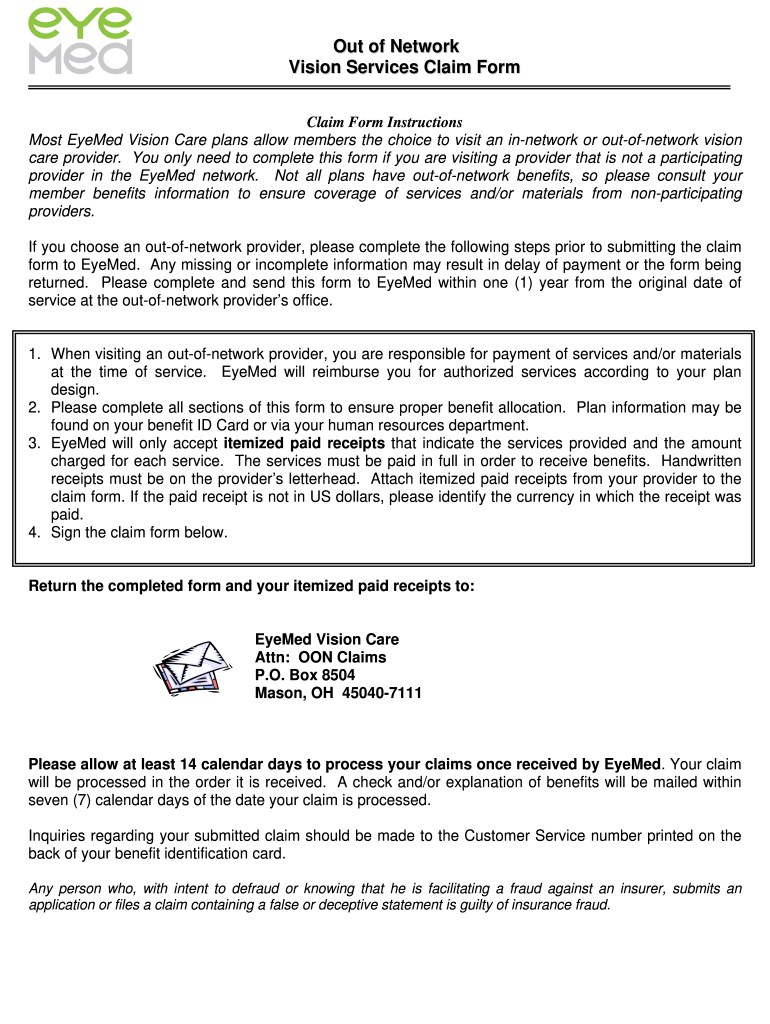
Filing an out-of-network claim for vision care can be a straightforward process when following the correct steps. This guide provides clear instructions on how to complete the OH EyeMed Claim Form online to ensure that you receive the reimbursements you are entitled to.
Follow the steps to successfully complete the claim form
- Press the ‘Get Form’ button to access the OH EyeMed Claim Form and open it in your preferred editor.
- Start by filling out the 'Patient Information' section. Include the patient's last name, first name, middle initial, street address, city, state, zip code, phone number, and birth date.
- Next, complete the 'Plan Information' section. This requires entering the subscriber's last name, first name, middle initial, plan name, and subscriber ID.
- In the 'Request for Reimbursement' section, itemize the services received. Enter the amounts charged for the exam, frames, lenses, and contact lenses, if applicable.
- Attach itemized paid receipts from your provider that detail the services provided and the charges. Ensure that receipts are on the provider's letterhead and specify the currency if not in US dollars.
- If applicable, include a copy of the Explanation of Benefits for secondary insurance claims.
- Indicate the recipient of the reimbursement by checking the appropriate option - subscriber or patient.
- Sign and date the claim form, confirming the accuracy of the information provided.
- Save your changes, and then you can download, print, or share the completed form as necessary.
Complete your OH EyeMed Claim Form online to ensure timely processing of your claim.
Experience a faster way to fill out and sign forms on the web. Access the most extensive library of templates available.
Related content
Claim forms must be submitted within 15 months of the date of service. For complete terms...
Claim forms must be submitted within 15 months of the date of service. For complete terms...
Jan 1, 2021 — EyeMed: eyemed.com. P: 888-581-3648. Claims Submission: eyemed.com...
Get answers to your most pressing questions about US Legal Forms API.
Who accepts EyeMed insurance?
Many eye care providers and retailers accept EyeMed insurance. This includes optical stores, independent optometrists, and online shops. You can use the EyeMed provider locator tool on their website to find acceptable locations near you. Don't forget, for any out-of-network purchases, you can use the OH EyeMed Claim Form to seek reimbursement.
How to use EyeMed insurance?
Using EyeMed insurance involves visiting an in-network eye care provider. Make an appointment and bring your EyeMed member card. Your provider will verify your benefits and help you understand your coverage. If you incur any costs that aren't covered, you can submit the OH EyeMed Claim Form for potential reimbursement.
Does EyeMed send you a card?
Yes, EyeMed typically sends a member card to you after enrollment. This card contains important information that makes accessing your benefits easier. Keep it handy for when you visit your eye care provider. Remember, you can also manage your benefits through the EyeMed website or mobile app.
How do I find my EyeMed information?
You can find your EyeMed information by logging into your account through the EyeMed website or app. Your member ID, plan details, and benefits will be readily available there. If you need further assistance, contacting EyeMed customer service can help.
How to submit claims to insurance?
Submitting claims to insurance is a simple process. Start by completing your OH EyeMed Claim Form with the required details. Attach receipts, and send your claim via the preferred method outlined by EyeMed, such as online submission or mail. Monitor your submission for updates.
How do I claim insurance on my glasses?
To claim insurance on your glasses, you'll need to complete the OH EyeMed Claim Form and gather your receipts. Submit your claim electronically or by mail, ensuring all necessary documents are included. Check the status of your claim online for peace of mind.
How do I get an EOB from EyeMed?
To obtain your Explanation of Benefits (EOB) from EyeMed, you can log into your EyeMed account online. The EOB provides details about your claims, copayments, and coverage limits. If you cannot access it online, you can request a paper copy through customer service.
How to file an insurance claim for glasses?
Filing a claim for glasses is straightforward. First, gather your receipts and any required information from your OH EyeMed Claim Form. Next, fill out the claim form accurately and submit it, either online or through traditional mail. Following up ensures your claim is processed efficiently.
What is something that would not be covered by eye insurance?
Eye insurance typically does not cover services like cosmetic procedures or non-prescription eyewear. Additionally, some plans may exclude coverage for specific brands or high-end designer frames. To avoid unexpected costs, review the details of your OH EyeMed Claim Form and policy.
How long does it take to get reimbursement from EyeMed?
Typically, reimbursement from EyeMed takes about seven to ten business days after submission of your claim. To ensure a smooth experience, make sure to include your OH EyeMed Claim Form with the required documents. Always keep copies of your submissions for your records.
Use professional pre-built templates to fill in and sign documents online faster. Get access to thousands of forms.
If you believe that this page should be taken down, please follow our DMCA take down process here.