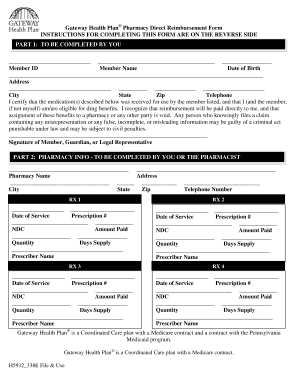
Gateway Health Plan Pharmacy Direct Reimbursement Form INSTRUCTIONS FOR COMPLETING THIS FORM ARE ON THE REVERSE SIDE PART 1: TO BE COMPLETED BY YOU Member ID Member Name Date of Birth Address City.
Open form follow the instructions
Easily sign the form with your finger
Send filled & signed form or save
How to fill out the Gateway Health Plan Pharmacy Direct Reimbursement Form online
This guide provides step-by-step instructions on how to complete the Gateway Health Plan Pharmacy Direct Reimbursement Form online. Whether you are new to the process or just need a refresher, this resource will assist you in navigating each section of the form effectively.
Follow the steps to complete your reimbursement form with ease.
- Press the ‘Get Form’ button to access the Gateway Health Plan Pharmacy Direct Reimbursement Form and open it in your chosen editor.
- In Part 1, enter your Member ID found on your Gateway Health Plan ID card. Then, fill in your name, address, and telephone number. Include your date of birth in the format of Month, Day, Year.
- Sign the form at the designated area to certify the accuracy of the information provided. If the member does not complete the form themselves, a guardian or legal representative must sign.
- In Part 2, provide the pharmacy information. Enter the pharmacy name, address, and telephone number where the prescription was purchased.
- For each prescription, fill out the corresponding RX fields (RX1, RX2, RX3, and RX4). This includes the date of service, prescription number, NDC number, amount paid, quantity, days supply, and prescriber name.
- Ensure you complete separate forms for each pharmacy if you had prescriptions filled at multiple locations.
- Once the form is filled out completely, save your changes, and you may choose to download, print, or share the form as needed for submission.
Complete your Gateway Health Plan Pharmacy Direct Reimbursement Form online today for efficient reimbursement processing.
Experience a faster way to fill out and sign forms on the web. Access the most extensive library of templates available.
Related content
May 7, 2002 — To minimize the impact of the new paper claim form implementation on the...
If you do not sign or turn in an enrollment form, your default coverage is: ... healthcare...
Form health care partnerships with area employers aimed at fostering ... urgent care...
Get answers to your most pressing questions about US Legal Forms API.
What pharmacy can I use with UPMC?
Our broad pharmacy network of more than 30,000 retail chain and independent pharmacies includes CVS/pharmacy, Giant Eagle, Rite Aid, Target, Walmart, and Wegmans (Erie locations).
What is the meaning of pharmacy benefit?
Pharmacy Benefit: Plan benefit that covers medications patients can self-administer at home or have administered at a providers office or facility based on delivery method of the medication (auto-injector, infusion…).
What is the difference between medical benefit and pharmacy benefit?
Medical benefit drugs are ones that are injected or infused by a healthcare professional in an out-patient clinic or infusion centers. Whilst, pharmacy benefit drugs are self-administered and include orals, self-injectable, or a route of administration a patient can manage at home.
What is the difference between pharmacy and medical insurance?
Generally, medical insurance covers care in a hospital or healthcare provider's office, and prescription drug insurance pays for the medications you buy at the pharmacy. There are exceptions.
What is the meaning of medical benefit?
Medical benefit means all payments made under this Title to the providers of medical care, rehabilitation services and hospital care.
What is the difference between medical and pharmacy claims?
Medical Billing Claims Take Longer to Be Reimbursed Pharmacists will also notice a difference in their billing timeline. When you bill for prescriptions through a pharmacy benefits manager (PBM), they deny or approve your claims almost instantly.
Does UPMC use Express Scripts?
Express Scripts helps millions of Americans manage their prescriptions and save money. We're partnering with UPMC Health Plan to do the same for you.
How do I submit a claim to CVS Caremark?
Reliable, Trackable and Efficient Modes for Caremark Members to submit member-paid prescription reimbursement requests online via Caremark Web Portal (Caremark.com) and Caremark Mobile app (iOS and Android).
Use professional pre-built templates to fill in and sign documents online faster. Get access to thousands of forms.
If you believe that this page should be taken down, please follow our DMCA take down process here.