Loading
Get Prior Authorization Questionnaire- - Restat
How it works
-

Open form follow the instructions
-

Easily sign the form with your finger
-

Send filled & signed form or save
How to fill out the PRIOR AUTHORIZATION QUESTIONNAIRE - Restat online
Filling out the PRIOR AUTHORIZATION QUESTIONNAIRE - Restat can seem daunting, but understanding each component will streamline the process. This guide provides clear, step-by-step instructions to help users complete the form accurately and efficiently.
Follow the steps to fill out the form correctly.
- Click ‘Get Form’ button to obtain the form and open it for editing.
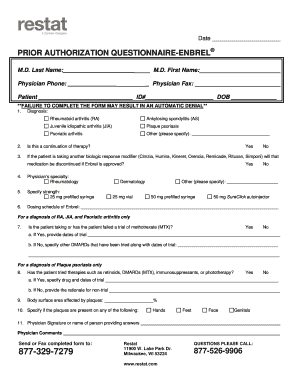
- Begin by filling in the physician's last name and first name. Include the physician's phone number and fax number as needed.
- Next, provide patient information, including the patient's full name, ID number, and date of birth.
- In the diagnosis section, select the appropriate diagnosis from the list provided: rheumatoid arthritis, ankylosing spondylitis, juvenile idiopathic arthritis, plaque psoriasis, psoriatic arthritis, or specify another condition.
- Indicate if this request is a continuation of therapy by selecting ‘Yes’ or ‘No’.
- If the patient is currently taking another biologic response modifier, specify if that medication will be discontinued upon approval of .
- Select the physician’s specialty from rheumatology, dermatology, or another specified field.
- Specify the strength of required and its dosing schedule, providing precise details as necessary.
- For patients with rheumatoid arthritis, juvenile idiopathic arthritis, and psoriatic arthritis, indicate whether the patient has taken or failed a trial of and provide the relevant dates.
- For patients with plaque psoriasis, confirm if therapies like retinoids, DMARDs, immunosuppressants, or phototherapy have been tried, supplying drug names and trial dates as applicable.
- Indicate the percentage of body surface area affected by plaques and specify the locations of the plaques.
- Provide the physician's signature or name of the person completing the questionnaire, followed by any additional comments if necessary.
- Once the form is completed, save your changes, and choose to download, print, or share the form as required.
Complete your form online today for a smooth prior authorization process.
to the insurer: • Patient name, date of birth, insurance policy number, and other relevant information. • Physician and facility information (eg, name, provider ID number, and tax ID number) • Relevant procedure and HCPCS codes for products/services to be provided/performed.