Loading
Get Division De Drogas Y Farmacia - Saludgovpr
How it works
-

Open form follow the instructions
-

Easily sign the form with your finger
-

Send filled & signed form or save
How to fill out the DIVISION DE DROGAS Y FARMACIA - Saludgovpr online
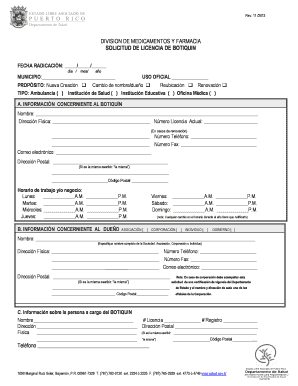
Filling out the DIVISION DE DROGAS Y FARMACIA online form is a crucial step for those seeking to apply for a pharmacy license. This guide will provide you with clear, step-by-step instructions to ensure that your application is completed accurately and efficiently.
Follow the steps to complete the application form seamlessly.
- Click ‘Get Form’ button to access the application form and open it in the editor.
- Begin by entering the date of filing in the format: day/month/year in the designated field.
- Fill out the municipality where the pharmacy will be located in the respective section.
- Select the official use option and indicate the purpose of the application by checking the appropriate box, such as new creation, name/owner change, relocation, or renewal.
- Specify the type of establishment by ticking the relevant option: ambulance, health institution, educational institution, or medical office.
- Provide information about the pharmacy in section A. Enter the name, physical address, current license number (if applicable), phone number, fax number, email address, and postal address. If the postal address is the same as the physical address, write ‘same’.
- Indicate the business hours for Monday to Sunday, specifying both the morning and afternoon times.
- In section B, provide details about the owner, including full name, physical address, phone number, fax number, email address, and postal address.
- If the owner is a corporation, include certification of good standing from the Department of State and provide the names and addresses of all corporate officers.
- In section C, fill in the information about the person responsible for the pharmacy, including name, license number, registration number, physical address, postal address, and phone number.
- Complete the certification section by writing your name, municipality, the date, your position, and providing your signature.
- Include a certified check or money order for $50 made out to the Secretario de Hacienda and attach the list of medications.
- After completing the form, ensure all information is accurate and save your changes.
- You can then download, print, or share the completed form as necessary.
Start your application process now by completing the DIVISION DE DROGAS Y FARMACIA form online.
TRATAMIENTO CONTRA LA ADICCIÓN Programas de tratamiento con metadona. ... Tratamiento con buprenorfina para confinados con dependencia a opiáceos. ... Centro de tratamiento residencial para usuarios de sustancias controladas. ... Comunidad terapéutica de unificación familiar “echado pa'lante”
Industry-leading security and compliance
US Legal Forms protects your data by complying with industry-specific security standards.
-
In businnes since 199725+ years providing professional legal documents.
-
Accredited businessGuarantees that a business meets BBB accreditation standards in the US and Canada.
-
Secured by BraintreeValidated Level 1 PCI DSS compliant payment gateway that accepts most major credit and debit card brands from across the globe.