Loading
Form preview
  • US Legal Forms
  • Form Library
  • Foreign Forms
  • Foreign Philippines Other Forms
  • Ph Umid Card Application Form 2013

Get Ph Umid Card Application Form 2013-2026

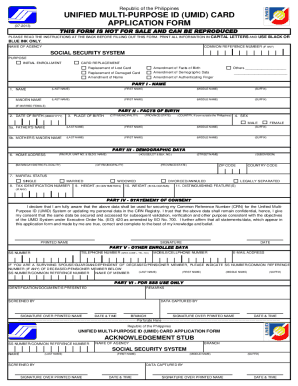
PTURED BY DATE & TIME SIGNATURE OVER PRINTED NAME Perforate here RIGHT THUMB DATE & TIME RIGHT INDEX INSTRUCTIONS 1. This form shall be used in applying for initial or replacement UMID card. 2. Fill out this form in one (1) copy without erasures and alterations. 3. Place a checkmark on the applicable box. 4. Always indicate "N/A" or "Not Applicable", if the required data is not applicable. 5. Present identification document/s. a. Any one (1) of the following primary documents: ▪ Driver.

How it works

  1. Open form

    Open form follow the instructions

  2. Easily sign form

    Easily sign the form with your finger

  3. Share form

    Send filled & signed form or save

How to fill out the PH UMID Card Application Form online

Filling out the PH UMID Card Application Form online is a straightforward process designed to help you obtain or replace your Unified Multi-Purpose ID. This guide provides clear, step-by-step instructions to ensure that you complete the application accurately and efficiently.

Follow the steps to successfully complete your online application.

  1. Click 'Get Form' button to access the application form and load it in your preferred editor.
  2. In the first section, enter your information in capital letters. Start with your last name, followed by your first name, middle name, and suffix if applicable. If you are a married female, also include your maiden name.
  3. Provide your date of birth in the format MMDDYYYY, and specify your place of birth, including city or municipality, province, and country if born outside the Philippines.
  4. Indicate your sex by selecting the appropriate option: male or female. Then, provide your father's name and your mother's maiden name in the specified fields.
  5. Complete your home address by detailing your complete location, including street name, barangay, city, province, and zip code.
  6. Select your marital status from the options provided and fill in additional details such as your tax identification number, height in centimeters, weight in kilograms, and any distinguishing features.
  7. Read the statement of consent carefully, affirming that the information provided is true and complete. Then, sign and date the application.
  8. Fill in any additional personal information in the section for the other enrollee. If applicable, indicate your relationship to the deceased or pensioner member along with their relevant identifiers.
  9. Review all the information you have entered for accuracy before saving or downloading the completed form. Ensure there are no erasures or alterations.
  10. Once satisfied with the form, save your changes, and download or print the application for submission. You may also choose to share the form as necessary.

Complete your PH UMID Card Application Form online today to ensure a smooth enrollment process.

Get form

Experience a faster way to fill out and sign forms on the web. Access the most extensive library of templates available.
Get form

Related content

PHILIPPINE IDENTIFICATION SYSTEM
What does a person need in order to register? To register, one must be able to present:75...
Learn more
maternity benefit reimbursement application
A. Primary ID Cards/Documents 1. Social Security (SS) card 2. Unified Multi-Purpose ID...
Learn more
Smart Governance and eGovernment - Brochure
Philippines Unified Multipurpose Identity (UMID). When the four biggest health-insurance...
Learn more

Related links form

CA SLBE Renewal App 2012 CA SO-200C 2001 CA Standardized Permit Application CA Temporary Showroom Rental Contract 2011

Questions & Answers

Get answers to your most pressing questions about US Legal Forms API.

Contact support

You can obtain the UMID card application form online via the SSS website or at any SSS branch. If choosing the online route, ensure you are connected to a secure network to download the form. Having this form filled out in advance can save you time during your visit, especially when applying for the PH UMID Card Application Form.

Yes, you can walk into any SSS branch to apply for an UMID card. However, it is advisable to secure an appointment online to reduce waiting time. Once you're at the branch, make sure to bring all required documents. This proactive approach will streamline your experience when filling out the PH UMID Card Application Form.

To activate your UMID card with Union Bank online, log in to the Union Bank mobile app or website and locate the UMID card activation option. Enter your details as prompted, and follow the on-screen instructions. Activating your card online makes transactions easier and assists you in utilizing your UMID for the PH UMID Card Application Form.

Registering for your SSS UMID card involves visiting an SSS office and preparing the necessary documents, such as valid ID and a completed application form. Once your documents are verified, you will be issued an appointment for the biometrics capture. Completing this process allows you to access services associated with your UMID card and fills out your PH UMID Card Application Form effectively.

To activate your UMID ID, visit the SSS website or an SSS branch with your UMID card and valid IDs. You will receive a one-time password (OTP) on your registered mobile number, which you need to input to complete the activation. This step is crucial so you can utilize your UMID card for identification purposes, especially when applying using the PH UMID Card Application Form.

You can find your SSS UMID card PIN code within your personal account on the My.SSS website. Simply log in using your credentials, and navigate to the 'UMID Card' section. If you have forgotten your PIN, you can reset it by following the instructions provided on the platform. Staying informed about your SSS UMID details will help you complete your PH UMID Card Application Form quickly.

It's important to clarify that UMID ID and SSS ID are not exactly the same, though they are closely related. The UMID ID serves as a universal identification that can be used across multiple government services, while the SSS ID is specifically associated with your social security contributions. Using the PH UMID Card Application Form simplifies the process of obtaining these IDs.

The UMID ID is often referred to as the Unified Multi-purpose ID. This multi-functional identification aims to consolidate multiple government IDs into one. By utilizing the PH UMID Card Application Form, you can enjoy the benefits of easier access to government services, along with your UMID ID.

To obtain your SSS UMID ID, you need to first fill out the PH UMID Card Application Form accurately. After that, visit an SSS office or an authorized institution to submit your application. Once your application is processed, you will receive instructions on how to claim your UMID ID.

Many people wonder about the relationship between SSS ID and UMID ID. While both serve as official identification and can be used for social security transactions, they are distinct entities. The UMID ID is specifically designed to streamline access to services provided by SSS, among others, and often features added benefits.

Get This Form Now!

Use professional pre-built templates to fill in and sign documents online faster. Get access to thousands of forms.
Get form
If you believe that this page should be taken down, please follow our DMCA take down processhere.

Industry-leading security and compliance

US Legal Forms protects your data by complying with industry-specific security standards.
  • In businnes since 1997
    25+ years providing professional legal documents.
  • Accredited business
    Guarantees that a business meets BBB accreditation standards in the US and Canada.
  • Secured by Braintree
    Validated Level 1 PCI DSS compliant payment gateway that accepts most major credit and debit card brands from across the globe.
Get PH UMID Card Application Form
Get form
  • Adoption
  • Bankruptcy
  • Contractors
  • Divorce
  • Home Sales
  • Employment
  • Identity Theft
  • Incorporation
  • Landlord Tenant
  • Living Trust
  • Name Change
  • Personal Planning
  • Small Business
  • Wills & Estates
  • Packages A-Z
  • Affidavits
  • Bankruptcy
  • Bill of Sale
  • Corporate - LLC
  • Divorce
  • Employment
  • Identity Theft
  • Internet Technology
  • Landlord Tenant
  • Living Wills
  • Name Change
  • Power of Attorney
  • Real Estate
  • Small Estates
  • Wills
  • All Forms
  • Forms A-Z
  • Form Library
  • Legal Hub
  • About Us
  • Help Portal
  • Legal Resources
  • Blog
  • Affiliates
  • Contact Us
  • Delete My Account
  • Site Map
  • Industries
  • Forms in Spanish
  • Localized Forms
  • State-specific Forms
  • Forms Kit
  • Real Estate Handbook
  • All Guides
  • Notarize
  • Incorporation services
  • For Consumers
  • For Small Business
  • For Attorneys
  • USLegal
  • FormsPass
  • pdfFiller
  • signNow
  • altaFlow
  • DocHub
  • Instapage
Form Packages
  • Adoption
  • Bankruptcy
  • Contractors
  • Divorce
  • Home Sales
  • Employment
  • Identity Theft
  • Incorporation
  • Landlord Tenant
  • Living Trust
  • Name Change
  • Personal Planning
  • Small Business
  • Wills & Estates
  • Packages A-Z
Form Categories
  • Affidavits
  • Bankruptcy
  • Bill of Sale
  • Corporate - LLC
  • Divorce
  • Employment
  • Identity Theft
  • Internet Technology
  • Landlord Tenant
  • Living Wills
  • Name Change
  • Power of Attorney
  • Real Estate
  • Small Estates
  • Wills
  • All Forms
  • Forms A-Z
  • Form Library
Customer Service
  • Legal Hub
  • About Us
  • Help Portal
  • Legal Resources
  • Blog
  • Affiliates
  • Contact Us
  • Delete My Account
  • Site Map
  • Industries
  • Forms in Spanish
  • Localized Forms
  • State-specific Forms
  • Forms Kit
Legal Guides
  • Real Estate Handbook
  • All Guides
Prepared for you
  • Notarize
  • Incorporation services
Our Customers
  • For Consumers
  • For Small Business
  • For Attorneys
Our Sites
  • USLegal
  • FormsPass
  • pdfFiller
  • signNow
  • altaFlow
  • DocHub
  • Instapage
Social Media
Call us now toll free:
+1 833 426 79 33
As seen in:
© Copyright 1999-2026 airSlate Legal Forms, Inc. 3720 Flowood Dr, Flowood, Mississippi 39232
  • Your Privacy Choices
  • Terms of Service
  • Privacy Notice
  • Content Takedown Policy
  • Bug Bounty Program