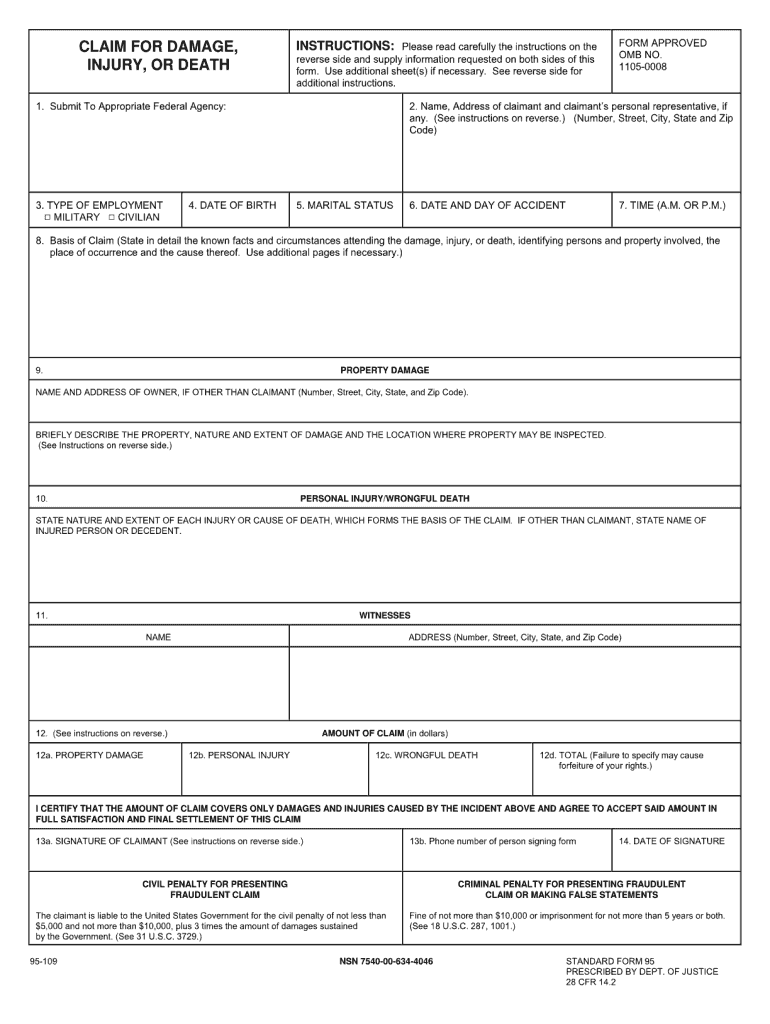
Reset Form CLAIM FOR DAMAGE, INJURY, OR DEATH 1. Submit To Appropriate Federal Agency: INSTRUCTIONS: Please read carefully the instructions on the reverse side and supply information requested on.
Loading

Open form follow the instructions

Easily sign the form with your finger

Send filled & signed form or save
How to fill out the SF 95 online
The SF 95 is an important form used for filing claims against the United States government. This guide provides clear and detailed instructions on how to complete the SF 95 online, ensuring that users can navigate the process smoothly and effectively.
Follow the steps to fill out the SF 95 with confidence.
- Press the ‘Get Form’ button to access the SF 95 document and open it for editing.
- Begin with section 1, which requires your name and contact information. Ensure to enter your full name, mailing address, and phone number.
- In section 2, provide the date of the accident or incident. This date is crucial for your claim's timeline.
- Move to section 3 and describe the nature of your claim. Include clear details about the event that led to the damages being claimed.
- Section 4 requires information about the property damage or personal injury. Be as thorough as possible, detailing the extent of the damages.
- In section 5, specify the amount of your claim. This should include any costs associated with damages, losses, or expenses incurred.
- Section 6 asks for your signature and date. Make sure to sign the form and fill in the date of completion.
- Finally, review all entries for accuracy, then save your changes, download the completed form, print it, or share it as needed.
Complete your SF 95 online today to ensure your claim is properly filed.
Experience a faster way to fill out and sign forms on the web. Access the most extensive library of templates available.
Related content
BASIS OF CLAIM (State in detail the known facts and circumstances attending the damage...
Aug 5, 2024 — A CLAIM SHALL BE DEEMED TO HAVE BEEN PRESENTED WHEN A FEDERAL. AGENCY...
AVISO DE SEGURANÇA. Apenas pessoal qualificado deverá instalar e reparar o equipamento...
Get answers to your most pressing questions about US Legal Forms API.
How do I file a claim against the US government?
To file a claim against the US government, you must first fill out the SF 95 form accurately. This form should detail your incident, the damages incurred, and the compensation you seek. Once completed, submit the SF 95 to the appropriate federal agency where the incident occurred. Utilizing uslegalforms can streamline your filing process, ensuring you provide all necessary information clearly.
What is a SF 95 form?
The SF 95 form is a critical document used to notify the federal government of your claim for damages under the Federal Tort Claims Act. This form allows you to detail the relevant facts surrounding your claim and the amount of compensation you seek. Properly completing the SF 95 is vital, as it initiates the government’s review process. With resources available on uslegalforms, you can navigate the form’s requirements efficiently.
What are the requirements for a FTCA claim?
To successfully file a FTCA claim, you must meet specific requirements. These include demonstrating that your claim arises from the negligence of a federal employee acting within their official capacity. Additionally, you must submit your claim within the statutorily defined time limits, typically two years from the date of the incident. Using the SF 95 form can help you provide the necessary details to meet these criteria effectively.
What is an SF 95 form?
The SF 95 form serves as a standard claim for damage, injury, or death caused by the negligent acts of the federal government. This form is crucial for individuals seeking compensation under the Federal Tort Claims Act (FTCA). Completing the SF 95 requires detailed information about the incident and the damages incurred. By using uslegalforms, you can easily access and fill out the SF 95 form, ensuring that your claim is processed smoothly.
What is an example of a commercial tort claim?
A commercial tort claim typically involves business-related disputes and may arise from unfair business practices or negligence. For example, a claim could involve a company suffering losses due to a competitor's false advertising, leading to financial harm. These types of claims may not always utilize the SF 95 form, as they often follow different legal pathways. It's advisable to consult with a legal expert to evaluate the specifics of your situation.
How long does it take to file SF 95?
Filing the SF 95 form is a straightforward process, but you should allow sufficient time for gathering necessary documentation. Generally, you can complete the form in a few hours, depending on the details of your claim. However, it is critical to ensure that your submission is complete and accurate, as this can affect the review time by the government. Once filed, the review period can take several months, so prepare for potential delays.
Who is eligible for FTCA coverage?
Individuals who have suffered personal injury or property damage due to the negligent actions of federal employees may qualify for FTCA coverage. This includes incidents involving government operations or employees while they are acting within the scope of their duties. To determine eligibility, it is essential to evaluate the circumstances surrounding the claim and the specific actions of the employee involved. If you believe you have a valid claim, consider using the SF 95 form to initiate the process.
Where do I send Form 95?
The destination for Form 95 varies based on which federal agency you are claiming against. Each agency has specific mailing addresses, so be sure to check the guidance provided with your form. Some agencies may also accept electronic submissions. Double-checking this information helps avoid unnecessary delays.
How long do you have to file Form 95?
Typically, you have two years from the date of the incident to file Form 95 for an FTCA claim. This timeline is critical for protecting your rights, so make sure to take action promptly. Delays can hinder your eligibility, so prepare your claim as soon as possible. Adhering to this timeline can significantly impact your case.
How to submit an FTCA claim?
You can submit an FTCA claim by completing SF 95 and sending it to the appropriate federal agency. Each agency has different submission guidelines, so review these before sending your claim. Online submission may be available for certain agencies, which can expedite the process. Always keep copies of the documents you send.
Use professional pre-built templates to fill in and sign documents online faster. Get access to thousands of forms.
If you believe that this page should be taken down, please follow our DMCA take down process here.