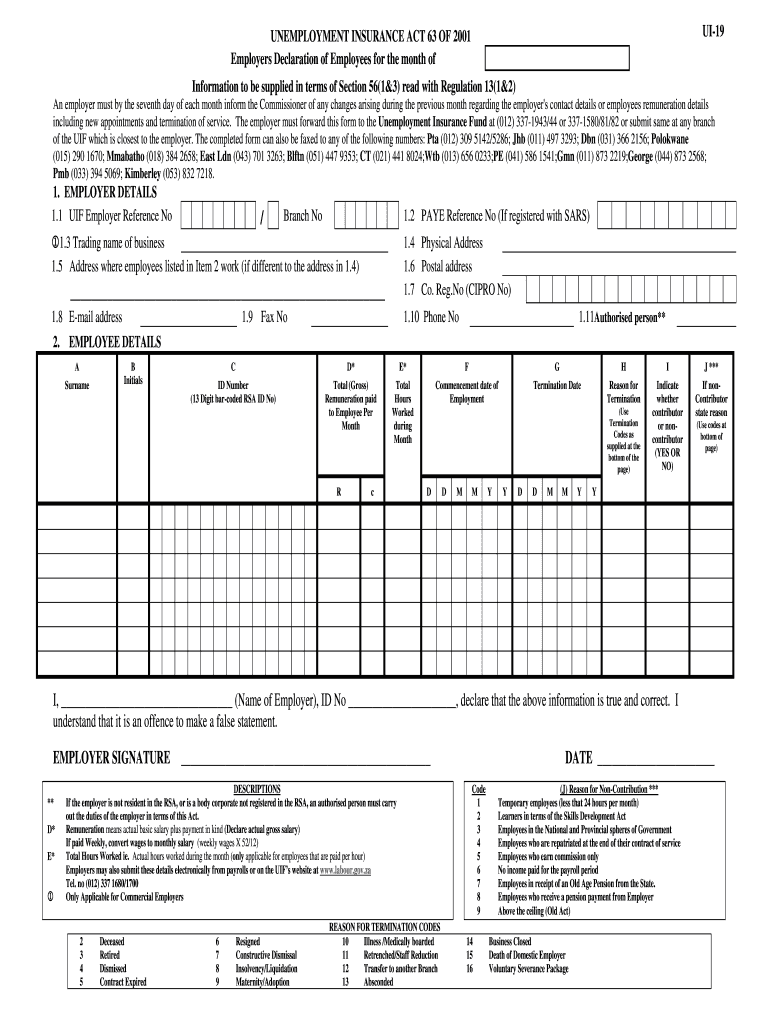
to another Branch 13 Absconded DATE ________________________ Code 1 2 3 4 5 6 7 8 9 14 15 16 (J) Reason for Non-Contribution *** Temporary employees (less that 24 hours per month) Learners in terms of the Skills Development Act Employees in the National and Provincial spheres of Government Employees who are repatriated at the end of their contract of service Employees who earn commission only No income paid for the payroll period Employees in receipt of an Old Age Pension from the State. Empl.
Loading

Open form follow the instructions

Easily sign the form with your finger

Send filled & signed form or save
How to fill out the UI-19 online
The UI-19 form is a crucial document for employers to declare their employees' information and changes in compliance with the Unemployment Insurance Act. This guide provides clear and comprehensive steps to effectively complete the UI-19 form online.
Follow the steps to successfully complete the UI-19 form online.
- Click the ‘Get Form’ button to receive the UI-19 form and open it in your chosen online editor.
- Begin by filling out the employer details section. Enter your UIF employer reference number and branch number, followed by the PAYE reference number if applicable.
- Provide the trading name of your business, the physical address, postal address, company registration number, email address, fax number, and phone number.
- Designate the authorized person responsible for declaring the information on behalf of the employer.
- In the employee details section, list each employee’s surname, initials, and their 13-digit bar-coded RSA ID number.
- Enter the total gross remuneration paid to each employee per month and total hours worked during the month.
- Fill in the employee’s commencement and termination dates if applicable, along with the reason for termination using the provided termination codes.
- Indicate whether each employee is a contributor or non-contributor to the unemployment insurance fund, and provide the reason if they are a non-contributor.
- Complete the declaration stating that the information provided is true and correct, along with the name and ID number of the employer.
- Finally, save your changes to the form. You can also download, print, or share the completed document as needed.
Complete your UI-19 form online today and ensure compliance with the Unemployment Insurance Act.
Experience a faster way to fill out and sign forms on the web. Access the most extensive library of templates available.
Related content
Click on the above for a graphic explaining the progression and timeline for current UI...
UI Health is prepared to safely care for any patient suspected or confirmed to have...
Users will be able to quickly customize UI elements on-the-fly (default keybind: Shift + H...
Get answers to your most pressing questions about US Legal Forms API.
What is UI in terms of unemployment?
In terms of unemployment, UI refers to Unemployment Insurance, a government program providing financial support to jobless individuals. The UI system is designed to help individuals maintain financial stability while seeking new job opportunities. Understanding UI can empower you to access the benefits you deserve during difficult times. If you need assistance navigating this system, check out the features available on USLegalForms.
What is a UI 2.8 form?
The UI 2.8 form is used for reporting specific employment information to your state’s unemployment office. This form helps contribute data regarding employee status and helps determine eligibility for UI benefits. It's essential to ensure that this form is completed accurately to avoid any issues with your unemployment claims. USLegalForms can guide you through filling out this form effectively.
What does UI mean on my paycheck?
When you see UI on your paycheck, it typically refers to the deductions for Unemployment Insurance. These deductions contribute to the fund that provides unemployment benefits to workers who are laid off. Being aware of this deduction helps you understand your paycheck better and manage your finances. For guidance on payroll-related queries, USLegalForms provides valuable resources.
What is a UI-19 form for?
The UI-19 form is primarily used to report the wages of employees for unemployment insurance purposes. Employers submit this form to provide the state with necessary information about employee earnings, which helps determine benefit eligibility. Completing the UI-19 accurately is crucial for both employers and employees to ensure correct benefit calculations. USLegalForms offers templates that simplify this process.
Why did I get a UI payment?
You receive a UI payment because you have filed a claim for unemployment benefits after losing your job. The payment serves to support you during your transition to new employment. Remember, guidelines and eligibility criteria can vary by state, so it's essential to check with local regulations. Tools available on USLegalForms can assist you in managing your claims effectively.
What does UI stand for in payroll?
UI stands for Unemployment Insurance in payroll. This insurance helps provide financial assistance to individuals who have lost their jobs without fault of their own. By understanding UI, you can better navigate your benefits and ensure you receive what you’re entitled to. On platforms like USLegalForms, you can find more resources to help with UI-related inquiries.
What is UI-19 football?
UI-19 football refers to youth soccer leagues that cater to players under the age of 19. These leagues provide a platform for young athletes to develop their skills, teamwork, and sportsmanship. Participating in UI-19 football can enhance your child's physical fitness and social connections, making it a valuable experience.
What does UI-19 mean?
UI-19 stands for the Unemployment Insurance form that provides essential information to state agencies. This form is crucial for documenting your employment history and eligibility for benefits. By knowing what UI-19 means, you can better navigate the unemployment system and access the services you need.
What is UI-19?
UI-19 is a specific form used in the unemployment insurance process in the United States. This form helps individuals apply for and manage their unemployment benefits. Additionally, understanding UI-19 can streamline your application process, ensuring you receive the necessary support during a challenging time.
How to fill in a UI 19 form?
Filling out the UI-19 form involves entering your business information, employee details, and accurate payroll figures. Be sure to follow the instructions closely to avoid mistakes, as errors could lead to delays. If you prefer guidance, US Legal Forms offers resources and support to help you complete the UI-19 form correctly and swiftly.
Use professional pre-built templates to fill in and sign documents online faster. Get access to thousands of forms.
If you believe that this page should be taken down, please follow our DMCA take down process here.