Loading
Get Third Party Authorization Form - Sun Life
How it works
-

Open form follow the instructions
-

Easily sign the form with your finger
-

Send filled & signed form or save
How to fill out the Third Party Authorization Form - Sun Life online
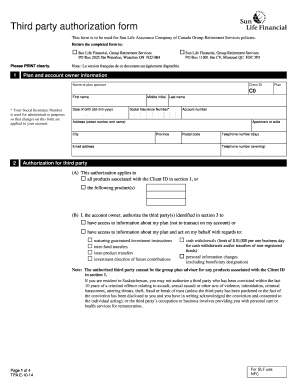
Completing the Third Party Authorization Form for Sun Life online is a straightforward process that allows you to authorize another individual to manage aspects of your Group Retirement Services account. This guide provides step-by-step instructions to ensure you fill out the form accurately and efficiently.
Follow the steps to complete the Third Party Authorization Form online.
- Press the ‘Get Form’ button to access the Third Party Authorization Form and open it in a suitable editor.
- Begin by filling out the plan and account owner information. You will need to provide your name, client ID, account number, date of birth, and social insurance number, which is necessary for administrative purposes.
- Complete the address section by providing your street address, city, province, postal code, and telephone number, ensuring all details are printed clearly.
- In the authorization for third party section, specify whether this authorization applies to all products associated with your client ID or specific products. You must also indicate the type of access you are granting the third party.
- Enter the details of the third party authorized in section 3. You will need to provide their full name, date of birth, relationship to you, detailed occupation, address, and contact information.
- If applicable, provide details for personal advisors as third parties. You must also specify the financial services company they represent and include their occupation.
- Review the terms and conditions section carefully. By signing the form, you agree to the terms regarding the authority granted to third parties.
- Once all information is complete, sign and date the form as the account owner, confirming your understanding of the authorization you have provided.
- After signing, save the changes to the form. You can then download it for your records, print it, or share it as needed.
Complete your Third Party Authorization Form online today to ensure your designated third party can assist with your account management.
The Third Party Authorization form authorizes a person other than the payor or recipient to act on the payor's or recipient's behalf. A Family Responsibility Office (FRO) support payor or support recipient may designate this person to request and receive information from the FRO regarding their case.