Loading
Get Ostomy Quick Start Form T 8004516510 F 8006160203 E
How it works
-

Open form follow the instructions
-

Easily sign the form with your finger
-

Send filled & signed form or save
How to fill out the ostomy quick start form T 8004516510 F 8006160203 E online
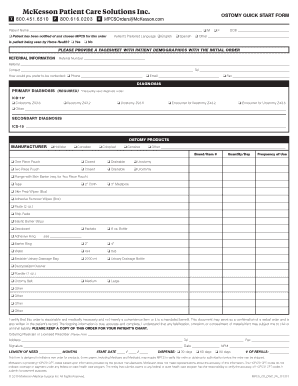
This guide provides a comprehensive overview of how to fill out the ostomy quick start form online. Following these instructions will ensure that you accurately complete each section of the form, facilitating a smooth order process for ostomy products.
Follow the steps to complete the ostomy quick start form online.
- Press the ‘Get Form’ button to access and open the ostomy quick start form in your preferred online editor.
- Begin by entering the patient’s name in the designated field. Indicate whether the patient has been notified about and chosen MPCS for their order by selecting ‘Yes’ or ‘No.’
- Specify if the patient is receiving home health services by marking ‘Yes’ or ‘No.’ If marked ‘Yes,’ provide additional details.
- Select the patient's preferred language from the available options: English, Spanish, or another option if necessary.
- Fill in the patient’s date of birth in the appropriate format.
- For referral information, input the referral number and contact details, including your preferred method of communication, such as phone, email, or fax.
- Identify the primary diagnosis using the corresponding ICD-10 code. Choose from the provided options, ensuring the primary diagnosis is required.
- If applicable, fill out the secondary diagnosis with the corresponding ICD-10 code.
- Select the manufacturer's products relevant to the patient’s needs and fill in the brand or item numbers along with type (e.g., one-piece pouch or two-piece pouch).
- Indicate the quantity of products required daily and their frequency of use by checking the relevant options.
- In the certification section, ensure you read and understand the declaration regarding the medical necessity of the order before signing.
- Once all sections are filled out, review for accuracy. Then, save any changes, download the completed form, print a copy for records, or share it as needed.
Complete your ostomy quick start form online today for a streamlined medical order process.
Industry-leading security and compliance
US Legal Forms protects your data by complying with industry-specific security standards.
-
In businnes since 199725+ years providing professional legal documents.
-
Accredited businessGuarantees that a business meets BBB accreditation standards in the US and Canada.
-
Secured by BraintreeValidated Level 1 PCI DSS compliant payment gateway that accepts most major credit and debit card brands from across the globe.