Loading
Form preview
  • US Legal Forms
  • Form Library
  • More Forms
  • More Uncategorized Forms
  • Fatca - Crs Declaration Form - Entities2cdr

Get Fatca - Crs Declaration Form - Entities2cdr

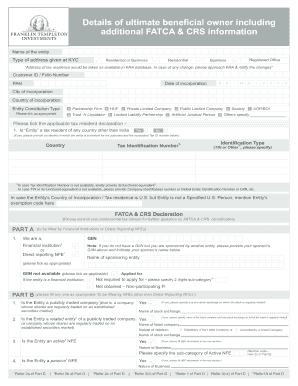
Details of ultimate bene cial owner including additional FATCA & CRS information Name of the entity Type of address given at KYC Residential or Business Residential Registered Of ce Business Address.

How it works

  1. Open form

    Open form follow the instructions

  2. Easily sign form

    Easily sign the form with your finger

  3. Share form

    Send filled & signed form or save

How to fill out the FATCA - CRS Declaration Form - Entities2cdr online

This guide provides a step-by-step approach to completing the FATCA - CRS Declaration Form - Entities2cdr online. Designed to assist users with varying levels of legal experience, this document aims to clarify key components and instructions for accurate submission.

Follow the steps to complete your declaration form successfully.

  1. Use the ‘Get Form’ button to access the declaration form and open it in the editor.
  2. Begin by entering the name of the entity as registered.
  3. Provide the type of address used in your KYC documentation—choose either 'Residential' or 'Business'.
  4. Fill in the entity's Customer ID or Folio Number.
  5. Input the PAN and the date of incorporation in the specified format.
  6. Indicate the city and country of incorporation.
  7. Select the entity constitution type by ticking the appropriate option from the provided list.
  8. Respond to the tax residency declaration questions by indicating if the entity is a tax resident of any country other than India and providing relevant details if applicable.
  9. Fill in the Identification Type and Tax Identification Number, including any alternatives if TIN is not available.
  10. Complete the FATCA & CRS Declaration sections according to your entity type, specifying if you are a financial institution or a non-financial entity.
  11. Provide details for beneficial owners and controlling persons in the UBO Declaration section, ensuring all tax residency, identification numbers, and interests are listed.
  12. Lastly, review all information carefully, then save your changes, download, print, or share the completed form as needed.

Start filling out your FATCA - CRS Declaration Form - Entities2cdr online today!

Get form

Experience a faster way to fill out and sign forms on the web. Access the most extensive library of templates available.
Get form

Related content

Bnp Paribas Fatca Form - [Mobi] Home Ebooks
International Tax Compliance BNP Paribas Paribas' entities Please note that BNP ... FATCA...
Learn more

Related links form

Apprenticeship Form Bill Of Sale Nm Pakistan Embassy Madrid Passport Form Notice To Vacate Indiana Forms 2020

Questions & Answers

Get answers to your most pressing questions about US Legal Forms API.

Contact support

This process is called “self-certification” and we are required to collect this information under the CRS. Is everyone doing this? All financial institutions – that includes banks, insurers and asset management businesses – in participating countries (including Australia) are required to be compliant with the CRS.

FATCA स्व-प्रमाणन का ऑनलाइन सबमिशन Log-in to your NPS account (please visit .cra-nsdl.com) Click on sub menu “FATCA Self-Certification” under the main menu “Transaction” Submit the required details under “FATCA/CRS Declaration Form” Click on “Submit”

You must now complete the FATCA declaration form with information such as your name, PAN number, nationality, residence, city, and country of birth, occupation, and income. If you are a resident of another country, you must additionally provide your tax residency number and click submit.

The form can be completed and signed by the Controlling Person, an authorized signer on behalf of the Controlling Person, or by an authorized person from the Passive NFE.

Foreign Account Tax Compliance Act (“FATCA”) and Common Reporting Standard (“CRS”) regulations require financial institutions like us to collect and report information about where our customers are tax resident. Under these regulations, we have to ask you to provide the information requested in this form.

Online Submission of FATCA Self-Certification Log-in to your NPS account (please visit .cra-nsdl.com) Click on sub menu “FATCA Self-Certification” under the main menu “Transaction” Submit the required details under “FATCA/CRS Declaration Form” Click on “Submit”

Foreign Account Tax Compliance Act (“FATCA”) and Common Reporting Standard (“CRS”) regulations require financial institutions like us to collect and report information about where our customers are tax resident. Under these regulations, we have to ask you to provide the information requested in this form.

The CRS & FATCA Self-certification form will ask you to confirm the following: Your full name. Your date of birth. Your country, town/city of birth. Your citizenship. Your current residence, and if applicable, mailing address. Whether you are a US Person. Your country/countries of residence for tax purposes.

Get This Form Now!

Use professional pre-built templates to fill in and sign documents online faster. Get access to thousands of forms.
Get form
If you believe that this page should be taken down, please follow our DMCA take down processhere.

Industry-leading security and compliance

US Legal Forms protects your data by complying with industry-specific security standards.
  • In businnes since 1997
    25+ years providing professional legal documents.
  • Accredited business
    Guarantees that a business meets BBB accreditation standards in the US and Canada.
  • Secured by Braintree
    Validated Level 1 PCI DSS compliant payment gateway that accepts most major credit and debit card brands from across the globe.
Get FATCA - CRS Declaration Form - Entities2cdr
Get form
  • Adoption
  • Bankruptcy
  • Contractors
  • Divorce
  • Home Sales
  • Employment
  • Identity Theft
  • Incorporation
  • Landlord Tenant
  • Living Trust
  • Name Change
  • Personal Planning
  • Small Business
  • Wills & Estates
  • Packages A-Z
  • Affidavits
  • Bankruptcy
  • Bill of Sale
  • Corporate - LLC
  • Divorce
  • Employment
  • Identity Theft
  • Internet Technology
  • Landlord Tenant
  • Living Wills
  • Name Change
  • Power of Attorney
  • Real Estate
  • Small Estates
  • Wills
  • All Forms
  • Forms A-Z
  • Form Library
  • Legal Hub
  • About Us
  • Help Portal
  • Legal Resources
  • Blog
  • Affiliates
  • Contact Us
  • Delete My Account
  • Site Map
  • Industries
  • Forms in Spanish
  • Localized Forms
  • State-specific Forms
  • Forms Kit
  • Real Estate Handbook
  • All Guides
  • Notarize
  • Incorporation services
  • For Consumers
  • For Small Business
  • For Attorneys
  • USLegal
  • FormsPass
  • pdfFiller
  • signNow
  • altaFlow
  • DocHub
  • Instapage
Form Packages
  • Adoption
  • Bankruptcy
  • Contractors
  • Divorce
  • Home Sales
  • Employment
  • Identity Theft
  • Incorporation
  • Landlord Tenant
  • Living Trust
  • Name Change
  • Personal Planning
  • Small Business
  • Wills & Estates
  • Packages A-Z
Form Categories
  • Affidavits
  • Bankruptcy
  • Bill of Sale
  • Corporate - LLC
  • Divorce
  • Employment
  • Identity Theft
  • Internet Technology
  • Landlord Tenant
  • Living Wills
  • Name Change
  • Power of Attorney
  • Real Estate
  • Small Estates
  • Wills
  • All Forms
  • Forms A-Z
  • Form Library
Customer Service
  • Legal Hub
  • About Us
  • Help Portal
  • Legal Resources
  • Blog
  • Affiliates
  • Contact Us
  • Delete My Account
  • Site Map
  • Industries
  • Forms in Spanish
  • Localized Forms
  • State-specific Forms
  • Forms Kit
Legal Guides
  • Real Estate Handbook
  • All Guides
Prepared for you
  • Notarize
  • Incorporation services
Our Customers
  • For Consumers
  • For Small Business
  • For Attorneys
Our Sites
  • USLegal
  • FormsPass
  • pdfFiller
  • signNow
  • altaFlow
  • DocHub
  • Instapage
Social Media
Call us now toll free:
+1 833 426 79 33
As seen in:
© Copyright 1999-2026 airSlate Legal Forms, Inc. 3720 Flowood Dr, Flowood, Mississippi 39232
  • Your Privacy Choices
  • Terms of Service
  • Privacy Notice
  • Content Takedown Policy
  • Bug Bounty Program