1 2 3 Lowell Finley, SBN 104414 LAW OFFICES OF LOWELL FINLEY 1604 SOLANO AVENUE BERKELEY, CALIFORNIA 94707-2109 TEL: 510-290-8823 FAX: 510-526-5424 4 Attorney for Plaintiffs and Petitioners 5 SUPERIOR.
Open form follow the instructions
Easily sign the form with your finger
Send filled & signed form or save
How to fill out the Canada GST/HST Return online
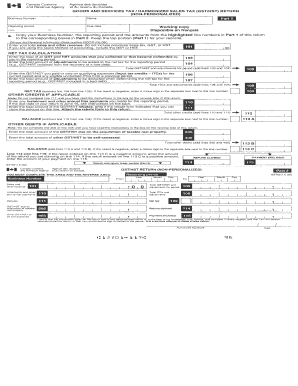
The Canada GST/HST Return is a vital document for businesses registered for goods and services tax/harmonized sales tax. This guide provides clear instructions to help users navigate the online form effectively and ensure accurate submissions.
Follow the steps to complete your Canada GST/HST Return online.
- Click ‘Get Form’ button to access the GST/HST Return form and open it in your chosen online platform.
- Fill in your business number. This unique identifier is essential for processing your return.
- Indicate the reporting period for your return. Select the correct time frame that covers your sales and purchases.
- Enter total sales and other revenue amounts for the period. Ensure to include any applicable taxes collected.
- Report your total input tax credits for the purchases you made during the reporting period.
- Calculate your net tax by subtracting your input tax credits from the taxes collected.
- Complete any additional fields as necessary, such as adjustments or specific circumstances that may apply.
- Review all entries for accuracy and completeness to avoid delays in processing your return.
- Save your changes, and choose to download, print, or share the completed form as needed.
Complete your Canada GST/HST Return online today for a streamlined filing experience.
Experience a faster way to fill out and sign forms on the web. Access the most extensive library of templates available.
Related content
Dec 16, 2024 — The 5 percent Goods and Services Tax (GST) will not be charged across the...
As this paper shows against the background of a concise history of sales taxation in...
Jan 11, 2018 — GST Amount. See HST Amount. HST Amount. Must reflect the amount of...
Get answers to your most pressing questions about US Legal Forms API.
How to file GST annual return step by step?
Filing a GST annual return involves several steps, starting with gathering your records of sales and expenses. Complete the T2 return form or the relevant GST return form based on your business structure. Review your financial information thoroughly before submitting your Canada GST/HST Return to the CRA, ensuring all data is accurate and complete.
How to file GST quarterly return online?
To file your GST quarterly return online, first ensure you are registered for the CRA's online services. After accessing your account, enter your financial data for the quarter, and complete the necessary fields for your Canada GST/HST Return. Double-check your entries for accuracy before submitting your return electronically.
How to file GST return on your own?
Filing your GST return independently starts with understanding the requirements for your business type. You will need to compile your sales data and expenses accurately. Utilize the CRA's online resources for guidance, or consider using applications like uSlegalforms that can simplify this process when preparing your Canada GST/HST Return.
How to do GST return filing?
Filing a GST return involves reporting your sales and purchases related to GST/HST. Begin by collecting your sales and expense invoices for the reporting period. You can file your Canada GST/HST Return electronically through the CRA's My Business Account or by mail, ensuring you meet the deadline to avoid penalties.
How do I file a GST refund?
To file a GST refund in Canada, start by gathering all necessary documentation, including your GST/HST returns and supporting receipts. You’ll need to fill out the appropriate form, typically the GST189, which can be submitted online through the Canada Revenue Agency's (CRA) website. Keeping track of your records helps to streamline this process for your Canada GST/HST Return.
Who is eligible for GST return in Canada?
Individuals and businesses in Canada that collect GST or HST are generally eligible to file a Canada GST/HST Return. This includes sole proprietors, corporations, partnerships, and certain non-resident businesses. If your taxable sales exceed the threshold set by the Canada Revenue Agency, you must register and file your returns. Staying compliant will help you manage your taxes effectively.
How do I fill out a GST return?
Filling out a GST return involves several key steps: gathering your sales data, calculating the GST collected, and recording your input tax credits. The Canada GST/HST Return form requires you to accurately report these figures. By understanding this process, you can ensure efficient submission and compliance.
How do I fill out an annual GST return?
Filling out an annual GST return involves compiling all your taxable sales, expenses, and input tax credits for the year. Use the GST return form to input this data accurately. This reflection of your financial activity during the year helps to ensure compliance with Canada's tax regulations, simplifying your Canada GST/HST Return process.
How to calculate GST from a total?
To calculate GST, simply determine the total amount before tax, then multiply that amount by the applicable GST rate, which is 5% in most provinces. If you already have the total amount that includes GST, divide it by 1.05 to find the pre-tax amount, and then subtract that from the total to find the GST amount. Understanding this calculation will aid you in managing your Canada GST/HST Return effectively.
What is Canada's GST tax?
Canada's GST tax, or Goods and Services Tax, is a value-added tax that applies to most goods and services sold in Canada. This tax is collected by businesses and submitted to the government. Understanding the Canada GST/HST Return process is crucial for both businesses and consumers to ensure compliance and proper tax management.
Use professional pre-built templates to fill in and sign documents online faster. Get access to thousands of forms.
If you believe that this page should be taken down, please follow our DMCA take down process here.