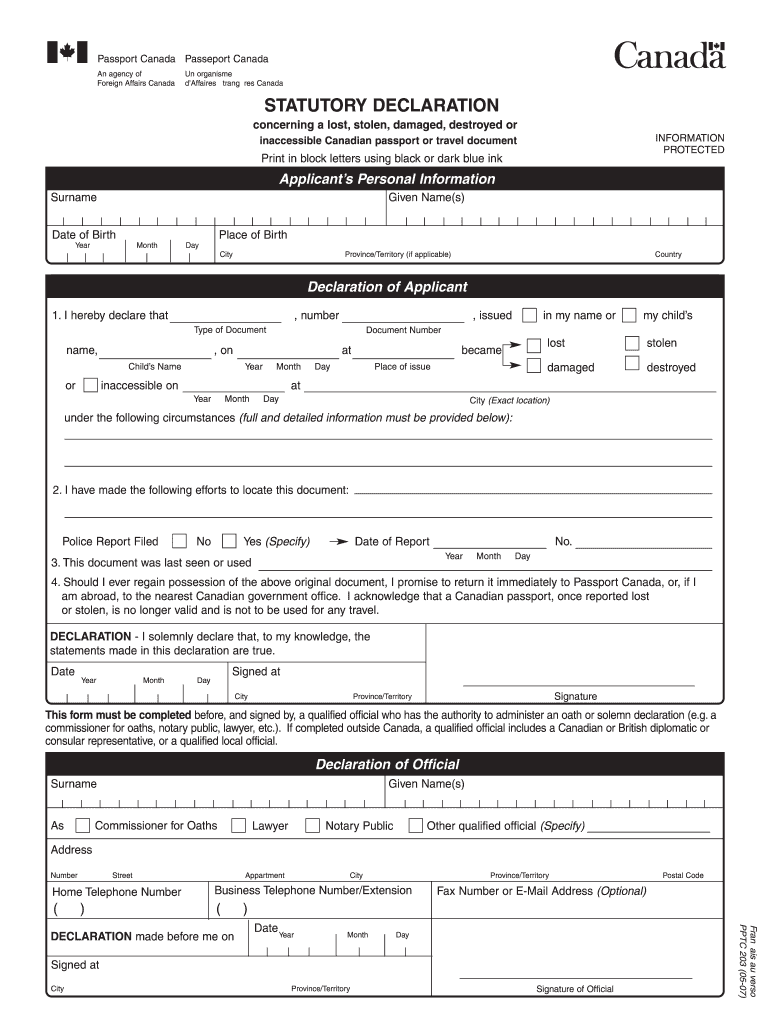
If completed outside Canada a qualified official includes a Canadian or British diplomatic or consular representative or a qualified local official. As Lawyer Notary Public Other qualified official Specify Address Street Appartment Home Telephone Number Business Telephone Number/Extension Fax Number or E-Mail Address Optional Date Year Signature of Official Fran ais au verso PPTC 203 05-07 DECLARATION made before me on Postal Code. Passport Canada Passeport Canada An agency of Foreign Affairs Canada Un organisme d Affaires trang res Canada STATUTORY DECLARATION concerning a lost stolen damaged destroyed or INFORMATION PROTECTED inaccessible Canadian passport or travel document Print in block letters using black or dark blue ink Applicant s Personal Information Surname Given Name s Date of Birth Place of Birth Year Month Day City Province/Territory if applicable Country Declaration of Applicant 1. I hereby declare that number issued Type of Document name on Child s Name or my child s lo....
Loading

Open form follow the instructions

Easily sign the form with your finger

Send filled & signed form or save
How to fill out the Canada PPTC 203 online
This guide provides a clear and professional walkthrough for users looking to fill out the Canada PPTC 203 form online. By following these step-by-step instructions, individuals can ensure that their application process is smooth and efficient.
Follow the steps to complete the Canada PPTC 203 form online.
- Click 'Get Form' button to obtain the form and open it in the editor.
- Begin by filling out the applicant's personal information, including your surname, given name(s), date of birth, place of birth, city, province/territory, and country. Ensure all entries are in block letters using black or dark blue ink.
- In the declaration section, detail the circumstances under which your passport or travel document was lost, stolen, damaged, or destroyed. Specify the type of document, document number, and the location where the incident occurred.
- Indicate whether a police report has been filed by answering the prompt provided. If yes, indicate the date of the report.
- Provide the last date when the document was seen or used, including the month, day, and year.
- Acknowledge the statement about regaining possession of the document by agreeing to return it to Passport Canada or the nearest Canadian government office if applicable.
- Complete the date and sign the declaration, ensuring that a qualified official witnesses your signature as required.
- For the declaration of the official section, provide the name, title, and contact information of the official who witnesses your declaration.
- Once all fields are completed, review the form for accuracy, then save your changes, download a copy, print it for submission or share it online as necessary.
Complete your Canada PPTC 203 form online today for a seamless application process.
Experience a faster way to fill out and sign forms on the web. Access the most extensive library of templates available.
Related content
Oct 31, 2013 — This section prescribes requirements for specific materials and...
... PPTC 203, Declaration, available online at passportcanada.gc.ca. A Canadian travel...
Get answers to your most pressing questions about US Legal Forms API.
What form do I need for a destroyed passport?
If your passport has been destroyed, you will need to fill out the Canada PPTC 203 form to apply for a replacement. Additionally, you might also need to submit a declaration explaining the circumstances of the destruction. This process ensures that you can obtain a new passport as quickly as possible. For guidance on filling out these forms, consider checking the solutions offered by uslegalforms.
What is a Statutory Declaration for translators?
A Statutory Declaration for translators is a document where a translator affirms the accuracy of their translation. This declaration ensures that the translated material is a true representation of the original content. If you require this service for immigration or legal purposes, using a statutory declaration enhances the credibility of your documents. For assistance, you can refer to resources available on the uslegalforms platform.
Do both parents need to be present for a child passport in Canada?
In Canada, both parents or legal guardians should be present when applying for a child passport. This requirement helps ensure that both parties consent to the passport application. If one parent cannot attend, they may need to provide a signed consent form. The use of the Canada PPTC 203 in this scenario requires adhering to the necessary guidelines to avoid any delays.
What is PPTC 132 statutory declaration in lieu of guarantor for Canadians?
The PPTC 132 form is a statutory declaration that Canadians use when they cannot find a guarantor for their passport application. This form allows individuals to declare their identity in the absence of a required referee. By filling out the PPTC 132, you provide an alternative verification of your identity, enabling you to proceed with your passport application. If you have any questions about this process, the uslegalforms platform offers comprehensive resources.
What is a PPTC 203 form?
The PPTC 203 form is specifically crafted for Canadians seeking to apply for their passports. It requires personal information like your name, address, and identification details. Therefore, completing the PPTC 203 accurately facilitates the issuance of your passport, making international travel possible. For a step-by-step guide, you might find helpful resources on the uslegalforms platform.
What is PPTC 203?
The Canada PPTC 203 is a passport application form used by Canadian citizens. It is designed for individuals who are applying for a new passport or renewing an existing one. Completing this form accurately is essential to ensure a smooth application process. By using the Canada PPTC 203, you can provide the necessary details to obtain your travel document.
How do I get a post study work permit in Canada?
To get a post study work permit in Canada, you must have completed a program at an eligible institution. You will need your official documents and your application must be submitted within 180 days of receiving your final grades. For efficient handling of all application forms and requirements, consider uslegalforms as a helpful resource in your journey.
What is the best way to renew my Canadian passport?
The best way to renew your Canadian passport is to complete the application online through the Government of Canada’s website. Ensure you have all necessary documents, including recent photographs and proof of identity. Alternatively, you can visit a passport office for assistance or resources available on uslegalforms to guide your renewal process.
Can you get passport renewal forms at the post office in Canada?
Yes, you can obtain passport renewal forms at select post offices across Canada. However, availability may vary, so it's a good idea to confirm with your nearest post office beforehand. For a broader selection of resources and forms, consider exploring uslegalforms.
How long is it currently taking to renew a passport in Canada?
Currently, the processing time for renewing a passport in Canada varies depending on the method of application. Applicants opting for in-person service can generally expect faster processing times compared to those who apply by mail. It’s always wise to check the Government of Canada’s official site for the latest updates.
Use professional pre-built templates to fill in and sign documents online faster. Get access to thousands of forms.
If you believe that this page should be taken down, please follow our DMCA take down process here.
This form is available in several versions. Select the version you need from the drop-down list below.