Loading
Get Hra Milford Ct Form
How it works
-

Open form follow the instructions
-

Easily sign the form with your finger
-

Send filled & signed form or save
How to fill out the Hra Milford Ct Form online
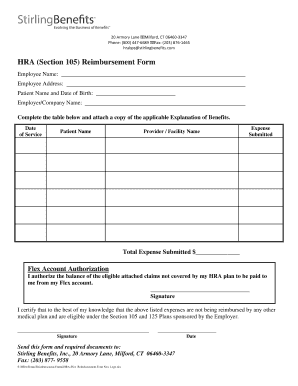
Filling out the Hra Milford Ct Form online can streamline the reimbursement process for medical expenses. This guide provides a clear, step-by-step approach to ensure that all necessary information is accurately captured for efficient processing.
Follow the steps to complete the Hra Milford Ct Form successfully.
- Click the ‘Get Form’ button to obtain the form and open it in the editor.
- Begin by entering your employee name in the designated field at the top of the form. Ensure that this name matches the name associated with your employer's records.
- Provide your employee address below your name. This should be your current residential address.
- Fill in the patient name and date of birth. This section should include the details of the individual who incurred medical expenses.
- Enter your employer or company name in the specified field. Clarity is essential for ensuring the form is processed correctly.
- Complete the table by listing each date of service, corresponding patient name, provider or facility name, and the expense submitted. Be thorough to facilitate the review of your claims.
- Calculate the total expenses submitted and enter the amount in the provided field. Double-check your calculations for accuracy before proceeding.
- In the Flex Account Authorization section, place your signature to authorize payments for any balances not covered by your HRA plan.
- In the certification area, sign again to confirm that the listed expenses have not been reimbursed by any other medical plans and are eligible under relevant employer-sponsored plans.
- Once all sections of the form are filled out, save your changes. You can download, print, or share the form as needed for submission.
Complete the Hra Milford Ct Form online to streamline your reimbursement process today!
What to include in your affidavit. Title. This is either your name (“Affidavit of Jane Doe”) or the specific case information. Statement of identity. The next paragraph tells the court about yourself. ... Statement of truth. ... Statement of facts. ... Closing statement of truth. ... Sign and notarize.