Loading
Get Employment Application - Locknet
How it works
-

Open form follow the instructions
-

Easily sign the form with your finger
-

Send filled & signed form or save
How to fill out the EMPLOYMENT APPLICATION - LockNet online
Completing the EMPLOYMENT APPLICATION - LockNet is a straightforward process that requires accurate information. This guide will provide step-by-step instructions to help you successfully fill out the application online.
Follow the steps to complete your application with ease.
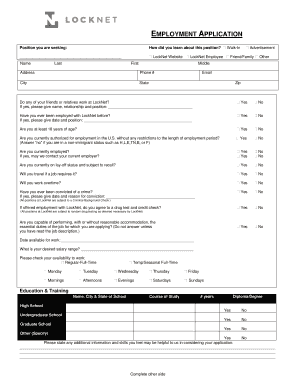
- Press the ‘Get Form’ button to access the application form and open it in the online editor.
- Indicate the position you are seeking by selecting the appropriate job title. This helps the employer understand which role you are applying for.
- Specify how you learned about the position by selecting one of the provided options such as LockNet website, LockNet employee, walk-in, advertisement, friend or family, or other.
- Enter your personal details including your full name (first, middle, and last), address, phone number, email, city, state, and zip code.
- Answer the question concerning any friends or relatives working at LockNet, specifying their name, relationship, and position if applicable.
- Indicate if you have previously been employed by LockNet, including the date and job title if so.
- Confirm your age by selecting yes or no to the question regarding being at least 18 years of age.
- State whether you are authorized for employment in the U.S. without restrictions by selecting yes or no.
- Answer the employment questions regarding your current employment status and willingness to travel or work overtime.
- Disclose any criminal convictions and provide details if applicable.
- Indicate your agreement to drug testing and credit checks if offered employment.
- Confirm whether you can perform the essential job duties with or without reasonable accommodation after reviewing the job description.
- State your availability and desired salary range, and check your availability for work by indicating the days and times you can work.
- Fill in the education and training section, providing the name, city, and state of the schools attended, course of study, years completed, and degree received.
- Enter your work experience starting with your current or last job, including all relevant details such as employer name, dates employed, job responsibilities, hourly/salary rates, supervisor contact information, and reason for leaving.
- Provide references, listing two professional contacts and one personal contact who are not family members, along with their contact information.
- Review the applicant’s certification statements to ensure understanding and agreement, then sign and date the application.
- Once all fields are completed, save your changes, and proceed to download, print, or share the completed application as needed.
Start filling out your EMPLOYMENT APPLICATION - LockNet online today!
iFax has a free mobile fax app for Android and iOS. These services provide you with a dedicated fax number for sending and receiving faxes. When you need to fax, simply upload the document to the application from your device.
Industry-leading security and compliance
US Legal Forms protects your data by complying with industry-specific security standards.
-
In businnes since 199725+ years providing professional legal documents.
-
Accredited businessGuarantees that a business meets BBB accreditation standards in the US and Canada.
-
Secured by BraintreeValidated Level 1 PCI DSS compliant payment gateway that accepts most major credit and debit card brands from across the globe.