_______________________________________________________________________ B. Reason for benefits:______________________________________________________________________________ CF-ES 2620, PDF 05/2010 [65A-1.205, F.A.C.] Page 1 of 2 ______________________________________________ ____________________________________ Case Name Case Number/Cat/Seq. Section III – RECORD OF PAY RECEIVED List the gross amounts and dates of checks or cash, which were paid for the last four weeks in the space bel.
Open form follow the instructions
Easily sign the form with your finger
Send filled & signed form or save
How to fill out the FL DCF CF-ES 2620 online
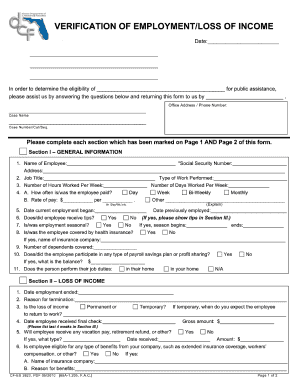
The FL DCF CF-ES 2620 form is essential for verifying employment or loss of income for public assistance eligibility. This guide provides a clear and supportive approach to filling out the form online, ensuring all required information is accurately provided.
Follow the steps to complete the form successfully.
- Click 'Get Form' button to access the FL DCF CF-ES 2620 form and open it for editing.
- Begin filling out Section I: General Information. Provide the employee's name and Social Security Number. Make sure to enter their address, job title, and the types of work they perform.
- Indicate the number of hours and days the employee works per week. Specify payment frequency and the rate of pay—either in hours or alternatively if applicable.
- Continue by noting the dates for current and previous employment. Indicate whether the employee receives tips, if the employment is seasonal, and if they are covered by health insurance. Provide the name of the insurance company if applicable.
- Complete Section II: Loss of Income. Record the date employment ended and the reason for termination. Clarify if the loss of income is permanent or temporary and when the employee is expected to return to work if applicable.
- Document the date the employee received their final paycheck along with the gross amount. Indicate if they will receive any additional payments such as vacation pay or retirement refunds.
- Fill out Section III: Record of Pay Received by listing the gross amounts and dates of payments for the last four weeks, including regular and overtime hours worked.
- Provide employer information in Section IV. Enter the signature of the employer, their title, contact number, address, and the date completed.
- After filling out all sections, review the form for accuracy, then save changes, and choose to download, print, or share the filled form as needed.
Complete the FL DCF CF-ES 2620 form online today to ensure timely assistance.
Experience a faster way to fill out and sign forms on the web. Access the most extensive library of templates available.
Related content
Jan 30, 2024 — Book. Commercial Sexual Exploitation of Children;. Requiring the...
The CF-ES Form 2014, Feb 2003, is issued by the Department of Children ... A copy of a...
Sep 20, 1976 — The use of microcomputers as the central control function for CRT...
Get answers to your most pressing questions about US Legal Forms API.
Can you view CPS cases?
Viewing CPS cases can be complex in Florida due to strict privacy regulations. While some information might be open to the public, much of the sensitive data regarding ongoing cases is protected to safeguard the involved individuals. If you are looking for specific information, it may be useful to explore resources like the FL DCF CF-ES 2620 for further assistance in your search.
Are Florida DCF reports confidential?
Yes, Florida DCF reports are typically confidential, particularly those involving sensitive information about children. This confidentiality serves to protect the welfare of minors and ensure that personal data remains secure. Specific information may be available under certain circumstances, so consider utilizing the FL DCF CF-ES 2620 form to navigate the request process if you need access or clarification.
Can you look up open DCF cases in Florida?
Looking up open DCF cases in Florida can be challenging due to confidentiality laws protecting the information of minors and sensitive cases. While some details may be accessible, you may not find comprehensive reports for ongoing investigations. It is beneficial to understand the limitations before searching, and using resources like the FL DCF CF-ES 2620 may provide you with additional insights on how to proceed.
Can you look up DCF cases in Florida?
Yes, you can look up DCF cases in Florida, but results may vary based on the nature of the case and its status. The Florida DCF website provides access to certain records publicly available. However, if you are unsure how to navigate this process, utilizing the FL DCF CF-ES 2620 can simplify your efforts to gather necessary information regarding cases.
Are CPS cases public record in Florida?
In Florida, Child Protective Services (CPS) cases can be public records, but specific details may remain confidential. To access information, you can utilize resources provided by the Florida Department of Children and Families (DCF). Keep in mind that sensitive information related to ongoing investigations or minors may not be available to the public. If you need guidance, consider using the FL DCF CF-ES 2620 form as part of your inquiry process.
Who fills out the verification of employment loss of income form in Florida?
The individual who has experienced employment loss fills out the verification of employment loss of income form in Florida. This form provides important details that the DCF needs to assess eligibility for food assistance. If you need guidance on how to complete this part of your application, using the FL DCF CF-ES 2620 form can help you understand what’s required.
What documents are needed for SNAP benefits in Florida?
Documents needed for SNAP benefits in Florida include proof of identity, income documentation, and proof of residency. Examples include state IDs, tax returns, and rental agreements. Make sure to gather these documents prior to filling out the FL DCF CF-ES 2620 form to streamline your application process.
What verification is needed for food stamps in Florida?
When applying for food stamps in Florida, you must provide verification of identity, residency, and income. Acceptable forms include photo IDs, utility bills, and paycheck stubs. This information is essential to complete the FL DCF CF-ES 2620 form and establish your eligibility for benefits.
How do I upload documents to food stamps in Florida?
To upload documents for food stamps in Florida, you can use the ACCESS Florida online portal. After logging into your account, navigate to the document upload section and follow the prompts. Ensuring your documents are clear and legible will help expedite processing your FL DCF CF-ES 2620 application.
How do I contact DCF Florida food stamps?
You can contact DCF Florida food stamps by calling the Customer Call Center at 1-850-300-4323. Additionally, you can visit the local DCF office for in-person assistance. If you need more information or help with the FL DCF CF-ES 2620 process, their representatives can guide you through the necessary steps.
Use professional pre-built templates to fill in and sign documents online faster. Get access to thousands of forms.
If you believe that this page should be taken down, please follow our DMCA take down process here.