Loading
Get Tenantsbc Rental Application
How it works
-

Open form follow the instructions
-

Easily sign the form with your finger
-

Send filled & signed form or save
How to fill out the TenantsBC rental application online
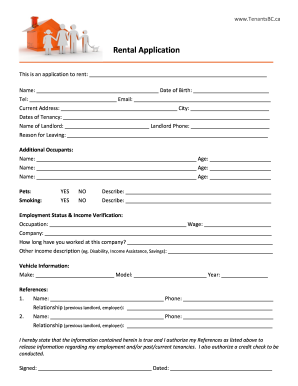
Completing the TenantsBC rental application is a straightforward process that helps landlords assess potential tenants. This guide provides clear instructions on filling out each section of the application to ensure you submit accurate and complete information.
Follow the steps to fill out your rental application online
- Click ‘Get Form’ button to obtain the application. This action allows you to access the form for editing.
- Begin by entering the property you wish to rent in the designated field at the top of the application. This section requires the address of the rental property.
- Provide your name and date of birth in the respective fields. This information is essential for identification purposes.
- Enter your contact number and email address. Ensure this information is accurate for effective communication.
- Fill in your current address along with the city of residence. This information helps the landlord verify your current location.
- Indicate the dates of your current tenancy. This section provides insight into your rental history.
- List the name and phone number of your current landlord. This information is crucial for reference checks.
- State your reason for leaving the current rental in the designated field. Clarity in this section can aid your application.
- Complete the section for additional occupants by listing their names and ages, if applicable. This section allows the landlord to know who will be living in the rental unit.
- Indicate whether you have pets. If yes, describe the pets in the provided field.
- State your smoking preferences in the section provided, and describe your habits as necessary.
- Fill out your employment status and income verification section by stating your occupation, wage, and employer. Also, include the duration of your employment.
- Describe any other income sources, such as benefits or savings, in the corresponding field.
- Provide your vehicle information, including make, model, and year. This section is optional but can be relevant for parking arrangements.
- List two references, including their names, phone numbers, and relationship to you. This information assists landlords in verifying your reliability.
- Review and confirm that all information entered is accurate and true. Sign and date the application at the bottom to authorize credit checks and the release of information.
- Once you have completed the form, you can save changes, download, print, or share the application according to your needs.
Take the next step towards your new home by completing your rental application online today!
Following up on a rental application can show your continued interest and ensure you stay top of mind. Wait a few days after submitting your application before contacting the landlord or property manager. Politely inquire about the status of your application, and consider referencing the TenantsBC Rental Application to reaffirm your commitment as a potential tenant.