Loading
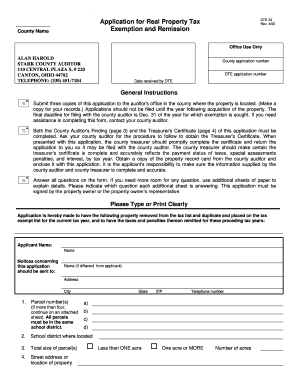
Get Stark County Auditor - Co Stark Oh
How it works
-

Open form follow the instructions
-

Easily sign the form with your finger
-

Send filled & signed form or save
How to fill out the STARK COUNTY AUDITOR - Co Stark Oh online
Filling out the STARK COUNTY AUDITOR form for real property tax exemption can seem daunting, but our guide will help simplify the process. This guide provides clear, step-by-step instructions to assist you in completing the application accurately and efficiently.
Follow the steps to successfully fill out the form online:
- Click the ‘Get Form’ button to access the application. This will allow you to open the form in your preferred editing tool.
- Begin by filling in the county name and office use only sections. You will need to provide your contact details and the DTE application number.
- In the applicant section, clearly type or print the applicant’s name. If different, include the name where notices should be sent.
- Provide the parcel numbers for the property. If you have more than four parcels, use an additional sheet to list them, ensuring they are all in the same school district.
- Enter the school district where the property is located, along with the total size of the parcels, indicating whether they are less than one acre or one acre or more.
- List the street address or location of the property and provide the title holder's details, including any additional explanations if the title holder is someone other than the applicant.
- Indicate whether the applicant has a lease or land contract for the property and attach a copy if applicable. Include the amount paid by the title holder and the date the exempt use began.
- Specify the sections under the Ohio Revised Code for which the exemption is sought and describe the current use of the property, being as specific as possible.
- Answer questions regarding the use of the property in the past, including whether it has been leased, used for business, or any other income-generating activities.
- If required, provide details about any residents on the property, and note if the applicant owns other exempt properties in the county.
- Complete the signature section, ensuring the form is signed by the applicant or their representative, and include the date and contact information.
- Once all sections are filled, check for accuracy, save your changes, and prepare to print or share the completed form as necessary.
Complete your forms online today and ensure your application is submitted accurately and on time.
Related links form
Finding the present owner of a property or home, if it is not you, can be done through the County Auditor's website using their property search tool. Note that you can search using the address, owner's name (if you know who owns it), or parcel ID.