Signature of authorized agency official Title Part 1 - Original NSN 7540-01-231-6228 2823-103 Previous editions are not usable. SF 2823 Revised April 2001 Examples of Designations 1. How to designate one beneficiary First name, middle initial, and last name of each beneficiary Mary E. Brown Show beneficiary's full name. Do not write names as M.E. Brown or as Mrs. John H. Brown. If you want to designate your estate, enter "My estate" in the beneficiary column. Social Security Number 00.
Loading

Open form follow the instructions

Easily sign the form with your finger

Send filled & signed form or save
How to fill out the OPM SF 2823 online
This guide provides a comprehensive overview of how to correctly fill out the OPM SF 2823 form online for Federal Employees' Group Life Insurance. Each section will be outlined step-by-step to ensure clarity and ease of understanding for all users.
Follow the steps to successfully complete the OPM SF 2823 form.
- Click the 'Get Form' button to obtain the OPM SF 2823 form and open it in your designated editor.
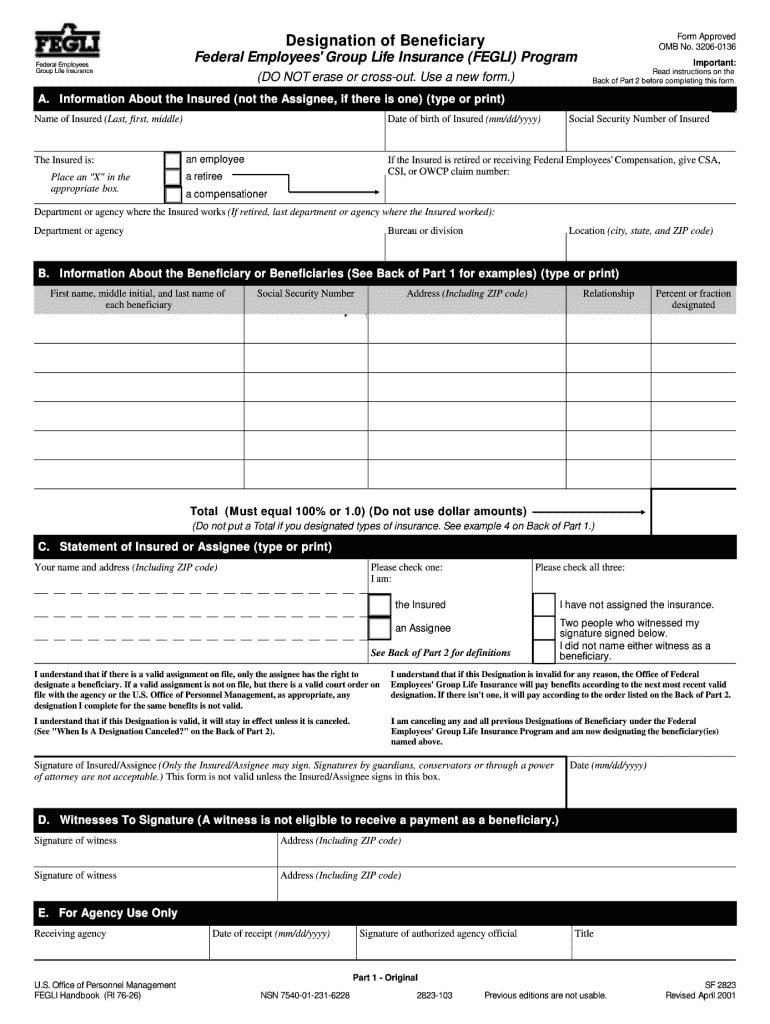
- In Section A, provide personal information about the insured individual. Enter the full name, date of birth, social security number, and the department or agency where the insured works.
- Indicate whether the insured is an employee, retiree, or receiving compensation by placing an 'X' in the appropriate box.
- In Section B, list the beneficiaries' information. Include the full name, social security number, address, relationship to the insured, and the percentage or fraction of benefits they will receive. Ensure the total adds up to 100%.
- In Section C, complete the statement by typing or printing the name and address of the insured or assignee. Check the appropriate boxes to confirm the designation status and that the insurance has not been assigned.
- Sign the form in the designated box as the insured or assignee. Include the date of signature.
- Section D requires two witnesses to sign. Make sure the witnesses provide their signatures and addresses.
- After completing all sections, review the form for accuracy. Users may then save the changes, download, print, or share the form as needed.
Complete your OPM SF 2823 form online today to ensure your beneficiaries are properly designated.
Experience a faster way to fill out and sign forms on the web. Access the most extensive library of templates available.
Related content
I understand that if there is a valid assignment on file, only the assignee has the right...
Do not confuse this form with designation forms used for other types of benefits: Standard...
No Load OPM. 14,000. 7,000 – 12,000. Orbit Diameter. 1/16". 3/32". Vacuum...
Get answers to your most pressing questions about US Legal Forms API.
Do I have to fill out a beneficiary designation form?
Yes, filling out a beneficiary designation form like the OPM SF 2823 is vital if you want to ensure that your life insurance benefits reach the right people. This form is your opportunity to specify who will receive financial assistance after your passing. Without this designation, your benefits may not be distributed as you intend. Therefore, it's important to complete and submit the form properly.
What is DA Form 2823 used for?
The DA Form 2823 is a different form used primarily in military applications for providing sworn statements. Unlike the OPM SF 2823, which deals with beneficiary designations, the DA Form 2823 is often used for documenting events or providing evidence in legal matters. While both forms share a similar number, they serve distinct purposes within their respective contexts.
What is SF 2823 used for?
The OPM SF 2823 is specifically used to designate beneficiaries for your Federal Employees' Group Life Insurance. It is essential for ensuring that your life insurance benefits go to your chosen recipients after your passing. Completing this form accurately is vital as it outlines who will receive financial support during a difficult time. Make sure to review and update it as necessary.
Can you change beneficiaries online?
Yes, many federal agencies allow you to update your beneficiaries online, including through the OPM SF 2823 form. However, you must verify whether your agency has this online capability. If your agency does not offer online changes, you'll need to submit a paper form as described in their guidelines. Regularly reviewing your beneficiary designations will help you keep them up to date.
Where do I send my OPM beneficiary form?
You should send your completed OPM SF 2823 beneficiary form to your agency’s designated human resources office. Different agencies might have specific procedures in place, so it's wise to confirm the correct destination. Some agencies may also offer electronic submission options. Properly submitting the form will help ensure that your beneficiary information is current and correct.
What is the basic benefit of FEGLI?
The basic benefit of FEGLI, which involves the OPM SF 2823, provides life insurance coverage for federal employees. This program offers insurance that can help support your loved ones financially in case of your untimely death. It typically includes coverage equal to your annual salary, providing a safety net for your beneficiaries. Understanding this benefit is key for responsible financial planning.
What is an SF 2823 form for?
The OPM SF 2823 form is used for designating a beneficiary for Federal Employees' Group Life Insurance (FEGLI). This form allows you to specify who will receive your life insurance benefits in the event of your death. It is crucial for ensuring that your life insurance payout goes to the intended recipients. Be sure to fill it out accurately to avoid any complications in claims processing.
How do I submit SF 2823?
To submit the OPM SF 2823, you need to complete the form and send it to your agency's human resources office. Ensure that you provide accurate and complete information to avoid delays. You can also check with your HR office for any specific submission guidelines they may have. Following the correct process will ensure your beneficiary designations are properly recorded.
Does life insurance automatically go to beneficiaries?
Life insurance typically goes directly to designated beneficiaries, provided you have completed the OPM SF 2823 form correctly. This direct transfer helps avoid probate, ensuring beneficiaries receive their benefits more swiftly. It’s always wise to review your beneficiary designations regularly to ensure they reflect your current wishes.
What happens if I don't designate a beneficiary?
If you don’t designate a beneficiary using the OPM SF 2823, your life insurance benefits may go to your estate, leading to unintended complications. This can delay the distribution of funds and may not align with your wishes. Designating a beneficiary is a straightforward process when using forms available through platforms like US Legal Forms, ensuring your choices are honored.
Use professional pre-built templates to fill in and sign documents online faster. Get access to thousands of forms.
If you believe that this page should be taken down, please follow our DMCA take down process here.