Ak period and you were in full-time attendance prior to the break and will continue school in the fall, you should answer YES to question 1(a). You should show the beginning date of the fall semester for question 1(b). See question 2 for past school attendance information.) School Year Began Month, Day, Year (b) Print School's Name and Address (c) Type of School Program High School Home School GED Technical School Year Will End Month, Day, Year Vocational Other (Specify): Hours (d) Sho.

Open form follow the instructions

Easily sign the form with your finger

Send filled & signed form or save
How to fill out the SSA-1372-BK online
The SSA-1372-BK is an essential form that enables individuals to notify the Social Security Administration about a child's potential termination of benefits due to age or changes in educational status. This guide provides a clear and supportive approach to filling out the SSA-1372-BK online, ensuring you navigate the form with confidence.
Follow the steps to fill out the SSA-1372-BK online effectively.
- Click the ‘Get Form’ button to obtain the SSA-1372-BK and open it in the editor.
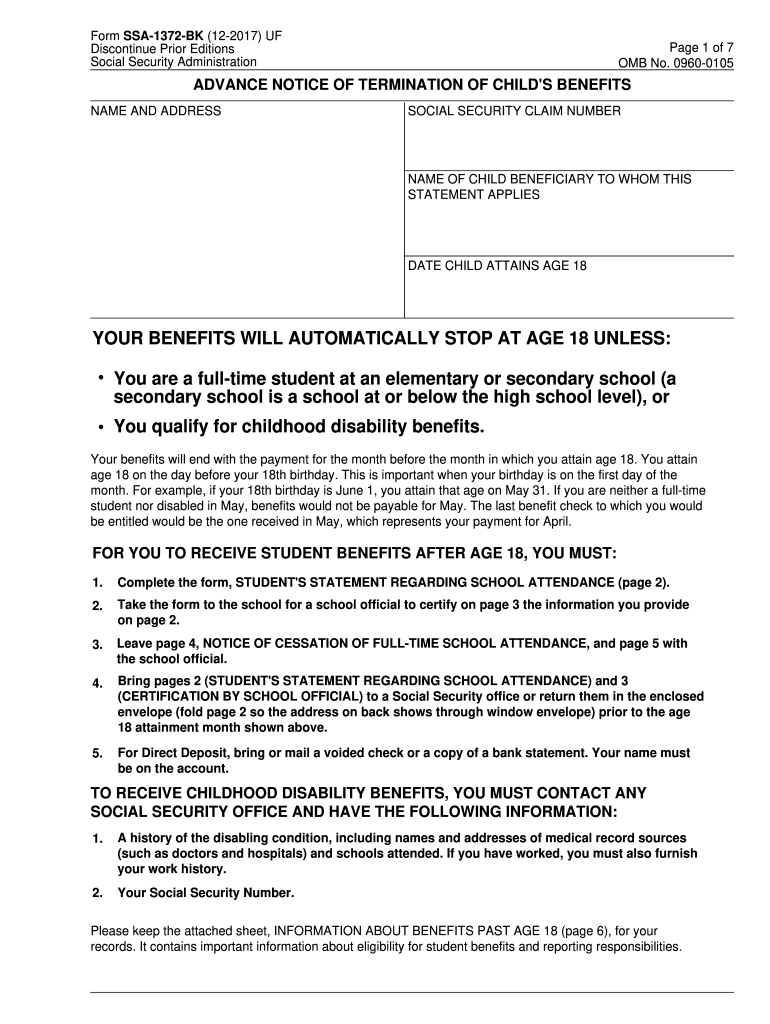
- Begin by entering the name and address of the child beneficiary in the first section, along with their Social Security claim number.
- Indicate the date when the child will attain age 18, ensuring accuracy as this impacts eligibility for benefits.
- Complete the section regarding. You will need to answer whether the child is a full-time student or qualifies for childhood disability benefits.
- On page 2, fill out the 'Student's Statement Regarding School Attendance' by providing the current school's name, address, and program type.
- Answer questions regarding past school attendance and provide the necessary details, such as attendance dates and type of program.
- Make sure to specify if the child is disabled, married, and detail any expected earnings, along with the corresponding timeline.
- Once all questions have been answered, review the information for accuracy and completeness.
- Sign and date the form, including the student’s Social Security number, mailing address, and telephone number.
- Finally, save your changes, and use the options provided to download, print, or share the completed form as needed.
Start completing your SSA-1372-BK online today to ensure timely submission.
Experience a faster way to fill out and sign forms on the web. Access the most extensive library of templates available.
Related content
Form SSA-1372-BK. Picture of 2 People handling form SSA-1372-BK. This form has to be...
Get answers to your most pressing questions about US Legal Forms API.
What is a SSA worker?
Employees in these positions assist individuals in establishing entitlement to benefits under Social Security programs. ... These contacts will allow you to obtain, clarify and verify information which will be used to analyze claims and make decisions regarding entitlement to benefits.
What is a SSA 1372 form?
SSA-1372-BK, page 1. Page 1 informs the child that his/her benefits will stop at age 18 unless he/she qualifies for childhood disability benefits or is a full-time student at an elementary or secondary school. It also states what the child should do to receive student or childhood disability benefits.
Will Social Security disability pay for college?
Social Security disability will not pay for college. However, those receiving disability benefits may be eligible for Vocational Rehabilitation benefits which can help pay for college and other types of training.
What is a SSA form?
An SSA-1099 is a tax form we mail each year in January to people who receive Social Security benefits. It shows the total amount of benefits you received from Social Security in the previous year so you know how much Social Security income to report to IRS on your tax return.
Do people on SSI get a stimulus check?
Most recipients of Supplemental Security Income (SSI) and/or Social Security Disability Insurance (SSDI) are eligible for the $1,200 COVID-19 stimulus payment (also called an economic impact payment).
What is considered a secondary school for social security?
What does SSA mean by secondary education? We consider courses at grade 12 or below to be secondary education. Must I report when the student graduates? You should only report a student's graduation if it is earlier than the expected graduation date entered in item 1.
What is a SSA 7005 form?
The Social Security Statement (Form SSA-7005-SM-OR or SSA-7005-SM-SI) is the form used to provide people who have worked under the Social Security program with information regarding their reported earnings, estimates of the tax contributions they and their employers have paid, and the potential benefits that they and ...
Can a child continue to receive social security benefits in college?
Currently, Social Security pays dependent or survivor benefits only to students attending classes at grade 12 and below. Generally, benefits stop when a student reaches 18, unless the student is disabled or is still attending a secondary school grade 12 or below on a full-time basis.
Use professional pre-built templates to fill in and sign documents online faster. Get access to thousands of forms.
If you believe that this page should be taken down, please follow our DMCA take down process here.