We use cookies to improve security, personalize the user experience, enhance our marketing activities (including cooperating with our marketing partners) and for other business use.
Click "here" to read our Cookie Policy. By clicking "Accept" you agree to the use of cookies. Read less
Read more
Accept
Loading
Form preview
  • US Legal Forms
  • Form Library
  • More Forms
  • More Uncategorized Forms
  • Signature On Recommendation Letter

Get Signature On Recommendation Letter

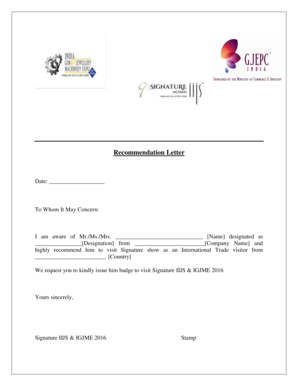
Recommendation Letter Date: To Whom It May Concern: I am aware of Mr./Ms./Mrs. Name designated as Designation from Company Name and highly recommend him to visit Signature show as an International.

How it works

  1. Open form

    Open form follow the instructions

  2. Easily sign form

    Easily sign the form with your finger

  3. Share form

    Send filled & signed form or save

How to fill out the Signature On Recommendation Letter online

Filling out the Signature On Recommendation Letter is a crucial step in facilitating the recommendation process for individuals. This guide provides a clear and structured approach to ensure that users can complete the letter accurately and efficiently online.

Follow the steps to complete the Recommendation Letter form.

  1. Click ‘Get Form’ button to obtain the form and open it in the editor.
  2. Begin by entering the date in the designated space provided at the top of the form. This ensures that the recommendation letter is current.
  3. In the salutation section, write 'To Whom It May Concern:'. This is a standard opening for formal letters.
  4. Next, specify the name of the individual being recommended in the space provided, labeled 'Name'. Ensure that the spelling is accurate.
  5. Indicate the designation of the individual. Please fill in this detail carefully to reflect their role or title accurately.
  6. Include the name of the company associated with the individual in the 'Company Name' field. This information adds credibility to the recommendation.
  7. Articulate a brief statement recommending the individual to visit the Signature show, specifying that they are an International Trade visitor from their respective country. Be concise and clear.
  8. Request the issuance of a badge for the individual to attend the event. This request should be straightforward and polite.
  9. In the closing section, write 'Yours sincerely,' followed by a line for your signature or representative signature for the event.
  10. Fill out the final section with your name, company, and email address, ensuring this information is clearly presented.
  11. Once all fields are completed, review the information for accuracy. After confirming all details, save your changes, download, print, or share the form as needed.

Complete your documents online today for a seamless process.

Get form

Experience a faster way to fill out and sign forms on the web. Access the most extensive library of templates available.
Get form

Related content

Sample letter of recommendation letter on ......
(Signature of Employer). NOTE: The recommendation letter should be on employer's...
Learn more
Letter Length and Form | Writing Recommendation...
In one study that assessed over 500 letters of recommendation, results ... then put your...
Learn more
Biometrics - Wikipedia
Biometrics are body measurements and calculations related to human characteristics. ... In...
Learn more

Related links form

How To Become Airtel Sim Registration Agent 2020 B Extract Transformer Visual Inspection Checklist Pdf 2020 Pvao Pension Update 2020 2020

Questions & Answers

Get answers to your most pressing questions about US Legal Forms API.

Contact support

Closing the Letter Sign off with “Sincerely” or something similar, then put your handwritten signature beneath, then include your typed name and title on separate lines directly beneath. Your title connects you to the student directly and affirms your credibility and affiliation.

How do you sign off a letter of recommendation? Start your closing statement with "In conclusion," or "In summary," before going to give your full backing for the person you are recommending. Finally, sign off with "Yours sincerely."

As a reference letter is a formal application document, it's important you can sign it in a professional and official manner. Type your name in print and consider using e-signature software to include your signature. In addition, include your job title and company after your name to show your credentials.

Luckily, the easiest way to verify that the person signing the letter actually wrote it is to contact them and ask if they recommended the person in question. This isn't always so easy– sometimes the person who wrote the letter may have changed phone numbers after switching jobs themselves or is otherwise unavailable.

It is important that your letter of recommendation include your signature and on official letterhead. Each letter should be at least 1 page in length and include your personal recommendation for this candidate.

The person providing a reference is called a referee. An employment reference letter is usually written by a former employer or manager, but references can also be requested from co-workers, customers, and vendors.

The closing of the letter should briefly summarize previous points and clearly state that you recommend the candidate for the position, graduate program or opportunity they are seeking. The recommendation letter should be written in language that is straightforward and to the point.

In the United States, at least, it is still quite strongly the custom for such letters to be signed. It at least proves that the person writing the letter has access to a copy of my signature.

Get This Form Now!

Use professional pre-built templates to fill in and sign documents online faster. Get access to thousands of forms.
Get form
If you believe that this page should be taken down, please follow our DMCA take down processhere.

Industry-leading security and compliance

US Legal Forms protects your data by complying with industry-specific security standards.
  • In businnes since 1997
    25+ years providing professional legal documents.
  • Accredited business
    Guarantees that a business meets BBB accreditation standards in the US and Canada.
  • Secured by Braintree
    Validated Level 1 PCI DSS compliant payment gateway that accepts most major credit and debit card brands from across the globe.
Get Signature On Recommendation Letter
Get form
Form Packages
Adoption
Bankruptcy
Contractors
Divorce
Home Sales
Employment
Identity Theft
Incorporation
Landlord Tenant
Living Trust
Name Change
Personal Planning
Small Business
Wills & Estates
Packages A-Z
Form Categories
Affidavits
Bankruptcy
Bill of Sale
Corporate - LLC
Divorce
Employment
Identity Theft
Internet Technology
Landlord Tenant
Living Wills
Name Change
Power of Attorney
Real Estate
Small Estates
Wills
All Forms
Forms A-Z
Form Library
Customer Service
Terms of Service
Privacy Notice
Legal Hub
Content Takedown Policy
Bug Bounty Program
About Us
Blog
Affiliates
Contact Us
Delete My Account
Site Map
Industries
Forms in Spanish
Localized Forms
State-specific Forms
Forms Kit
Legal Guides
Real Estate Handbook
All Guides
Prepared for You
Notarize
Incorporation services
Our Customers
For Consumers
For Small Business
For Attorneys
Our Sites
US Legal Forms
USLegal
FormsPass
pdfFiller
signNow
airSlate WorkFlow
DocHub
Instapage
Social Media
Call us now toll free:
+1 833 426 79 33
As seen in:
  • USA Today logo picture
  • CBC News logo picture
  • LA Times logo picture
  • The Washington Post logo picture
  • AP logo picture
  • Forbes logo picture
© Copyright 1997-2025
airSlate Legal Forms, Inc.
3720 Flowood Dr, Flowood, Mississippi 39232
Form Packages
Adoption
Bankruptcy
Contractors
Divorce
Home Sales
Employment
Identity Theft
Incorporation
Landlord Tenant
Living Trust
Name Change
Personal Planning
Small Business
Wills & Estates
Packages A-Z
Form Categories
Affidavits
Bankruptcy
Bill of Sale
Corporate - LLC
Divorce
Employment
Identity Theft
Internet Technology
Landlord Tenant
Living Wills
Name Change
Power of Attorney
Real Estate
Small Estates
Wills
All Forms
Forms A-Z
Form Library
Customer Service
Terms of Service
Privacy Notice
Legal Hub
Content Takedown Policy
Bug Bounty Program
About Us
Blog
Affiliates
Contact Us
Delete My Account
Site Map
Industries
Forms in Spanish
Localized Forms
State-specific Forms
Forms Kit
Legal Guides
Real Estate Handbook
All Guides
Prepared for You
Notarize
Incorporation services
Our Customers
For Consumers
For Small Business
For Attorneys
Our Sites
US Legal Forms
USLegal
FormsPass
pdfFiller
signNow
airSlate WorkFlow
DocHub
Instapage
Social Media
Call us now toll free:
+1 833 426 79 33
As seen in:
  • USA Today logo picture
  • CBC News logo picture
  • LA Times logo picture
  • The Washington Post logo picture
  • AP logo picture
  • Forbes logo picture
© Copyright 1997-2025
airSlate Legal Forms, Inc.
3720 Flowood Dr, Flowood, Mississippi 39232