We use cookies to improve security, personalize the user experience, enhance our marketing activities (including cooperating with our marketing partners) and for other business use.
Click "here" to read our Cookie Policy. By clicking "Accept" you agree to the use of cookies. Read less
Read more
Accept
Loading
Form preview
  • US Legal Forms
  • Form Library
  • More Forms
  • More Uncategorized Forms
  • Annual Return Of Income And Tax Payable It05 Paye

Get Annual Return Of Income And Tax Payable It05 Paye

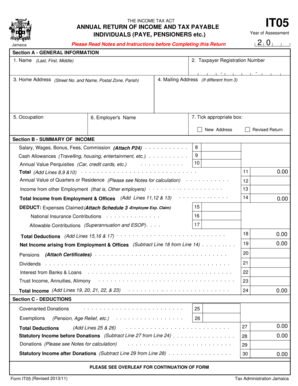
RESET IT05 PRINT THE INCOME TAX ACT ANNUAL RETURN OF INCOME AND TAX PAYABLE INDIVIDUALS (PAYE, PENSIONERS etc.) Year of Assessment Please Read Notes and Instructions before Completing this Return.

How it works

  1. Open form

    Open form follow the instructions

  2. Easily sign form

    Easily sign the form with your finger

  3. Share form

    Send filled & signed form or save

How to fill out the ANNUAL RETURN OF INCOME AND TAX PAYABLE IT05 PAYE online

Filling out the ANNUAL RETURN OF INCOME AND TAX PAYABLE IT05 PAYE is an essential task for individuals who need to report their income and tax obligations. This guide will walk you through the process of completing this form online, ensuring you provide accurate information and meet your tax responsibilities.

Follow the steps to complete your income and tax return accurately.

  1. Click the ‘Get Form’ button to access the form and open it in your preferred editor.
  2. Begin with Section A - General Information. Enter your tax identification number, full name (last, first, middle), home address, mailing address (if different), occupation, and employer's name. Additionally, select whether this is a new address or a revised return.
  3. In Section B - Summary of Income, report your gross salary, wages, bonuses, fees, and commissions. Don’t forget to attach the required P24 form. Then, list any cash allowances you have received, the annual value of perquisites, and any income from other employers. Add these amounts to calculate the total income from employment and offices.
  4. Next, calculate the annual value of quarters, and input any claimed expenses along with allowable contributions and national insurance contributions in Section C - Deductions. Be sure to refer to attached schedules when necessary.
  5. Continue to Section D - Tax Computation. Here, identify any income that falls under the nil rate threshold and report dividend income. Ensure you apply the correct tax rates to compute your tax payable or refundable amounts.
  6. Lastly, in Section E, you must sign the declaration. This attests that the information provided is complete and accurate. If someone else prepared the form, they should complete the representative's details section.
  7. Once you have reviewed all sections for accuracy, save your changes, and choose to download, print, or share the completed form.

Start completing your ANNUAL RETURN OF INCOME AND TAX PAYABLE IT05 PAYE online today to ensure you meet your tax obligations.

Get form

Experience a faster way to fill out and sign forms on the web. Access the most extensive library of templates available.
Get form

Related content

AUTHOR TITLE PUB DATE NOTE AVAILABLE FROM ......
On behalf of the Executive, welcome to the 9th Annual ... Despite the nature of their...
Learn more
The Jamaican Individual Income Tax - International...
Jamaica's individual income tax is an important revenue source for the ... taxpayers file...
Learn more

Related links form

Brigance Kindergarten Assessment Pdf 2020 Pb Enterprise Service Application Maintenance Form 2020 (2) Shipper / Exporter 2020 REFERRAL FORM

Questions & Answers

Get answers to your most pressing questions about US Legal Forms API.

Contact support

Payroll tax and PAYE You do not have to collect payroll taxes through PAYE if you are self-employed and have no employees. Payroll taxes handled through PAYE include income tax and National Insurance contributions deducted from employees' pay and the employers' National Insurance paid by the business.

What information will I need to fill in a Self Assessment tax return? your ten-digit Unique Taxpayer Reference (UTR) your National Insurance number. details of your untaxed income from the tax year, including income from self-employment, dividends and interest on shares. records of any expenses relating to self-employment.

PAYE is HM Revenue and Customs' ( HMRC ) system to collect Income Tax and National Insurance from employment. You do not need to register for PAYE if none of your employees are paid £123 or more a week, get expenses and benefits, have another job or get a pension. However, you must keep payroll records.

100 individuals and families have each paid at least £10.7 million of tax either personally or through their businesses. The highest taxpayers in Britain include a scrap metal dealer, an athleisure tycoon from Bromsgrove, JK Rowling, the boss of Wetherspoon, Sting and the Duke of Westminster.

You will need to register as an employer with HMRC if any of the following are true: You are paying your employee at or above the National Insurance Lower Earnings Limit (LEL) (£123 per week in 2022/23). This is the same as £533 a month or £6,396 a year. For an example of how the LEL threshold works, see below.

Tax code 1257L The most common tax code for tax year 2022 to 2023 is 1257L. It's used for most people with one job and no untaxed income, unpaid tax or taxable benefits (for example a company car). 1257L is an emergency tax code only if followed by 'W1', 'M1' or 'X'.

PAYE stands for 'Pay As You Earn'. If you are an employee, you normally pay tax through PAYE. Every time your salary is paid, your employer deducts Income Tax, Pay Related Social Insurance (PRSI) and Universal Social Charge (USC) and pays the amount deducted to Revenue.

The PAYE income tax collection process also includes an amount for national insurance to cover social care benefits and the NHS....How is PAYE calculated in the UK? BandTaxable incomeratePersonal AllowanceUp to £12,5700%Basic rate£12,571 to £50,27020%Higher rate£50,271 to £150,00040%1 more row • Mar 27, 2023

Using the IRS Where's My Refund tool. Viewing your IRS account information. Calling the IRS at 1-800-829-1040 (Wait times to speak to a representative may be long.) Looking for emails or status updates from your e-filing website or software.

Get This Form Now!

Use professional pre-built templates to fill in and sign documents online faster. Get access to thousands of forms.
Get form
If you believe that this page should be taken down, please follow our DMCA take down processhere.

Industry-leading security and compliance

US Legal Forms protects your data by complying with industry-specific security standards.
  • In businnes since 1997
    25+ years providing professional legal documents.
  • Accredited business
    Guarantees that a business meets BBB accreditation standards in the US and Canada.
  • Secured by Braintree
    Validated Level 1 PCI DSS compliant payment gateway that accepts most major credit and debit card brands from across the globe.
Get ANNUAL RETURN OF INCOME AND TAX PAYABLE IT05 PAYE
Get form
Form Packages
Adoption
Bankruptcy
Contractors
Divorce
Home Sales
Employment
Identity Theft
Incorporation
Landlord Tenant
Living Trust
Name Change
Personal Planning
Small Business
Wills & Estates
Packages A-Z
Form Categories
Affidavits
Bankruptcy
Bill of Sale
Corporate - LLC
Divorce
Employment
Identity Theft
Internet Technology
Landlord Tenant
Living Wills
Name Change
Power of Attorney
Real Estate
Small Estates
Wills
All Forms
Forms A-Z
Form Library
Customer Service
Terms of Service
Privacy Notice
Legal Hub
Content Takedown Policy
Bug Bounty Program
About Us
Help Portal
Legal Resources
Blog
Affiliates
Contact Us
Delete My Account
Site Map
Industries
Forms in Spanish
Localized Forms
State-specific Forms
Forms Kit
Legal Guides
Real Estate Handbook
All Guides
Prepared for You
Notarize
Incorporation services
Our Customers
For Consumers
For Small Business
For Attorneys
Our Sites
US Legal Forms
USLegal
FormsPass
pdfFiller
signNow
airSlate WorkFlow
DocHub
Instapage
Social Media
Call us now toll free:
+1 833 426 79 33
As seen in:
  • USA Today logo picture
  • CBC News logo picture
  • LA Times logo picture
  • The Washington Post logo picture
  • AP logo picture
  • Forbes logo picture
© Copyright 1997-2025
airSlate Legal Forms, Inc.
3720 Flowood Dr, Flowood, Mississippi 39232
Form Packages
Adoption
Bankruptcy
Contractors
Divorce
Home Sales
Employment
Identity Theft
Incorporation
Landlord Tenant
Living Trust
Name Change
Personal Planning
Small Business
Wills & Estates
Packages A-Z
Form Categories
Affidavits
Bankruptcy
Bill of Sale
Corporate - LLC
Divorce
Employment
Identity Theft
Internet Technology
Landlord Tenant
Living Wills
Name Change
Power of Attorney
Real Estate
Small Estates
Wills
All Forms
Forms A-Z
Form Library
Customer Service
Terms of Service
Privacy Notice
Legal Hub
Content Takedown Policy
Bug Bounty Program
About Us
Help Portal
Legal Resources
Blog
Affiliates
Contact Us
Delete My Account
Site Map
Industries
Forms in Spanish
Localized Forms
State-specific Forms
Forms Kit
Legal Guides
Real Estate Handbook
All Guides
Prepared for You
Notarize
Incorporation services
Our Customers
For Consumers
For Small Business
For Attorneys
Our Sites
US Legal Forms
USLegal
FormsPass
pdfFiller
signNow
airSlate WorkFlow
DocHub
Instapage
Social Media
Call us now toll free:
+1 833 426 79 33
As seen in:
  • USA Today logo picture
  • CBC News logo picture
  • LA Times logo picture
  • The Washington Post logo picture
  • AP logo picture
  • Forbes logo picture
© Copyright 1997-2025
airSlate Legal Forms, Inc.
3720 Flowood Dr, Flowood, Mississippi 39232