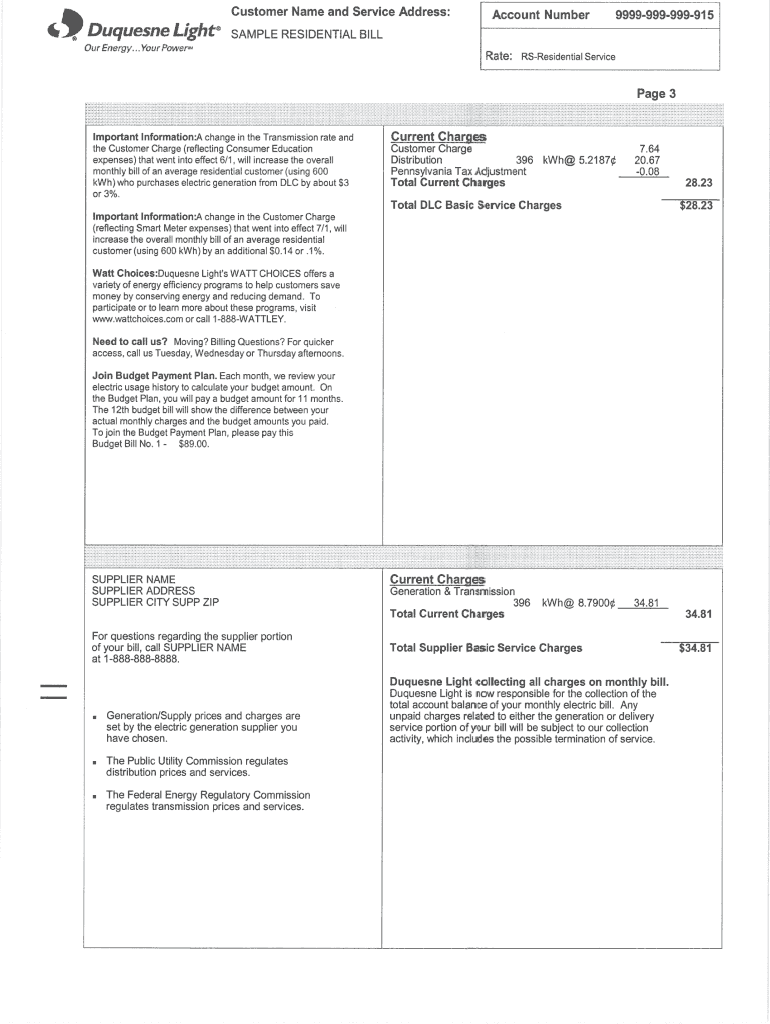
Monthly bill of an average residential customer (using 600. kWh) who purchases ... Watt Choices:Duquesne Light's WATT CHOICES offers a variety of energy .
Loading

Open form follow the instructions

Easily sign the form with your finger

Send filled & signed form or save
How to fill out the Duquesne Light Sample Residential Bill online
This guide provides clear and supportive instructions on how to fill out the Duquesne Light Sample Residential Bill online. Following these steps will help ensure that you complete the form accurately and efficiently.
Follow the steps to fill out the form correctly.
- Click ‘Get Form’ button to access the form and open it in your chosen editing tool.
- Begin by entering your account information in the designated fields. This includes your name, service address, and account number, which is typically found on a previous bill.
- Next, input your billing period dates. This ensures clarity regarding the time frame for which you are being billed.
- Review any listed charges for accuracy. This includes understanding your electricity usage, fixed charges, and any applicable taxes or fees.
- Fill in any additional sections requiring user-specific details, such as payment methods or any discounts you may be eligible for.
- Once all information is entered, carefully review the entire form for any errors or omissions before finalizing.
- After verifying that the form is complete, you can choose to save your changes, download the document, print it, or share it as needed.
Complete your documents online with confidence today!
Experience a faster way to fill out and sign forms on the web. Access the most extensive library of templates available.
Related content
income customers to conserve energy and reduce residential utility bills, and to operate...
May 28, 2025 — The average monthly Duquesne Light bill, which stood at $137.99 in April...
Dec 25, 2019 — Guided by science, Environmental Defense evaluates environmental problems...
Get answers to your most pressing questions about US Legal Forms API.
Why is my Duquesne Light bill so high?
If your Duquesne Light bill appears unusually high, various factors could be at play, including seasonal energy usage, rate increases, or inefficient appliances. Reviewing the details in your Duquesne Light Sample Residential Bill can help you identify specific charges. Additionally, consider using platforms like US Legal Forms to find resources that assist you in understanding your bill and managing your energy costs effectively.
How can I find out why my light bill is so high?
To determine the factors contributing to your high light bill, first compare your current bill with the Duquesne Light Sample Residential Bill from previous months. Look for unusual spikes in usage or changes in rates. If you're still unsure, contacting Duquesne Light for clarification can provide the answers you need to understand your charges.
Why is my Duquesne Light bill so expensive?
A high Duquesne Light bill can result from increased energy consumption during peak usage times or higher rates implemented by the provider. To better understand your charges, examine your Duquesne Light Sample Residential Bill for specific line items. If the costs are still unclear, consider exploring energy-saving strategies to reduce your future bills.
Did Duquesne Light raise their rates?
Yes, Duquesne Light occasionally revises their rates to reflect changes in supply costs and operational expenses. These adjustments can influence your monthly charges, so it's helpful to stay informed about any updates related to the Duquesne Light Sample Residential Bill. Reviewing your bill regularly can shed light on any changes in rates and how they affect your total amount due.
How does Duquesne Light budget billing work?
Duquesne Light’s budget billing is designed to help you manage your payments more predictably. The program averages your monthly usage over the past year, allowing for consistent payments reflected on your Duquesne Light Sample Residential Bill. This method can help you avoid extreme fluctuations in your bills during high usage months. If you're interested, you can contact Duquesne Light to enroll and learn more about how to stabilize your energy costs.
Why has my electric bill doubled for no reason?
A sudden doubling of your electric bill can be alarming, and it may result from a variety of issues such as billing errors, increased energy consumption, or even changes in rate plans. Review your Duquesne Light Sample Residential Bill and check for any discrepancies. If everything appears correct, consider contacting Duquesne Light for a detailed explanation. They can assist in identifying unexpected changes and suggest options for lowering your bill.
How do I start my Duquesne Light service?
To start your Duquesne Light service, go to their website and select the option to initiate service. You will complete a short application form requiring your personal and address information. Once you submit your application, you will receive confirmation details, along with a sample residential bill outlining your expected charges. This makes budgeting easier as you prepare for your new service.
How long does it take for Duquesne Light to turn power back on?
Typically, Duquesne Light can restore power within a few hours, though it may take longer depending on the situation. After reporting an outage, their dedicated team works diligently to restore service. You can check the status of your power restoration via their website. Your Duquesne Light sample residential bill will reflect any adjustments related to this service.
How do I switch back to Duquesne Light?
Switching back to Duquesne Light is easy and can often be done online. You will need to provide your current utility details and confirm your choice to return. After the switch, you will be given a new Duquesne Light sample residential bill reflecting your account status. This process ensures you enjoy the benefits of Duquesne Light's reliable service.
How do I start service with Duquesne Light?
Starting service with Duquesne Light is a straightforward process. Simply visit their website and fill out the online form to set up your new service. Make sure to have your identification and address details handy. Once completed, you will receive information about your initial Duquesne Light sample residential bill that outlines your pending charges.
Use professional pre-built templates to fill in and sign documents online faster. Get access to thousands of forms.
If you believe that this page should be taken down, please follow our DMCA take down process here.