Loading
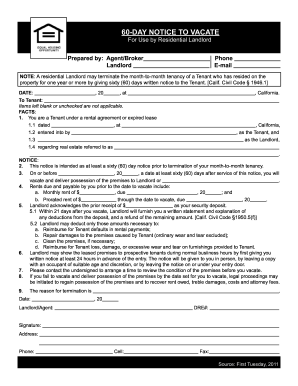
Get Ca 60-day Notice To Vacate 2011
How it works
-

Open form follow the instructions
-

Easily sign the form with your finger
-

Send filled & signed form or save
How to fill out the CA 60-Day Notice to Vacate online
This guide provides clear and supportive instructions for completing the CA 60-Day Notice to Vacate form online. Whether you are a landlord or an agent, following these steps will help ensure that you fill out the form accurately and effectively.
Follow the steps to complete the CA 60-Day Notice to Vacate form.
- Click the ‘Get Form’ button to obtain the CA 60-Day Notice to Vacate form and open it in an appropriate editor.
- Fill in the date at the top of the form in the designated section, ensuring it reflects the current date.
- In the 'To Tenant' section, clearly enter the full name of the tenant receiving the notice.
- Complete the 'Facts' section: provide the date of the rental agreement or lease, address of the rental property, and names of both the tenant and landlord.
- Indicate the notice's intent in the 'Notice' section, confirming this serves as a sixty (60) day advance notice for termination of the tenancy.
- Specify the date by which the tenant must vacate the premises, ensuring it is at least sixty (60) days after the notice is served.
- In the 'Rents due and payable' section, list the monthly rent and prorated rent amounts due before the vacate date, including their respective due dates.
- Acknowledge the security deposit amount received from the tenant and outline how deductions will be handled following their vacating.
- Provide details about scheduling a time to review the condition of the premises before the tenant vacates, as stated in the instructions.
- Complete the 'Reason for termination' section if applicable, providing a brief explanation for the notice.
- Sign the document as the landlord or agent, including the necessary contact information and license number.
- Once all fields are completed, save changes to your document. You can then download, print, or share the filled form as needed.
Complete your CA 60-Day Notice to Vacate online today!
Get form
Experience a faster way to fill out and sign forms on the web. Access the most extensive library of templates available.
Related links form
In California, an email is typically not considered a formal written notice for a CA 60-Day Notice to Vacate. Written notices usually need to be in physical format, either hand-delivered or sent via certified mail. Therefore, it is advisable to follow the traditional methods to avoid potential disputes.
Get This Form Now!
Use professional pre-built templates to fill in and sign documents online faster. Get access to thousands of forms.