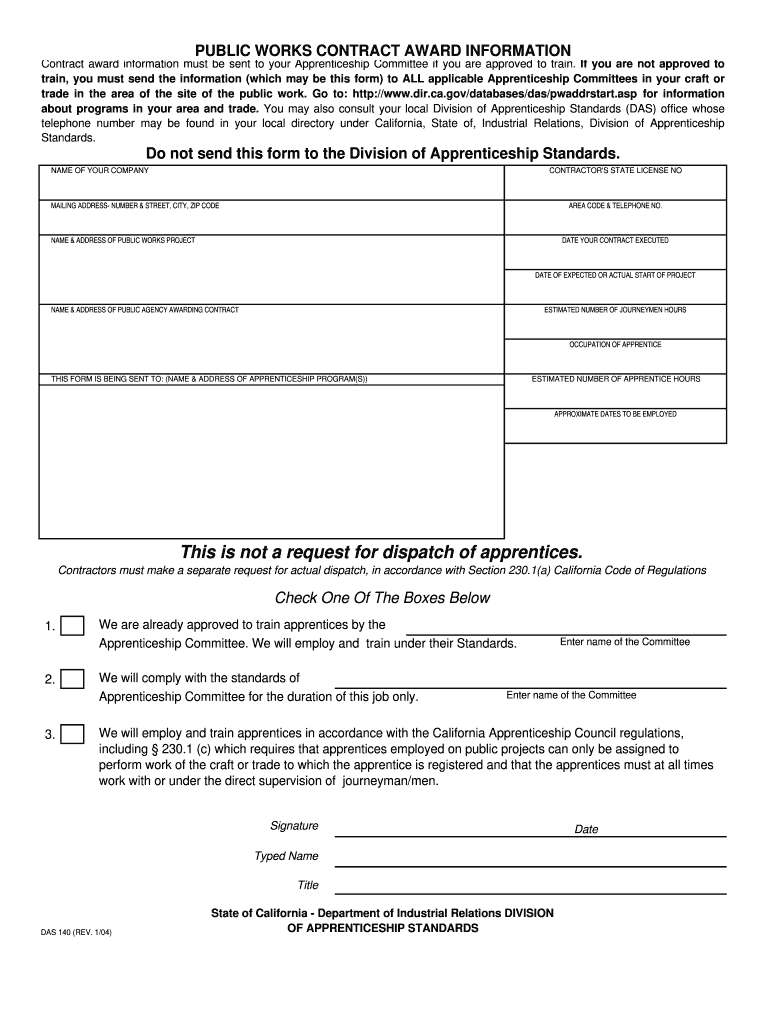
1 c which requires that apprentices employed on public projects can only be assigned to perform work of the craft or trade to which the apprentice is registered and that the apprentices must at all times work with or under the direct supervision of journeyman/men. Signature Typed Name Title DAS 140 REV. You may also consult your local Division of Apprenticeship Standards DAS office whose telephone number may be found in your local directory under California State of Industrial Relations Division of Apprenticeship Standards. PUBLIC WORKS CONTRACT AWARD INFORMATION Contract award information must be sent to your Apprenticeship Committee if you are approved to train* If you are not approved to train you must send the information which may be this form to ALL applicable Apprenticeship Committees in your craft or trade in the area of the site of the public work. Go to http //www. dir. ca*gov/das/PublicWorksForms. htm for information about programs in your area and trade. Do not send this fo....
Loading

Open form follow the instructions

Easily sign the form with your finger

Send filled & signed form or save
How to fill out the CA DAS 140 online
This guide provides step-by-step instructions for completing the CA DAS 140 form online, ensuring that you submit your contract award information accurately. Whether you are a contractor approved to train apprentices or not, following these instructions will help you navigate the form effectively.
Follow the steps to complete the CA DAS 140 form easily.
- Click ‘Get Form’ button to obtain the form and open it in the editor.
- Begin by entering the name of your company in the designated field. Ensure that the name is accurate and matches your official business registration.
- Provide your contractor's state license number in the appropriate box. This number verifies your eligibility to perform contracted work.
- Fill in your mailing address, including the number and street, city, and ZIP code. It is essential to provide the correct information for correspondence.
- Enter your area code and telephone number to allow the apprenticeship committee to contact you if needed.
- Complete the section regarding the name and address of the public works project. This information identifies where the work will take place.
- Indicate the date your contract was executed. This is the official date when the contract was signed.
- Specify the expected or actual start date of the project. This information is vital for scheduling and planning.
- Provide the name and address of the public agency awarding the contract. Accurate details ensure proper communication between parties.
- Estimate the number of journeyman hours for the project in the appropriate field. This figure reflects the labor needed for skilled workers.
- State the occupation of the apprentices you intend to employ during the project. This detail is necessary for accurate record-keeping.
- List the name and address of the apprenticeship program to which this form is being sent. It is crucial for compliance and program tracking.
- Estimate the number of apprentice hours expected during the project. Accurate estimates help in planning for training and compliance.
- Provide the approximate dates for when apprentices will be employed on the project.
- Check the appropriate box to confirm your organization’s status regarding apprenticeship training approval. Ensure clarity by choosing one of the provided options.
- Sign the form where indicated. Include your typed name and title, as well as the date of submission.
We encourage you to complete your CA DAS 140 form online today for more efficient processing of your training program.
Experience a faster way to fill out and sign forms on the web. Access the most extensive library of templates available.
Related content
DAS 140 (REV. 1/04). Page 2. Explanation to box 1 ‐ 3 on form DAS 140. • Box 1 is for...
This course introduces the student to mass communications theory and history and to...
Our high quality Drive Systems, are based upon our unique hydraulic piston motors...
Get answers to your most pressing questions about US Legal Forms API.
Where to submit DAS 140 form?
Submit the CA DAS 140 form to the California Secretary of State’s office via their online portal or by mail. It's crucial to ensure that you send it to the correct address to avoid delays. Keeping track of your submission will help you confirm that your documents reach the appropriate department.
How to file California corporate disclosure statement online?
To file a California corporate disclosure statement online, you should utilize the California Secretary of State's online filing system. This platform simplifies the process for submitting necessary documents, including the CA DAS 140. Just follow the website's instructions for an easy filing experience.
How to file a disability claim in California?
Filing a disability claim in California involves submitting the appropriate forms to the Employment Development Department (EDD). Begin by gathering your medical information and filling out the claim form. You can file your claim online, ensuring you have the necessary documentation to support your CA DAS 140.
How to file a California corporate disclosure statement online?
To file a California corporate disclosure statement online, start by visiting the California Secretary of State's website. Locate the section for corporate filings and choose the option for submitting a disclosure statement. Follow the prompts to complete and submit your CA DAS 140 online efficiently.
How to file Form SI 100 in California?
Filing Form SI 100 in California involves several steps. First, visit the California Secretary of State's website to access the necessary form. Once you've filled out the form, you can submit it online or by mail. Make sure to keep a copy for your records after successfully filing your CA DAS 140.
Can you file CA Statement of Information online?
Yes, you can file the CA Statement of Information online. Utilizing the California Secretary of State's website allows business owners to complete this process conveniently. By accessing the site's portal, you can submit your CA DAS 140 electronically and save time in the filing process.
What is the difference between DAS 140 and DAS 142?
The CA DAS 140 and DAS 142 are both important forms related to corporate filings in California. The DAS 140 is typically used for disclosures regarding corporate governance, while the DAS 142 focuses on specific corporate interests and stakeholders. Understanding these differences can help ensure you file the correct form for your needs.
How to fill out a California residential lease agreement?
When filling out a California residential lease agreement, take time to carefully enter every required detail, including rental terms, liabilities, and any stipulations on utilities. Clarity in your lease helps prevent disputes down the line. Utilizing US Legal Forms can help simplify this process by offering structured templates that cover all necessary elements.
How to fill out California residential lease agreement?
Filling out a California residential lease agreement requires you to include essential details such as tenant and landlord information, lease duration, and monthly rent. Ensure all clauses related to tenant rights and responsibilities are clearly stated. To assist you, US Legal Forms provides templates that can help streamline the process effectively.
What disclosures are required on a residential lease in California?
California law requires several disclosures in residential leases, including information about lead-based paint, mold, and any specific health or safety issues within the rental. It's crucial to be transparent about these factors as they affect tenant well-being. If you're unsure about compliance, consider exploring resources from US Legal Forms for comprehensive guidance.
Use professional pre-built templates to fill in and sign documents online faster. Get access to thousands of forms.
If you believe that this page should be taken down, please follow our DMCA take down process here.