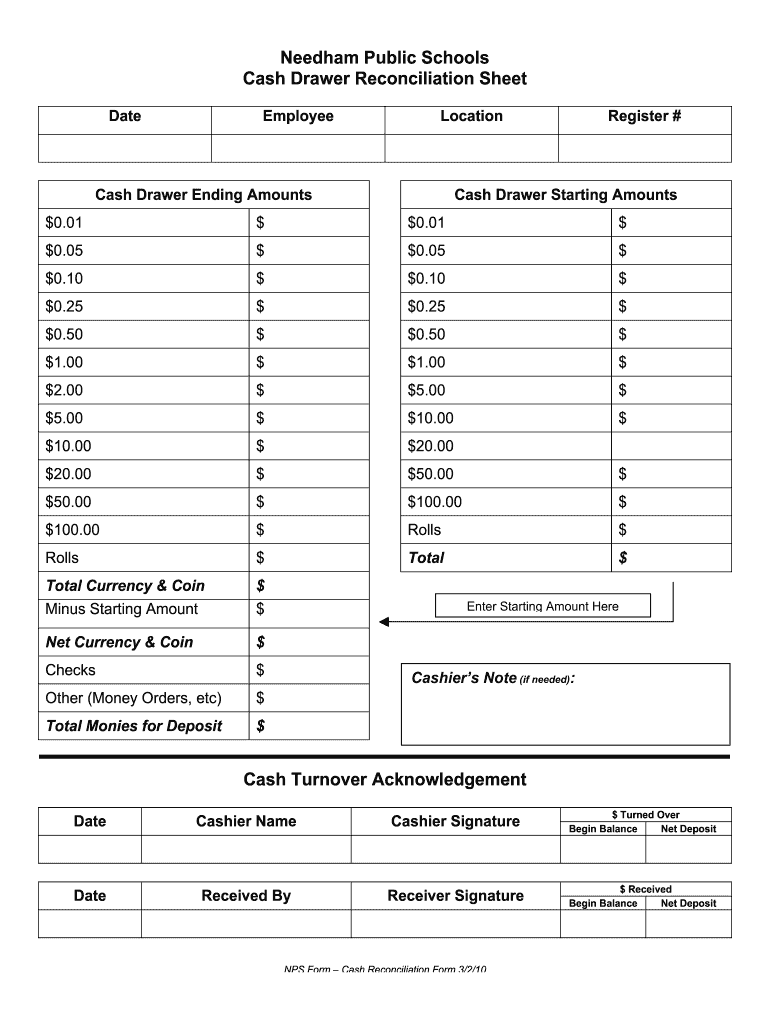
Orders, etc) $ Total Monies for Deposit $ Enter Starting Amount Here Cashier’s Note (if needed): Cash Turnover Acknowledgement Date Cashier Name Cashier Signature $ Turned Over Begin Balance Net Deposit Date Received By Receiver Signature $ Received Begin Balance Net Deposit NPS Form – Cash Reconciliation Form 3/2/10 .
Loading

Open form follow the instructions

Easily sign the form with your finger

Send filled & signed form or save
How to fill out the NPS Cash Drawer Reconciliation Sheet online
The NPS Cash Drawer Reconciliation Sheet is a vital tool for accurately reconciling cash drawer amounts in a systematic manner. This guide will provide you with clear, step-by-step instructions on how to effectively complete the form online.
Follow the steps to complete the NPS Cash Drawer Reconciliation Sheet accurately.
- Press the ‘Get Form’ button to retrieve the NPS Cash Drawer Reconciliation Sheet and open it in the editing interface.
- Begin by entering the date at the top section of the form to indicate when the reconciliation is taking place.
- Next, provide the name of the employee responsible for the reconciliation in the designated field.
- Indicate the location where the cash drawer is situated.
- Move on to the cash drawer ending amounts section. Here, you will enter the amounts of various denominations in the fields provided, such as $0.01, $0.05, $0.10, and so on, using the corresponding boxes.
- After filling in all ending amounts, calculate your total currency and coin and enter that figure in the appropriate total field.
- Subtract the starting amounts from the total amounts noted in the previous step to get the net currency and coin, and record that value.
- Include any checks or other monetary items like money orders in the respective fields.
- Add all the amounts to calculate the total monies for deposit and document that amount in the final field.
- If necessary, provide any additional notes in the cashier’s note section.
- Complete the cash turnover acknowledgement section with the date, cashier name, and signature, and note the amount turned over.
- Finally, ensure that the received by section is filled out, including the date, receiver name, signature, and amount received. Review all entries for accuracy.
- You may now save your changes, download the completed form, print it for your records, or share it as needed.
Complete your NPS Cash Drawer Reconciliation Sheet online today for accurate financial management.
Experience a faster way to fill out and sign forms on the web. Access the most extensive library of templates available.
Related content
Dec 16, 2021 — This VAR template provides standard, NPS-approved language and enables...
by G Riverafontan · 2022 — The DL report is a snapshot in time, much like the balance...
Feb 14, 2012 — Net decrease in cash and cash equivalents. (271,843). (212,704). Cash and...
Get answers to your most pressing questions about US Legal Forms API.
How do you reconcile a cash drawer?
The reconciliation feature for cash drawers is designed so that employees using cash drawers in your company can check the money in the drawer against transactions that occurred over a period of time. Best practice is to reconcile cash drawers at the end of every business day.
How do you use a cash register step by step?
Put all your cash, credit card receipts and checks into a deposit bag and take them to the bank. Keep a written ledger of the currency, credit card transactions and checks. This will help with your overall accounting. Replace a base amount of money to the drawer for the start of the next business day.
How do you countdown a cash register drawer?
1. Take your starting cash total and the amount of cash receipts for the day. The amount in the cash drawer needs to add up to the sum total of these two figures. It helps to have paper available to write the totals out for the cash and change as you tally it up.
What does it mean to reconcile cash?
Page 4. RECONCILIATION OF CASH. Bank Reconciliation is the process of. comparing transactions from the accounting. records against those presented on the bank statements/records.
How do you balance a cash register?
Always have one person per drawer. ... Start your day by counting cash. ... Deposit cash throughout shifts. ... Determine your ideal starting amount. ... Keep one employee per register. ... Run an X read. ... Conduct the physical count. ... Don't forget the cash drop.
How do you reconcile a cash account?
COMPARE THE DEPOSITS. Match the deposits in the business records with those in the bank statement. ... ADJUST THE BANK STATEMENTS. Adjust the balance on the bank statements to the corrected balance. ... ADJUST THE CASH ACCOUNT. ... COMPARE THE BALANCES.
How do you set up a cash register drawer?
Sort the bills by denomination. Arrange each stack of bills so they all face the same direction, with the front of each bill facing up. Place the stack of 1s in the slot of the cash drawer furthest to the left. Place 5s in the next slot, 10s in the next and 20s in the slot furthest to the right.
How do you balance a cash drawer?
Always have one person per drawer. ... Start your day by counting cash. ... Deposit cash throughout shifts. ... Determine your ideal starting amount. ... Keep one employee per register. ... Run an X read. ... Conduct the physical count. ... Don't forget the cash drop.
Use professional pre-built templates to fill in and sign documents online faster. Get access to thousands of forms.
If you believe that this page should be taken down, please follow our DMCA take down process here.