Loading
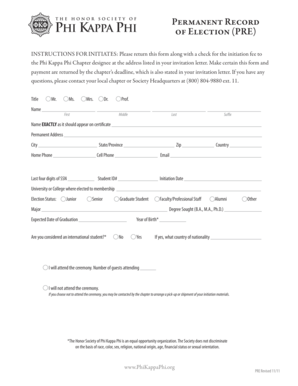
Get Permanent Record Of Election Pre - Mtsu
How it works
-

Open form follow the instructions
-

Easily sign the form with your finger
-

Send filled & signed form or save
How to fill out the Permanent Record Of Election PRE - Mtsu online
Filling out the Permanent Record Of Election PRE - Mtsu is an important step for individuals seeking initiation into the Phi Kappa Phi Honor Society. This guide will walk you through each component of the form, ensuring that you provide accurate and complete information.
Follow the steps to successfully complete the form online.
- Click the ‘Get Form’ button to access the document and launch it in your preferred editor.
- Fill in your title by selecting the appropriate option: Mr., Ms., Mrs., Dr., or Prof. This will appear on official documents pertaining to your membership.
- Enter your full name as it should appear on the certificate in the designated fields for first, middle, last names, and suffix.
- Provide your permanent address, including street, city, state/province, zip code, and country, ensuring all information is current and accurate.
- Fill in your home phone number and cell phone number, followed by your email address to maintain clear communication.
- Input the last four digits of your Social Security Number and your Student ID number for identification purposes.
- Indicate your initiation date which will be relevant for your membership records.
- Specify the university or college where you were elected to membership.
- Select your election status from the available options, such as junior, senior, graduate student, faculty/professional staff, or alumni.
- Complete your major and the degree you are seeking (B.A., M.A., Ph.D.) with the expected date of graduation.
- Provide your year of birth as an additional identification measure.
- Indicate if you are considered an international student by selecting yes or no; if yes, specify your country of nationality.
- Confirm your attendance at the ceremony and provide an estimated number of guests if applicable.
- If you choose not to attend the ceremony, note that the chapter may contact you regarding the arrangement for your initiation materials.
- Review all your entries for accuracy, then save your changes, download, print, or share the completed form as necessary.
Complete your documents online today to ensure a smooth initiation process.
Grades—Grade Point Average (Quality Credits) GradeGrade PointsA A- B+ B B- C+ C C- D+ D D- F4.00 3.67 3.33 3.00 2.67 2.33 2.00 1.67 1.33 1.00 0.67 0.00
Industry-leading security and compliance
US Legal Forms protects your data by complying with industry-specific security standards.
-
In businnes since 199725+ years providing professional legal documents.
-
Accredited businessGuarantees that a business meets BBB accreditation standards in the US and Canada.
-
Secured by BraintreeValidated Level 1 PCI DSS compliant payment gateway that accepts most major credit and debit card brands from across the globe.