Loading
Get Building Permit Application - Red Wing Minnesota - Red-wing
How it works
-

Open form follow the instructions
-

Easily sign the form with your finger
-

Send filled & signed form or save
How to fill out the BUILDING PERMIT APPLICATION - Red Wing Minnesota - Red-wing online
This guide provides a clear and comprehensive approach to completing the Building Permit Application for Red Wing, Minnesota. Following these instructions will help ensure that your application is accurately filled out and submitted without issues.
Follow the steps to complete your building permit application effectively.
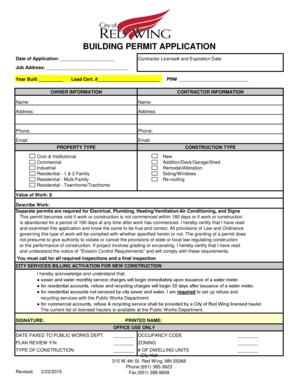
- Click 'Get Form' button to obtain the form and open it in your preferred editor.
- Input the date of the application in the designated field at the top of the form.
- Fill in the contractor's license number along with its expiration date to ensure compliance with local regulations.
- Provide the job address where the construction will take place. Also, indicate the year the property was built and include the lead certification number if applicable.
- Complete the owner information section, providing the parcel identification number (PIN) of the property.
- Proceed to the contractor information section, filling out the contractor's name, address, phone number, and email address.
- Select the property type by checking the appropriate category, such as Civic & Institutional, Commercial, or Residential.
- Indicate the construction type from the listed options, selecting from new construction, additions, remodels, siding, or re-roofing.
- Enter the estimated value of the work being performed in the specified field.
- Provide a detailed description of the work to be done in the respective area.
- Acknowledge that separate permits are needed for electrical, plumbing, HVAC, and signage work.
- Review the certification section, confirming that you have read and understood the application requirements and regulations.
- Fill out the City Services Billing Activation section by indicating your understanding of service charges related to your new construction.
- Sign the application, including your printed name and date, to validate the submission.
- After completing the form, save changes, download, print, or share the filled application as needed.
Start your building permit application online today for a smooth approval process.
All plans must be submitted electronically via ProjectDox. Sign in at the check in counter and staff will assist you through the process. Once your plans are approved, pay the necessary fees (see the ) the Minneapolis Development Review staff will provide information on required inspections.