Loading
Get Iijs Login
How it works
-

Open form follow the instructions
-

Easily sign the form with your finger
-

Send filled & signed form or save
How to fill out the Iijs Login online
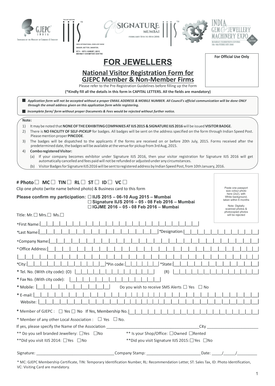
Completing the Iijs Login form accurately is essential for a smooth registration process. This guide provides easy-to-follow steps to ensure that you fill out the form correctly and provide all necessary information.
Follow the steps to successfully complete the Iijs Login form online.
- Click the ‘Get Form’ button to access the Iijs Login form and open it for editing.
- Fill in all the mandatory fields, ensuring that each entry is written in capital letters as required. Pay special attention to your email address and mobile number, as these are crucial for communication regarding your application.
- Upload a recent passport-sized color photo (2x2 inches) with a white background. Ensure the photo is taken within the last six months, as digitally scanned or photocopied photos will not be accepted.
- Indicate whether you wish to receive SMS alerts by selecting 'Yes' or 'No'.
- Complete any additional questions regarding your membership status or past event attendance, ensuring all responses are accurate.
- Review all information provided for accuracy and completeness. Incomplete applications may be rejected.
- Submit the application before the specified deadline to ensure your visitor badge is dispatched to the provided address.
Start filling out your Iijs Login form online for a hassle-free registration experience.
The Gem & Jewellery Export Promotion Council (GJEPC) is organizing the 39th edition of India International Jewellery Show (IIJS) Premiere 2023 at two venues concurrently, at JWCC (Jio World Convention Centre) BKC, Bandra, Mumbai from 3rd to 7th August 2023 & BEC (Bombay Exhibition Centre), Goregaon Mumbai, from 4th to ...