Loading
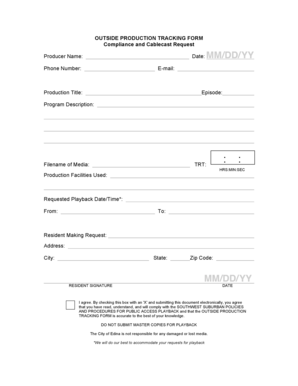
Get Outside Production Tracking Form - Edina Minnesota - Edinamn
How it works
-

Open form follow the instructions
-

Easily sign the form with your finger
-

Send filled & signed form or save
How to fill out the Outside Production Tracking Form - Edina Minnesota - Edinamn online
Filling out the Outside Production Tracking Form is an essential process for individuals or groups wishing to submit production requests in Edina, Minnesota. This guide provides clear, user-friendly instructions to help you complete the form accurately online.
Follow the steps to complete the Outside Production Tracking Form online.
- Press the ‘Get Form’ button to access the form and open it in your preferred online document editor.
- Fill in the 'Producer Name' field with your full name or the name of the individual responsible for the production.
- Enter the current 'Date' to indicate when the form is being completed.
- Provide your 'Phone Number' and 'E-mail' address for any necessary follow-up communications.
- Input the 'Production Title', which should reflect the name of the production you are submitting.
- Specify the 'Episode' number or title, if applicable, to differentiate between multiple productions.
- Write a brief 'Program Description' to give context about the content of the production.
- Include the 'Filename of Media' that will be used in the submission.
- Indicate the 'TRT' (Total Running Time) in the format of HRS:MIN:SEC.
- List the 'Production Facilities Used' where the production was recorded or edited.
- Specify the 'Requested Playback Date/Time', indicating both the start and end times for playback.
- Provide the 'Resident Making Request' by entering their name, along with their complete address including 'City', 'State', and 'Zip Code'.
- Obtain the required 'Resident Signature' either by electronically checking the agreement box with an 'X' or signing physically if needed.
- Include the date of the signature if it differs from the date above.
- Review all the entered information to ensure accuracy before finalizing the submission.
- Once completed, you can save the changes, download, print, or share the form as needed.
Complete your Outside Production Tracking Form online today to ensure your production requests are processed efficiently.
7.00. A= Tech-Prep Course K= Pre IB Course V= Course taken with modified content C= Correspondence Course L= Local Credit X= Innovative Course D= College Dual Credit M= Magnet Course Z= Distance Learning E= Credit by. Exam N= Night School G= Gifted/Talented P= AP Course H= Honors Q= Pre AP Course I = IB Course R= ...
Industry-leading security and compliance
US Legal Forms protects your data by complying with industry-specific security standards.
-
In businnes since 199725+ years providing professional legal documents.
-
Accredited businessGuarantees that a business meets BBB accreditation standards in the US and Canada.
-
Secured by BraintreeValidated Level 1 PCI DSS compliant payment gateway that accepts most major credit and debit card brands from across the globe.