Loading
Form preview
  • US Legal Forms
  • Form Library
  • Executive Forms
  • Executive Department DOC Forms
  • Census 7525-v 2003

Get Census 7525-v 2003-2025

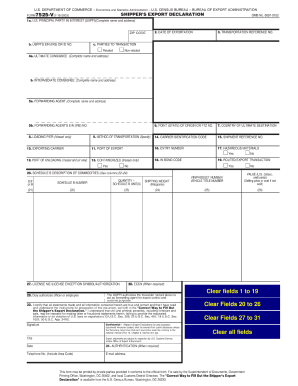
U.S. DEPARTMENT OF COMMERCE Economics and Statistics Administration U.S. CENSUS BUREAU BUREAU OF EXPORT ADMINISTRATION FORM SHIPPER S EXPORT DECLARATION 7525-V 7-18-2003 OMB No. 0607-0152 1a. U.S. PRINCIPAL PARTY IN INTEREST USPPI Complete name and address ZIP CODE b. Date 31. AUTHENTICATION When required Telephone No. Include Area Code E-mail address Clear fields 1 to 19 Clear Fields 20 to 26 Clear all fields This form may be printed by private parties provided it conforms to the official form. For sale by the Superintendent of Documents Government Printing Office Washington DC 20402 and local Customs District Directors. The Correct Way to Fill Out the Shipper s Export Declaration is available from the U.S. Census Bureau Washington DC 20233. USPPI S EIN IRS OR ID NO. 2. DATE OF EXPORTATION 3. TRANSPORTATION REFERENCE NO. 6. POINT STATE OF ORIGIN OR FTZ NO. 7. COUNTRY OF ULTIMATE DESTINATION 14. CARRIER IDENTIFICATION CODE 15. SHIPMENT REFERENCE NO. c* PARTIES TO TRANSACTION Related....

How it works

  1. Open form

    Open form follow the instructions

  2. Easily sign form

    Easily sign the form with your finger

  3. Share form

    Send filled & signed form or save

How to fill out the Census 7525-V online

Filling out the Census 7525-V, or Shipper's Export Declaration, is essential for individuals and businesses involved in exporting goods. This guide will provide clear instructions to help users complete the form accurately and efficiently online.

Follow the steps to complete the Census 7525-V online.

  1. Click ‘Get Form’ button to obtain the form and open it in your preferred digital editor.
  2. Begin by entering the complete name and address of the U.S. principal party in interest (USPPI). Ensure the ZIP code is accurately filled in.
  3. Provide the USPPI's Employer Identification Number (EIN) or ID number in the designated field.
  4. Indicate the date of exportation in the specified section.
  5. Fill in the transportation reference number if applicable.
  6. Specify the point of origin or Free Trade Zone (FTZ) number for the shipment.
  7. Indicate the country of ultimate destination where the goods will be shipped.
  8. Enter the carrier identification code related to the transport of the goods.
  9. Document the shipment reference number as needed.
  10. Provide the names and addresses of both the ultimate consignee and intermediary consignee where applicable.
  11. Fill in the complete name and address of the forwarding agent and their EIN number.
  12. If applicable, enter the loading pier for vessel shipments.
  13. Select the method of transportation for the export (e.g., air, sea, land).
  14. Provide details of the exporting carrier managing the shipment.
  15. Specify the port of export where the goods will depart.
  16. Document the port of unloading for vessel and air shipments.
  17. Indicate if the shipment involves hazardous materials.
  18. Specify the containerized details for vessel shipments.
  19. Fill in the entry number if available.
  20. Provide information regarding the routed export transaction (Yes/No).
  21. Utilize Schedule B columns to describe the commodities being exported, including their quantity, shipping weight, and Schedule B number.
  22. Document the license number, license exception symbol, or any relevant authorization required.
  23. Ensure that a duly authorized officer or employee signs the declaration, certifying the accuracy of the information provided.
  24. Conclude by entering the date, telephone number, and email address of the individual completing the form.
  25. Review all fields for accuracy before proceeding to save the form. You can choose to download, print, or share it.

Complete your Census 7525-V online today for a smooth export process.

Get form

Experience a faster way to fill out and sign forms on the web. Access the most extensive library of templates available.
Get form

Related content

FTD - Regulations - Section 30.3
The arrangement of Form 7525-V-Alternate (Intermodal) conforms to and is designed for...
Learn more
correct way to complete the
by SSED SED — The Shipper's Export Declaration (SED), Commerce Form 7525-V, is used for...
Learn more
National Vital Statistics Reports
Jul 26, 2021 — Objectives—This report presents final 2019 data on U.S. deaths, death...
Learn more

Related links form

IL UI-28 2018 IN WCE-1 2015 NC IC Form 25T 2013 NJ WDS-1 2014

Questions & Answers

Get answers to your most pressing questions about US Legal Forms API.

Contact support

Yes, completing the Census 7525-V is mandatory and plays an important role in shaping economic policies. The government requires this data to gain insights into various industries and businesses across the nation. By participating, you help ensure that your voice is heard in economic decisions. If you’re unsure how to comply, USLegalForms can offer tailored solutions for completing your census requirements.

If you neglect to fill out the Census 7525-V, your business may face unnecessary complications, including follow-up requests from the Census Bureau. Incomplete data can lead to misconceptions about economic conditions, affecting community resources. Moreover, it can limit your eligibility for local grants or assistance. It's in your best interest to complete the survey for an accurate representation.

Yes, there are potential penalties for not completing the Census 7525-V and other economic census forms. These penalties can include monetary fines, as the government requires comprehensive data to assess and improve economic growth. Filling out the form not only helps you comply with regulations but also aids in community development. Using USLegalForms can simplify navigating these requirements.

While you can technically refuse to fill out the Census 7525-V, it's important to understand the implications. Refusal may hinder accurate economic profiling, which influences local and state funding for services. It's beneficial to participate, as it contributes to a clearer picture of the economy. If you have concerns or questions, platforms like USLegalForms can guide you through the process.

Choosing not to fill out the Census 7525-V can lead to consequences, as participation is encouraged for various reasons. While individual fines may not be immediate, your business data will remain incomplete, which can affect regional planning and funding. Therefore, proactively submitting the form helps avoid any potential misunderstandings with authorities. Remember, your participation supports the broader community.

If you engage in international trade, filing the Census 7525-V is typically mandatory. This requirement helps authorities gather vital data about U.S. exports and imports. Ensuring your submission is complete and accurate not only protects you from penalties but also contributes to a better understanding of global trade.

Yes, failing to complete the Census 7525-V can result in penalties. The specific fines depend on the circumstances, but it's essential to comply to avoid unnecessary costs. This form is crucial for accurate trade data collection, and the consequences of non-compliance can be significant.

Form 7525-V, commonly known as the Census 7525-V, is a vital document used for gathering information about U.S. exports. This form ensures compliance with export regulations and helps in accurate data collection. Utilizing platforms like USLegalForms can simplify the process of filling out the Census 7525-V, guiding you through the necessary steps.

While you have the right to refuse to answer questions in a census survey, doing so can lead to fines and inaccuracies in data collected. The Census 7525-V emphasizes the importance of complete and accurate data for the benefit of your community. It's advisable to answer to the best of your ability to support communal needs.

Yes, participation in the U.S. Census is mandatory for most individuals. Completing the Census 7525-V is vital for government planning, funding, and representation. Not participating can expose you to penalties, so it's best to engage in this civic duty fully.

Get This Form Now!

Use professional pre-built templates to fill in and sign documents online faster. Get access to thousands of forms.
Get form
If you believe that this page should be taken down, please follow our DMCA take down processhere.

Industry-leading security and compliance

US Legal Forms protects your data by complying with industry-specific security standards.
  • In businnes since 1997
    25+ years providing professional legal documents.
  • Accredited business
    Guarantees that a business meets BBB accreditation standards in the US and Canada.
  • Secured by Braintree
    Validated Level 1 PCI DSS compliant payment gateway that accepts most major credit and debit card brands from across the globe.
Get Census 7525-V
Get form
Form Packages
Adoption
Bankruptcy
Contractors
Divorce
Home Sales
Employment
Identity Theft
Incorporation
Landlord Tenant
Living Trust
Name Change
Personal Planning
Small Business
Wills & Estates
Packages A-Z
Form Categories
Affidavits
Bankruptcy
Bill of Sale
Corporate - LLC
Divorce
Employment
Identity Theft
Internet Technology
Landlord Tenant
Living Wills
Name Change
Power of Attorney
Real Estate
Small Estates
Wills
All Forms
Forms A-Z
Form Library
Customer Service
Your Privacy Choices
Terms of Service
Privacy Notice
Legal Hub
Content Takedown Policy
Bug Bounty Program
About Us
Help Portal
Legal Resources
Blog
Affiliates
Contact Us
Delete My Account
Site Map
Industries
Forms in Spanish
Localized Forms
State-specific Forms
Forms Kit
Legal Guides
Real Estate Handbook
All Guides
Prepared for You
Notarize
Incorporation services
Our Customers
For Consumers
For Small Business
For Attorneys
Our Sites
US Legal Forms
USLegal
FormsPass
pdfFiller
signNow
altaFlow
DocHub
Instapage
Social Media
Call us now toll free:
+1 833 426 79 33
As seen in:
  • USA Today logo picture
  • CBC News logo picture
  • LA Times logo picture
  • The Washington Post logo picture
  • AP logo picture
  • Forbes logo picture
© Copyright 1997-2025
airSlate Legal Forms, Inc.
3720 Flowood Dr, Flowood, Mississippi 39232
Form Packages
Adoption
Bankruptcy
Contractors
Divorce
Home Sales
Employment
Identity Theft
Incorporation
Landlord Tenant
Living Trust
Name Change
Personal Planning
Small Business
Wills & Estates
Packages A-Z
Form Categories
Affidavits
Bankruptcy
Bill of Sale
Corporate - LLC
Divorce
Employment
Identity Theft
Internet Technology
Landlord Tenant
Living Wills
Name Change
Power of Attorney
Real Estate
Small Estates
Wills
All Forms
Forms A-Z
Form Library
Customer Service
Your Privacy Choices
Terms of Service
Privacy Notice
Legal Hub
Content Takedown Policy
Bug Bounty Program
About Us
Help Portal
Legal Resources
Blog
Affiliates
Contact Us
Delete My Account
Site Map
Industries
Forms in Spanish
Localized Forms
State-specific Forms
Forms Kit
Legal Guides
Real Estate Handbook
All Guides
Prepared for You
Notarize
Incorporation services
Our Customers
For Consumers
For Small Business
For Attorneys
Our Sites
US Legal Forms
USLegal
FormsPass
pdfFiller
signNow
altaFlow
DocHub
Instapage
Social Media
Call us now toll free:
+1 833 426 79 33
As seen in:
  • USA Today logo picture
  • CBC News logo picture
  • LA Times logo picture
  • The Washington Post logo picture
  • AP logo picture
  • Forbes logo picture
© Copyright 1997-2025
airSlate Legal Forms, Inc.
3720 Flowood Dr, Flowood, Mississippi 39232