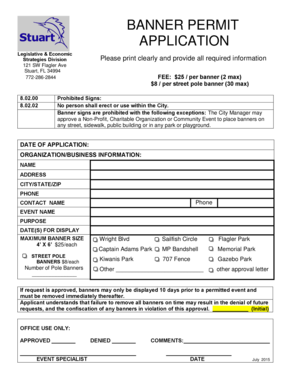
BANNER PERMIT APPLICATION Legislative & Economic Strategies Division 121 SW Flagler Ave Stuart, FL 34994 7722862844 8.02.00 8.02.02 Please print clearly and provide all required information FEE:.
Open form follow the instructions
Easily sign the form with your finger
Send filled & signed form or save
How to fill out the BANNER PERMIT APPLICATION - City Of Stuart - Cityofstuart online
The BANNER PERMIT APPLICATION is essential for organizations and businesses seeking to display banners within the City of Stuart. This guide will walk you through the online process of completing this application effortlessly.
Follow the steps to complete your application accurately.
- Press the ‘Get Form’ button to access the BANNER PERMIT APPLICATION online and open it in your preferred editor.
- Fill in the date of application at the top of the form.
- Provide your organization or business information, including the name, address, city/state/zip code, phone number, and the contact person's name.
- Indicate the event's name and the purpose for which you are requesting the banner.
- Specify the dates you wish for the banner to be displayed.
- List the maximum banner size, which is 4' x 6', and note the fee of $25 for each banner.
- If you are requesting street pole banners, indicate the number of banners needed and note the $8 fee per street pole banner, with a maximum of 30.
- Select the desired locations for your banners from the provided options, or specify another location if necessary.
- Acknowledge the requirement to remove banners within 10 days after the event by initialing the designated area.
- Once all fields are completed, ensure to save your changes, and you can then download, print, or share the form as needed.
Complete your BANNER PERMIT APPLICATION online today to ensure your event is visible in the City of Stuart.
Experience a faster way to fill out and sign forms on the web. Access the most extensive library of templates available.
Related content
Mar 29, 2018 — The City of Stuart has operated under the Commission-manager form of...
STUART The City of Stuart Community Redevelopment Agency, Downtown ... to the car dealer...
Indiantown is a village in Martin County, Florida, United States. The population was 6,083...
Get answers to your most pressing questions about US Legal Forms API.
What is name resolution error?
This error indicates that the system is unable to translate a domain name into its corresponding IP address. Several factors can contribute to this error, including network connectivity issues, incorrect configuration of the resolv.
What is the implementation of name resolution?
The modern implementation of this is DNS. DNS servers maintain a database of names and IP addresses. Client systems, such as Windows, Linux and macOS, dynamically update the DNS server's database any time their hostname or IP address changes.
How do I fix name resolution error?
8 Strategies for Troubleshooting a DNS Failure Restart Your Software or Device. Sometimes simply exiting the browser completely for a few minutes will solve the problem. ... Restart the Modem or Router. ... Switch Browsers. ... Pause Your Firewall. ... Clear Your Cache. ... Disable Extra Connections. ... Keep Everything Updated. ... Check DNS Settings.
What are the steps involved in a full DNS name resolution?
How Does the DNS Process Work? Step 1: Requesting Website Information. Visit a website by typing a domain name into a web browser. ... Step 2: Contact the Recursive DNS Servers. ... Step 3: Query the Authoritative DNS Servers. ... Step 4: Access the DNS Record. ... Step 5: Final DNS Step.
How do I resolve temporary failure in name resolution?
How to Fix “Temporary Failure in Name Resolution” Step 1: Check Your Network Configuration. ... Step 2: Check Your DNS Server. ... Step 3: Use IP Addresses Instead of Hostnames. ... Step 4: Use Hosts File. ... Step 5: Restart Your DNS Server.
How to fix temporary failure in name resolution in Linux?
Resolving a temporary failure in name resolution on Linux systems involves checking network connectivity, verifying DNS settings, inspecting the local hosts file, restarting network services, and clearing the DNS cache.
What is the sequence of host name resolution?
Host name resolution generally uses the following sequence: The client checks to see if the name queried is its own. The client then searches a local Hosts file, a list of IP address and names stored on the local computer.
How do I fix name resolution failure?
The “ERR_NAME_RESOLUTION_FAILED” error can be scary because it prevents you from accessing any website. However, it's pretty easy to troubleshoot in Chrome. If it's a browser issue, you can solve it by either clearing the cache, changing the DNS address, or resetting Chrome's settings.
Use professional pre-built templates to fill in and sign documents online faster. Get access to thousands of forms.
If you believe that this page should be taken down, please follow our DMCA take down process here.