Loading
Form preview
  • US Legal Forms
  • Other Templates
  • Executive Forms
  • Executive Department DOD Forms
  • Da 4187 2014

Get Da 4187 2014-2026

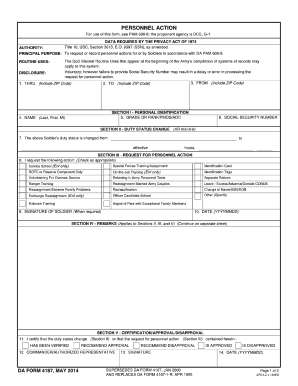
Attachments Menu PERSONNEL ACTION For use of this form, see PAM 600-8; the proponent agency is DCS, G-1. DATA REQUIRED BY THE PRIVACY ACT OF 1974 Title 10, USC, Section 3013, E.O. 9397 (SSN), as amended.

How it works

  1. Open form

    Open form follow the instructions

  2. Easily sign form

    Easily sign the form with your finger

  3. Share form

    Send filled & signed form or save

How to fill out the DA 4187 online

The DA 4187 is a crucial form used in various military contexts for personnel actions. This guide provides you with step-by-step instructions on how to complete the DA 4187 online, ensuring accuracy and efficiency in your submission.

Follow the steps to fill out the DA 4187 online successfully.

  1. Click ‘Get Form’ button to obtain the form and open it in the editor.
  2. Carefully review the first section, which requires personal information such as name, rank, and service number. Ensure that all entries are accurate and up-to-date.
  3. In the next section, indicate the purpose of the form by selecting the appropriate action. This may include requests for temporary duty assignments, voluntary resignations, or other personnel changes.
  4. Fill in the details regarding the requested action in the corresponding fields. Be specific in your descriptions to avoid any misunderstandings.
  5. Provide any supporting documentation that may be required for your request. This could include narratives or additional forms that substantiate your action.
  6. Once all fields are completed, review all entries for accuracy. Make sure that the information provided is clear and concise.
  7. Finalize your submission by saving your changes. You have the option to download, print, or share the completed DA 4187 as needed.

Complete your DA 4187 online today and ensure your personnel actions are processed smoothly.

Get form

Experience a faster way to fill out and sign forms on the web. Access the most extensive library of templates available.
Get form

Related content

PERSONNEL ACTION
SUPERSEDES DA FORM 4187, JAN 2000. AND REPLACES DA FORM 4187-1-R, APR 1995. DA FORM 4187...
Learn more
Personnel Action
Windows is either a registered trademark or a trademark of Microsoft Corporation in the...
Learn more
Piezoelectric accelerometers and vibration...
4187. 1 ,163. 103t27. 1. 3,9685. 3087,4. 1056. 2,93. 101107,59. 0,251 98. 1. 778. 1,3558...
Learn more

Related links form

UK D777BDL 2009 UK DS01 2012 UK DVLA FEP1 2019 UK F2508 2000

Questions & Answers

Get answers to your most pressing questions about US Legal Forms API.

Contact support

To fill out the DA 4787, you must gather accurate personal information and clearly indicate the purpose of the request. While this is a different form from the DA 4187, understanding how to complete forms in military documentation is vital for efficiency. For assistance with military forms, consider using platforms like US Legal Forms for guidance.

The DA 4187 form serves multiple purposes within the Army, including requests for educational assistance, changes to duty assignments, and modifications to personal information. Utilizing this form effectively can lead to smoother administrative procedures. Recognizing the versatility of the DA 4187 is essential.

To change a name on your DD214, you should fill out the DA 4187 and provide supporting documentation for the name change. Submit this form through the appropriate channels in your unit for review and approval. Once processed, this change will reflect on your DD214.

The DA 4187 form can be utilized to formally request a name change in military records. This procedure ensures that updates reflect your current name in all official documents. Proper use of the DA 4187 for this purpose is critical for maintaining accurate personal information.

The DA 4187 is an official form used by the United States Army for various personnel actions. This form facilitates requests for changes such as reassignments, duty status updates, and evaluations. Understanding how to use the DA 4187 can streamline many administrative processes.

To submit a DA 4187, first ensure you have completed the form accurately. You can submit it through your unit's administrative channel or directly to your Personnel Administration Office. It's essential to keep a copy for your records after submission.

A 4187 meal deduction refers to a request made through the DA 4187 form for reimbursement of meal costs incurred while on official duty. This process allows service members to claim meal expenses in compliance with military guidelines. Properly documenting these expenses is key to ensuring reimbursement.

You can find the DA 4187 form on military websites, such as the Army Publishing Directorate. Additionally, you may access it through your unit's administrative office. For a streamlined process, consider using platforms like US Legal Forms to download and fill out the form conveniently.

To fill out the DA 4187, start by entering your personal information at the top of the form. Make sure to specify the type of request you are making in the details section, and be as clear and concise as possible. After completing the form, double-check for accuracy before submitting it to the appropriate authorities.

The AOC 4187 refers to the specific section of the Army's regulations that governs the use of the DA 4187. This regulation outlines how the form should be processed and the types of requests allowed. Understanding AOC 4187 is crucial for service members who need to submit requests effectively.

Get This Form Now!

Use professional pre-built templates to fill in and sign documents online faster. Get access to thousands of forms.
Get form
If you believe that this page should be taken down, please follow our DMCA take down processhere.
Get DA 4187
Get form
  • Adoption
  • Bankruptcy
  • Contractors
  • Divorce
  • Home Sales
  • Employment
  • Identity Theft
  • Incorporation
  • Landlord Tenant
  • Living Trust
  • Name Change
  • Personal Planning
  • Small Business
  • Wills & Estates
  • Packages A-Z
  • Affidavits
  • Bankruptcy
  • Bill of Sale
  • Corporate - LLC
  • Divorce
  • Employment
  • Identity Theft
  • Internet Technology
  • Landlord Tenant
  • Living Wills
  • Name Change
  • Power of Attorney
  • Real Estate
  • Small Estates
  • Wills
  • All Forms
  • Forms A-Z
  • Other Templates
  • Legal Hub
  • About Us
  • Help Portal
  • Legal Resources
  • Blog
  • Affiliates
  • Contact Us
  • Delete My Account
  • Site Map
  • Industries
  • Forms in Spanish
  • Localized Forms
  • State-specific Forms
  • Forms Kit
  • Real Estate Handbook
  • All Guides
  • Notarize
  • Incorporation services
  • For Consumers
  • For Small Business
  • For Attorneys
  • USLegal
  • FormsPass
  • pdfFiller
  • signNow
  • altaFlow
  • DocHub
  • Instapage
Form Packages
  • Adoption
  • Bankruptcy
  • Contractors
  • Divorce
  • Home Sales
  • Employment
  • Identity Theft
  • Incorporation
  • Landlord Tenant
  • Living Trust
  • Name Change
  • Personal Planning
  • Small Business
  • Wills & Estates
  • Packages A-Z
Form Categories
  • Affidavits
  • Bankruptcy
  • Bill of Sale
  • Corporate - LLC
  • Divorce
  • Employment
  • Identity Theft
  • Internet Technology
  • Landlord Tenant
  • Living Wills
  • Name Change
  • Power of Attorney
  • Real Estate
  • Small Estates
  • Wills
  • All Forms
  • Forms A-Z
  • Other Templates
Customer Service
  • Legal Hub
  • About Us
  • Help Portal
  • Legal Resources
  • Blog
  • Affiliates
  • Contact Us
  • Delete My Account
  • Site Map
  • Industries
  • Forms in Spanish
  • Localized Forms
  • State-specific Forms
  • Forms Kit
Legal Guides
  • Real Estate Handbook
  • All Guides
Prepared for you
  • Notarize
  • Incorporation services
Our Customers
  • For Consumers
  • For Small Business
  • For Attorneys
Our Sites
  • USLegal
  • FormsPass
  • pdfFiller
  • signNow
  • altaFlow
  • DocHub
  • Instapage
Social Media
Call us now toll free:
+1 833 426 79 33
As seen in:
© Copyright 1999-2026 airSlate Legal Forms, Inc. 17 Station Street, Suite 303, Brookline, MA 02445
  • Your Privacy Choices
  • Terms of Service
  • Privacy Notice
  • Content Takedown Policy
  • Bug Bounty Program