Loading
Form preview
  • US Legal Forms
  • Form Library
  • RMV Forms
  • California RMV Forms
  • Ca Dmv Reg 256 2008

Get Ca Dmv Reg 256 2008-2026

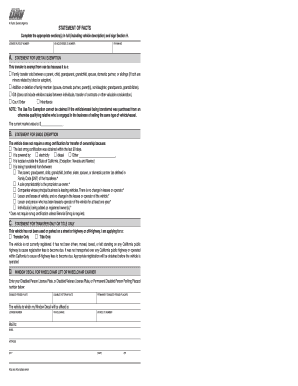
) The current market value of the vehicle or vessel is: $________________ . Changes were made at a cost of $________________ on this date ________________ . This is what i changed: Check all that apply: Unladen Weight changed because __________________ (Public Weighmaster Certificate is required. Exception: Trailers) Motive Power changed from ________________ to ________________ . Body Type changed from ________________ to ________________ . Number of Axles changed from ________________ to___.

How it works

  1. Open form

    Open form follow the instructions

  2. Easily sign form

    Easily sign the form with your finger

  3. Share form

    Send filled & signed form or save

How to fill out the CA DMV REG 256 online

This guide provides clear, step-by-step instructions for completing the CA DMV REG 256 form online. Whether you are transferring ownership of a vehicle or changing details, this user-friendly guide will assist you in navigating each section effectively.

Follow the steps to complete the CA DMV REG 256 form online.

  1. Click ‘Get Form’ button to obtain the CA DMV REG 256 form and open it in the editor.
  2. Complete the 'Statement of Facts' section in full, ensuring you include the vehicle description and any applicable exemptions in the provided fields.
  3. Fill in the 'License Plate/CF Number,' 'Vehicle/Vessel ID Number,' and 'Year/Make' fields accurately. This information is crucial for identifying the vehicle associated with the transfer.
  4. If applicable, provide details for the 'Statement for Use Tax Exemption.' Indicate the reason for the exemption by selecting the appropriate options and providing the current market value of the vehicle.
  5. In the 'Statement for Smog Exemption' section, indicate whether the vehicle requires smog certification by selecting the relevant reason from the list provided.
  6. For those applying for transfer only or title only, complete the section accordingly by selecting the correct option and ensuring the vehicle has not been registered or operated within California.
  7. If applicable, fill out the 'Window Decal for Wheelchair Lift or Wheelchair Carrier' section with the relevant license plate or placard number and vehicle information.
  8. In the 'Statement for Vehicle Body Change,' specify any changes made to the vehicle and the associated costs, if any. Make sure to check all applicable changes.
  9. Provide your name and any required corrections in the 'Name Statement' section to ensure your information is accurate.
  10. Sign and date the form in Section H, certifying the information provided is true and correct under penalty of perjury.
  11. Once all sections are completed, you can save changes, download, print, or share the form as needed.

Start completing your CA DMV REG 256 form online today for a smooth transfer process.

Get form

Experience a faster way to fill out and sign forms on the web. Access the most extensive library of templates available.
Get form

Related content

Forms
Preview & Download Form. Bill of Sale (REG 135). Preview & Download Form. Statement of...
Learn more
BFB-BUS-19: Registration and Licensing of ...
Jun 30, 1992 — Used Report of Sale Vehicle (DMV form REG. 51); and vi. Statement of...
Learn more
application for title or registration
(Requires completed Statement of Facts [REG 256].) Page 2. X. DMV. Vehicle ... This form...
Learn more

Related links form

PH General Form No. 58(A) 1976 PH Metrobank Card Supplementary Card Application PH Pag-IBIG Fund HQP-PFF-033 (Formerly PH FPC014) 2017 PH Philippine Retirement Authority Exit Interview Form

Questions & Answers

Get answers to your most pressing questions about US Legal Forms API.

Contact support

To transfer your registration to another person, you must fill out a California DMV form and provide the new owner’s information. The process typically involves submitting the CA DMV REG 256 form along with other required documents either online or in person. Ensure that all steps are completed to finalize the transfer efficiently.

California allows title transfers to be completed online for eligible vehicles. You must provide the necessary information and documentation related to the CA DMV REG 256 during the process. Confirm your eligibility on the DMV website to ensure a smooth transaction.

Yes, California DMV allows electronic title transfers in some cases. To initiate an electronic transfer, both parties need to complete the necessary forms that can be found on the DMV website. This process simplifies ownership changes and aligns with CA DMV REG 256 requirements.

Typically, it takes about 15 to 30 days to receive a replacement title from the California DMV. You can apply for a replacement online, by mail, or in person at a DMV office. Keep in mind that processing times may vary, so check for updates regarding your CA DMV REG 256 application status.

The signature release interest in the vehicle should be signed by the current registered owner. This verifies that the owner relinquishes their interest in the vehicle, paving the way for a smooth title transfer. It is advisable to review the CA DMV REG 256 to understand the specific requirements related to signing this document.

Filling out a statement of facts involves meticulously providing the required personal and vehicle information. Be sure to explain any special circumstances clearly, as this can affect your title application. Utilizing the resources on the CA DMV REG 256 will offer valuable insights on how to properly complete this important document.

The primary owners and any necessary parties involved in the vehicle's transfer must sign the Reg 256 statement of facts. This ensures that all involved parties acknowledge the contents of the document, which is critical for a smooth transfer process. Familiarizing yourself with the CA DMV REG 256 will guide you through who needs to sign this document.

In the statement of facts for the DMV, include essential details related to the vehicle, such as its history, any modifications, or issues affecting ownership. You should also clarify the reasons for submitting this statement, which helps to avoid misunderstandings. Referencing the CA DMV REG 256 can provide you with the necessary guidelines for completing this section accurately.

The CA DMV REG 256 form can be filled out by either the seller or the buyer of the vehicle, or their authorized agents. This form is essential for documenting the change of ownership with the DMV. Ensure that all information is filled out thoroughly to prevent any delays in processing.

To transfer ownership of a car in California, complete the CA DMV REG 256 form and provide any necessary documents such as the title and bill of sale. Both the seller and buyer need to sign the title. Once you have everything ready, visit the DMV or use their online services to finalize the transfer.

Get This Form Now!

Use professional pre-built templates to fill in and sign documents online faster. Get access to thousands of forms.
Get form
If you believe that this page should be taken down, please follow our DMCA take down processhere.

Industry-leading security and compliance

US Legal Forms protects your data by complying with industry-specific security standards.
  • In businnes since 1997
    25+ years providing professional legal documents.
  • Accredited business
    Guarantees that a business meets BBB accreditation standards in the US and Canada.
  • Secured by Braintree
    Validated Level 1 PCI DSS compliant payment gateway that accepts most major credit and debit card brands from across the globe.
Get CA DMV REG 256
Get form
  • Adoption
  • Bankruptcy
  • Contractors
  • Divorce
  • Home Sales
  • Employment
  • Identity Theft
  • Incorporation
  • Landlord Tenant
  • Living Trust
  • Name Change
  • Personal Planning
  • Small Business
  • Wills & Estates
  • Packages A-Z
  • Affidavits
  • Bankruptcy
  • Bill of Sale
  • Corporate - LLC
  • Divorce
  • Employment
  • Identity Theft
  • Internet Technology
  • Landlord Tenant
  • Living Wills
  • Name Change
  • Power of Attorney
  • Real Estate
  • Small Estates
  • Wills
  • All Forms
  • Forms A-Z
  • Form Library
  • Legal Hub
  • About Us
  • Help Portal
  • Legal Resources
  • Blog
  • Affiliates
  • Contact Us
  • Delete My Account
  • Site Map
  • Industries
  • Forms in Spanish
  • Localized Forms
  • State-specific Forms
  • Forms Kit
  • Real Estate Handbook
  • All Guides
  • Notarize
  • Incorporation services
  • For Consumers
  • For Small Business
  • For Attorneys
  • USLegal
  • FormsPass
  • pdfFiller
  • signNow
  • altaFlow
  • DocHub
  • Instapage
Form Packages
  • Adoption
  • Bankruptcy
  • Contractors
  • Divorce
  • Home Sales
  • Employment
  • Identity Theft
  • Incorporation
  • Landlord Tenant
  • Living Trust
  • Name Change
  • Personal Planning
  • Small Business
  • Wills & Estates
  • Packages A-Z
Form Categories
  • Affidavits
  • Bankruptcy
  • Bill of Sale
  • Corporate - LLC
  • Divorce
  • Employment
  • Identity Theft
  • Internet Technology
  • Landlord Tenant
  • Living Wills
  • Name Change
  • Power of Attorney
  • Real Estate
  • Small Estates
  • Wills
  • All Forms
  • Forms A-Z
  • Form Library
Customer Service
  • Legal Hub
  • About Us
  • Help Portal
  • Legal Resources
  • Blog
  • Affiliates
  • Contact Us
  • Delete My Account
  • Site Map
  • Industries
  • Forms in Spanish
  • Localized Forms
  • State-specific Forms
  • Forms Kit
Legal Guides
  • Real Estate Handbook
  • All Guides
Prepared for you
  • Notarize
  • Incorporation services
Our Customers
  • For Consumers
  • For Small Business
  • For Attorneys
Our Sites
  • USLegal
  • FormsPass
  • pdfFiller
  • signNow
  • altaFlow
  • DocHub
  • Instapage
Social Media
Call us now toll free:
+1 833 426 79 33
As seen in:
© Copyright 1999-2026 airSlate Legal Forms, Inc. 3720 Flowood Dr, Flowood, Mississippi 39232
  • Your Privacy Choices
  • Terms of Service
  • Privacy Notice
  • Content Takedown Policy
  • Bug Bounty Program