If you answered “Yes” to Item Numbers 14. - 15., provide the information requested in Item Numbers 16.a. - 17.b. Provide your father's birth name. 7.a. Street Number and Name Apt. Consent for Disclosure: I authorize disclosure of information from this application to the SSA as required for the purpose of assigning me an SSN and issuing me a Social Security card. Yes No Father's Name U.S. Physical Address 7.b. No Male Female List all countries where you are currently a citizen or n.
Loading

Open form follow the instructions

Easily sign the form with your finger

Send filled & signed form or save
How to fill out the USCIS I-765 online
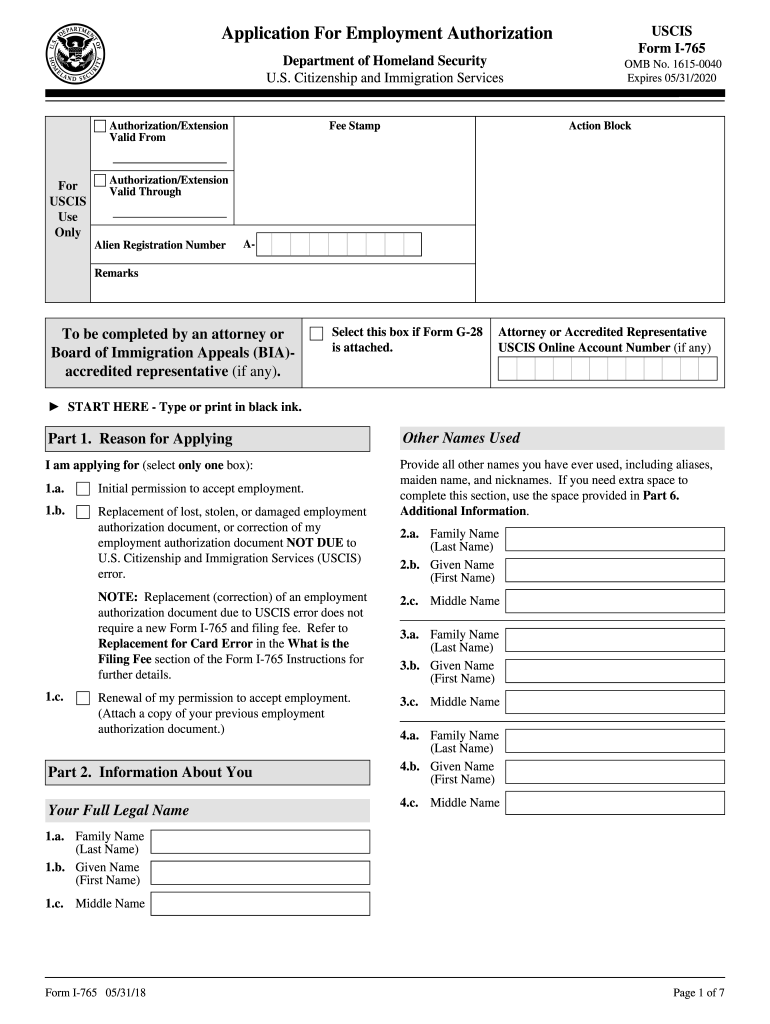
The USCIS I-765 form, also known as the Application for Employment Authorization, is a crucial document for individuals seeking permission to work in the United States. This guide provides clear and detailed instructions on how to complete this form online, ensuring that users have the assistance they need throughout the process.
Follow the steps to fill out the I-765 form accurately.
- Press the ‘Get Form’ button to obtain the I-765 form and open it in your editing tool.
- Begin by completing Part 1, which asks for your reason for applying. Select only one box from the options: initial permission to accept employment, replacement of a lost document, or renewal.
- In Part 2, fill out your full legal name as it appears on your official documents. Provide any other names you have used in this section as well.
- Input your Social Security number if you have one. Indicate whether you want the Social Security Administration (SSA) to issue you a card.
- Complete your U.S. mailing address and confirm if your current mailing address is the same as your physical address.
- Provide information about your eligibility category in Item 27. Ensure you refer to the USCIS guidelines to select the correct category.
- Fill out the information regarding your last arrival in the United States, including the date and immigration status at that time.
- In Part 3, complete the applicant's declaration and provide your signature along with the date.
- If applicable, provide information regarding the interpreter and preparer following Parts 4 and 5.
- Use Part 6 for any additional information if needed. If extra space is required, make copies of this page.
- At the final step, review your completed form before saving changes. You can save, download, print, or share the form as necessary.
Start the process of filling out your I-765 form online today.
Experience a faster way to fill out and sign forms on the web. Access the most extensive library of templates available.
Related content
Form I-765 is an application for employment authorization, used for initial permission...
START HERE - Type or print in black ink. Answer all questions fully and accurately. If a...
Jan 17, 2017 — This petition is being filed for: (Select only one box):. An alien of...
Get answers to your most pressing questions about US Legal Forms API.
How do I know if my I-765 is approved?
To find out if your I-765 has been approved, visit the USCIS website and use their online case status tool. By entering your receipt number, you can quickly confirm your application's status. Additionally, USCIS sends approval notifications by mail, so keep an eye on your mailbox for any updates regarding your employment authorization.
What happens after I-765 is approved for a green card?
Once your USCIS I-765 is approved and you have received your EAD, you can legally work in the United States. Following this approval, you may proceed with your green card application process, if applicable. The EAD provides you a legal work authorization while you await your permanent resident status, a critical step towards securing your future in the U.S.
How long does it take to get approved for the I-765?
The approval time for the I-765 form generally ranges between 3 to 6 months, but it can vary significantly based on individual circumstances and processing conditions at USCIS. Factors such as application volume and completeness may affect the timeline. For better tracking, applicants should utilize the USCIS online tools to check their application status.
What is USCIS form I-765?
The USCIS form I-765 is an application for employment authorization that allows eligible individuals to request the right to work in the United States. This form is crucial for those who have pending applications for certain immigration benefits, such as asylum or adjustment of status. By submitting the I-765, individuals can receive an EAD, helping them gain legal employment while they await their immigration status decision.
How long does it take for I-765 to get approved?
The processing time for the USCIS I-765 form can vary based on several factors, including the workload of the USCIS office handling your application. Typically, approval may take anywhere from 3 to 6 months, but it can take longer during peak times. It's advisable to regularly check the USCIS website for current processing times to stay informed.
Can I start working with an I-765 approval notice?
Yes, you can begin working once you receive your I-765 approval notice, also known as an Employment Authorization Document (EAD). This document serves as proof of your legal right to work in the United States. However, ensure that you also have the physical card in hand before starting any employment to avoid potential complications.
How do you know if I-765 is approved?
To determine if your USCIS I-765 is approved, check your application status online using the receipt number provided by USCIS. You will receive notification by mail if your application is approved. If you are concerned about the status or need additional assistance, services like UsLegalForms can guide you through the tracking process and help ensure you are updated on your application.
How long does an I-765 take to get approved?
The approval time for the USCIS I-765 can vary significantly depending on several factors, including the complexity of your application and the current processing times at USCIS. Typically, applicants may wait anywhere from 3 to 6 months for a decision. It's crucial to monitor your application status through the USCIS website to stay informed. Using platforms like UsLegalForms can help streamline the process and reduce potential delays.
Can form I-765 be filed online?
Yes, you can file your USCIS I-765 form online through the USCIS website if you meet certain eligibility criteria. Online filing provides a convenient way to submit your application and track its status in real-time. Additionally, using USLegalForms can help you navigate the online process with ease and ensure all information is provided correctly. Always confirm that you meet the requirements for online submission before proceeding.
How to file for form I-765?
To file for form USCIS I-765, start by gathering the necessary documents, such as your identification and evidence supporting your eligibility. Next, complete the form accurately, ensuring all information is clear and correct. You can submit your USCIS I-765 application by mail, or use platforms like USLegalForms for guidance. Be sure to check for updates on fees and processing times before submitting your application.
Use professional pre-built templates to fill in and sign documents online faster. Get access to thousands of forms.
If you believe that this page should be taken down, please follow our DMCA take down process here.
This form is available in several versions. Select the version you need from the drop-down list below.