Loading
Get Vfc Return Form - Vdh Virginia
How it works
-

Open form follow the instructions
-

Easily sign the form with your finger
-

Send filled & signed form or save
How to fill out the VFC Return Form - Vdh Virginia online
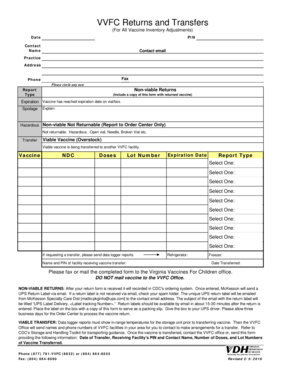
Completing the VFC Return Form is essential for managing vaccine inventory adjustments effectively. This guide provides a step-by-step approach to filling out the form online, ensuring that users have all the necessary information at their fingertips.
Follow the steps to complete the VFC Return Form online.
- Click ‘Get Form’ button to obtain the form and open it in the editor.
- Fill in the date by entering the current date in the designated field. This helps track when the report is being made.
- Provide your PIN number in the corresponding field. This is essential for identifying your practice within the system.
- Enter the contact name for the submission, ensuring that the person responsible for this return is clearly named.
- Input the contact email address to receive any necessary communications regarding your form submission.
- Complete the practice address section, including street, city, state, and zip code, to identify where the vaccines originated.
- Provide the phone number and fax number of your practice to ensure effective communication.
- Circle the applicable report type based on the reason for the return or transfer, such as Non-viable Returns or Viable Vaccine Transfer.
- For non-viable returns, include a clear explanation in the space provided, detailing the reason for the return.
- If applicable, list the details of the vaccine including NDC, doses, lot number, and expiration date in the specified sections.
- If transferring viable vaccine, ensure that data logger reports are ready to be submitted along with the form.
- Indicate the name and PIN of the facility that will receive the vaccine transfer.
- Enter the date the vaccine is transferred.
- Once all sections are completed, save the changes made to the form. Download, print, or share the completed form as necessary.
- Ensure to fax or mail the completed form to the Virginia Vaccines For Children office as per the instructions.
Start completing the VFC Return Form online today to ensure smooth vaccine return and transfer processes.
If expired vaccine is inadvertently is administered, it is considered a vaccine administration error and requires remediation including a VAERS report, contacting the recipient to inform them of the error, and may or may not require revaccination based on the manufacturers' guidance.