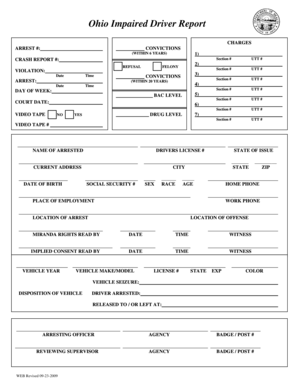
Ohio Impaired Driver Report ARREST #: CRASH REPORT #: VIOLATION: Date Time ARREST: Date Time DAY OF WEEK: COURT DATE:.
Loading
Open form follow the instructions
Easily sign the form with your finger
Send filled & signed form or save
How to fill out the Ohio Impaired Driver Report - Odh Ohio online
Filling out the Ohio Impaired Driver Report - Odh Ohio online is a crucial step in documenting incidents related to impaired driving. This guide provides clear, step-by-step instructions to help users navigate the form effectively, ensuring a thorough and accurate submission.
Follow the steps to complete the form with confidence.
- Click ‘Get Form’ button to obtain the form and open it in the editor.
- Begin by entering the 'charges' section. Input the arrest number and fill in any convictions within the past six years.
- Provide details for the crash report number, if applicable. Indicate whether there was a refusal and identify the related violations, including date and time.
- Complete the 'convictions' section for any violations within the past 20 years, as well as the day of the week and blood alcohol concentration (BAC) level relevant to the report.
- Document the name, driver's license number, current address, date of birth, social security number, sex, race, state of issue, and age of the individual being reported.
- Fill in the details of the arrest, such as the location, the arresting officer, and associated agencies with any necessary badge or post numbers.
- Provide a detailed statement of facts observed by the officer, including chemical test information and the results.
- Input information gathered from the interview regarding the individual's activities, consumption of alcohol or drugs, and any medical conditions.
- Conclude by reviewing all entered information for accuracy, ensuring you have covered all necessary fields. Save changes, and consider downloading or printing the finalized document for your records.
Take the first step in completing your documents online effectively.
Experience a faster way to fill out and sign forms on the web. Access the most extensive library of templates available.
Related content
A catalog of Ohio Department of Health program forms. ... Revised Adult Cardiac Cath Level...
The Ohio Department of Health contracted with the Health Policy Institute of Ohio (HPIO)...
typically result from problems with the clock driver or with the reference system clock at...
Get answers to your most pressing questions about US Legal Forms API.
How do I interconnect Excel spreadsheets?
Select the cell or cells where you want to create the external reference. Type = (equal sign). Switch to the source workbook, and then click the worksheet that contains the cells that you want to link. Press F3, select the name that you want to link to and press Enter.
How do I make an Excel spreadsheet update automatically?
Automatically refresh data at regular intervals Click a cell in the external data range. On the Data tab, in the Connections group, click Refresh All, and then click Connection Properties. Click the Usage tab. Select the Refresh every check box, and then enter the number of minutes between each refresh operation.
How do I automatically sync data from one spreadsheet to another?
How to automatically update one Excel worksheet from another sheet Open your worksheets. First, open both spreadsheets that you want to connect. ... Select data from your source worksheet. ... Copy the formula. ... Click the corresponding area of the new sheet. ... Enter the link. ... Add criteria. ... Set update intervals. ... Save the workbook.
Can you automatically pull data from one Excel sheet to another?
From Excel (or any spreadsheet app), open or create a new sheet. Select the cell you want to pull data into. Type = immediately followed by the name of your source sheet, an exclamation mark, and the name of the cell being copied.
How do I link data from Sheet1 to Sheet2 in Excel?
0:46 3:43 Link Data Between Worksheets in a Workbook in Excel - YouTube YouTube Start of suggested clip End of suggested clip Now. We've got the data from sheet 1 cell a1. So we can't continue this equals go to where the dataMoreNow. We've got the data from sheet 1 cell a1. So we can't continue this equals go to where the data is located. Click the cell we want hit enter.
How do I merge and match data in Excel?
How to use Merge Two Tables for Excel Start Merge Tables. Step 1: Select your main table. Step 2: Pick your lookup table. Step 3: Select matching columns. Step 4: Choose the columns to update in your main table. Step 5: Pick the columns to add to your main table. Step 6: Choose additional merging options.
How to combine all sheets data in one sheet in Google Sheets?
3 quickest ways to merge multiple Google sheets Select sheets or entire spreadsheets to merge and specify the ranges if necessary. ... Choose how to pull the data: ... Decide where to place the merged table: new spreadsheet, new sheet, or in a location of your choice.
How do you get data from other sheets in your spreadsheet automatically?
Get data from other sheets in your spreadsheet Select a cell. Type = followed by the sheet name, an exclamation point, and the cell being copied. For example, =Sheet1! A1 or ='Sheet number two'!
Use professional pre-built templates to fill in and sign documents online faster. Get access to thousands of forms.
If you believe that this page should be taken down, please follow our DMCA take down process here.