Loading
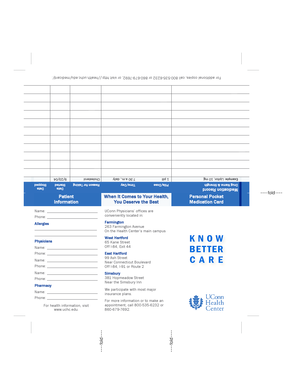
Get Personal Pocket Medication Card
How it works
-

Open form follow the instructions
-

Easily sign the form with your finger
-

Send filled & signed form or save
How to fill out the Personal Pocket Medication Card online
The Personal Pocket Medication Card is an essential tool for keeping track of your medications and relevant health information. This guide provides clear, step-by-step instructions to help you fill out the card online efficiently and accurately.
Follow the steps to complete your Personal Pocket Medication Card.
- Press the ‘Get Form’ button to access the form and load it in your editing interface.
- Begin filling out the 'Patient Information' section by providing your name and phone number. Ensure this information is accurate to facilitate communication regarding your health.
- In the 'Medication Record' section, list each medication you are currently taking. For each entry, specify the drug name and strength, as well as the dosage and frequency — for example, ', 10 mg, 1 pill, 7:30 a.m., daily.'
- For each medication, include the start date and, if applicable, the stop date. This will help healthcare providers understand your medication history.
- Fill out the 'Allergies' section with any known allergies. This information is vital for ensuring safe and effective treatment.
- Complete the 'Pharmacy' section with the name and phone number of your pharmacy, as well as any relevant details about your preferred pharmacy location.
- If applicable, include details regarding your healthcare providers by providing their names and contact numbers in the designated fields.
- Once you have completed all sections of the form, review your entries for accuracy and clarity. Make any necessary corrections.
- Finally, save your changes. You may also download, print, or share the completed form for your records or to provide to your healthcare providers.
Take the next step in managing your health by filling out the Personal Pocket Medication Card online today.
The Medication Matters card can help you keep an up-to-date personal emergency health record, which is vital in the event of a medical emergency. * List everything you take, including prescription drugs and doses, over-the-counter products, dietary supplements, herbal remedies, eye drops, inhalers, and oxygen.