Loading
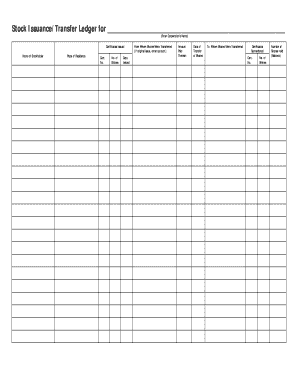
Get Stock Issuance/transfer Ledger
How it works
-

Open form follow the instructions
-

Easily sign the form with your finger
-

Send filled & signed form or save
How to fill out the Stock Issuance/Transfer Ledger online
The Stock Issuance/Transfer Ledger is a crucial document used to track the issuance and transfer of shares within a corporation. This guide provides clear, step-by-step instructions to help users fill out the form accurately and efficiently online.
Follow the steps to complete your Stock Issuance/Transfer Ledger online.
- Click ‘Get Form’ button to obtain the form and open it in the editor.
- Enter the corporation's name in the designated field at the top of the form. This should accurately reflect the legal name of the corporation that is issuing or transferring shares.
- In the 'Certificates Issued' section, begin with the 'Name of Stockholder'. Fill in the full name of the person or entity holding the shares.
- Next, provide the 'Place of Residence' for the stockholder. This should include the street address, city, state, and zip code.
- In the 'Cert. No.' field, input the certificate number assigned to the stockholder’s share certificate.
- In the 'No. of Shares' column, enter the total number of shares that are issued to the stockholder.
- Provide the 'Date Issued' which is the date on which the shares were officially issued to the stockholder.
- If the shares were transferred from another party, fill in the 'From Whom Shares Were Transferred' section, entering the name of the previous holder or indicating 'original issue' if applicable.
- In the 'Amount Paid Thereon' field, specify the amount that was paid for the shares, which should correspond to the number of shares issued.
- Enter the 'Date of Transfer of Shares' when the transaction occurred if applicable.
- In the 'To Whom Shares Were Transferred' section, state the name of the person or entity receiving the shares.
- For any shares surrendered, fill in the corresponding 'Certificates Surrendered' section by providing the certificate number and the number of shares being returned.
- Finally, in the 'Number of Shares Held (Balance)' section, indicate the total shares still held by the stockholder after the transaction is completed.
- Once all sections have been filled out, review the form for accuracy. Then, save the changes, download the document, print it for your records, or share it as needed.
Complete your Stock Issuance/Transfer Ledger online today!
Related links form
A stock ledger is a record that contains detailed information about the stock ownership and transactions within a company. It provides a comprehensive overview of who owns shares, when they were acquired, and any transfers that take place. Maintaining an accurate stock issuance/transfer ledger is essential for compliance and transparency in managing corporate ownership.