Loading
Form preview
  • US Legal Forms
  • Other Templates
  • More Forms
  • More Uncategorized Forms
  • Unit 1 Students Name Multilevel Grammar Worksheet Date

Get Unit 1 Students Name Multilevel Grammar Worksheet Date

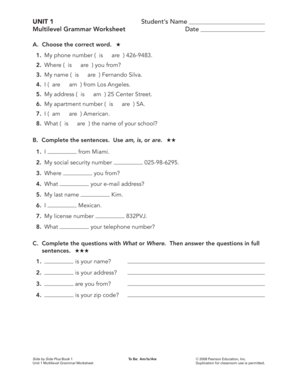
UNIT 1 Multilevel Grammar Worksheet Students Name Date A. Choose the correct word. 1. My phone number ( is 2. Where ( is are ) you from? 3. My name ( is 4. I ( are are ) 4269483. are ) Fernando Silva.

How it works

  1. Open form

    Open form follow the instructions

  2. Easily sign form

    Easily sign the form with your finger

  3. Share form

    Send filled & signed form or save

How to fill out the UNIT 1 Students Name Multilevel Grammar Worksheet Date online

Filling out the UNIT 1 Students Name Multilevel Grammar Worksheet Date online can be a straightforward process if you follow the right steps. This guide provides clear, step-by-step instructions to help you complete the worksheet accurately.

Follow the steps to successfully complete your worksheet.

  1. Click the ‘Get Form’ button to access the UNIT 1 Students Name Multilevel Grammar Worksheet Date. This action allows you to retrieve the form and open it within the online editor.
  2. In the designated field, enter your name as it should appear on the form. Be sure to use the correct spelling and format.
  3. Next, input the date in the appropriate field. Use the format requested by the form, typically MM/DD/YYYY.
  4. Proceed to section A. For each item, carefully select or fill in the correct word based on the grammar prompts. Ensure you choose am, is, or are accurately.
  5. Move to section B, where you will complete the sentences with am, is, or are. Read each prompt closely and fill in the blanks.
  6. In section C, answer the questions by completing them with What or Where. Then, provide full sentences as your answers.
  7. Once you have completed all sections, review your entries for accuracy and completeness.
  8. Finally, save your changes. You can choose to download, print, or share the completed form as required.

Start filling out your UNIT 1 Students Name Multilevel Grammar Worksheet Date online today!

Get form

Experience a faster way to fill out and sign forms on the web. Access the most extensive library of templates available.
Get form

Related content

Nov 92 - ERIC
Aug 1, 2013 — PUB DATE. CONTRACT ... sheet about TEFL/TESL teaching at their site...
Learn more
ESL Multi-Level/Communication at School/CBET 1...
Feb 26, 2020 — Teacher Feedback Form. 19‐21. Appendix. CBET Multilevel Communication...
Learn more
Linguistics - Wikipedia
Linguistics is the scientific study of language. It involves an analysis of language form...
Learn more

Related links form

FR Rendita 126436 Form 2012 Frank and Bill's Auto Collision Center Authorization to Release Vehicle Franklin Academy Gobble Gram Franklin Regional Hockey Club Registration Packet 2014

Questions & Answers

Get answers to your most pressing questions about US Legal Forms API.

Contact support

Rule 46 (b) of the CGST Rules 2017 suggests that a tax invoice should have 16 character alpha-numeric invoice number which is unique for a financial year. This draws attention, now that we are entering the new Financial Year, 2023-2024.

However, if you change your invoice number series, you should be sure that you don't repeat or exclude any numbers. This means that if your last invoice number was '023', your next invoice number must include '024' – for example '21/INV/024' or '2021-024'.

How to create an invoice number numbering your invoices sequentially, for example, INV00001, INV00002. starting with a unique customer code, for example, XER00001. including the date at the start of your invoice number, for example, 2023-01-001. combining the customer code and date, for example, XER-2023-01-001.

Duplicate invoice numbers are a common and costly mistake that can affect your cash flow, reputation, and compliance. In this article, you will learn what causes duplicate invoice numbers, what risks they pose, and how you can avoid them with some simple tips and tools.

Here are the steps to create an invoice number automatically in excel: Create Your Invoice in Excel. Note the Cell Where Your Invoice Number Is. Select ALT + F11. Double-Click “This Workbook” Revise, Copy and Paste This Code. Adjust Your Macro Settings. Save Document as Macro-Enabled. Restart Your Computer.

Chronological Invoice Numbering The first series of numbers is the date, the second series of numbers is the customer number and the third series of numbers is the sequential unique identifier for the invoice. If you generate a second invoice on that date for that customer, the invoice number will be 20170630-4072-01.

Make each invoice number unique to avoid confusion. Duplicate invoice numbers may get misfiled, discarded or processed multiple times. For example, if you start your invoice numbering with 0001, avoid starting over with the same number the following month or year.

If a company creates an invoice with a number that has already been used, they get an error, and to proceed they must change the invoice number. However, it is possible to have documents that have the same number if they are not sent (drafts).

Get This Form Now!

Use professional pre-built templates to fill in and sign documents online faster. Get access to thousands of forms.
Get form
If you believe that this page should be taken down, please follow our DMCA take down processhere.
Get UNIT 1 Students Name Multilevel Grammar Worksheet Date
Get form
  • Adoption
  • Bankruptcy
  • Contractors
  • Divorce
  • Home Sales
  • Employment
  • Identity Theft
  • Incorporation
  • Landlord Tenant
  • Living Trust
  • Name Change
  • Personal Planning
  • Small Business
  • Wills & Estates
  • Packages A-Z
  • Affidavits
  • Bankruptcy
  • Bill of Sale
  • Corporate - LLC
  • Divorce
  • Employment
  • Identity Theft
  • Internet Technology
  • Landlord Tenant
  • Living Wills
  • Name Change
  • Power of Attorney
  • Real Estate
  • Small Estates
  • Wills
  • All Forms
  • Forms A-Z
  • Other Templates
  • Legal Hub
  • About Us
  • Help Portal
  • Legal Resources
  • Blog
  • Affiliates
  • Contact Us
  • Delete My Account
  • Site Map
  • Industries
  • Forms in Spanish
  • Localized Forms
  • State-specific Forms
  • Forms Kit
  • Real Estate Handbook
  • All Guides
  • Notarize
  • Incorporation services
  • For Consumers
  • For Small Business
  • For Attorneys
  • USLegal
  • FormsPass
  • pdfFiller
  • signNow
  • altaFlow
  • DocHub
  • Instapage
Form Packages
  • Adoption
  • Bankruptcy
  • Contractors
  • Divorce
  • Home Sales
  • Employment
  • Identity Theft
  • Incorporation
  • Landlord Tenant
  • Living Trust
  • Name Change
  • Personal Planning
  • Small Business
  • Wills & Estates
  • Packages A-Z
Form Categories
  • Affidavits
  • Bankruptcy
  • Bill of Sale
  • Corporate - LLC
  • Divorce
  • Employment
  • Identity Theft
  • Internet Technology
  • Landlord Tenant
  • Living Wills
  • Name Change
  • Power of Attorney
  • Real Estate
  • Small Estates
  • Wills
  • All Forms
  • Forms A-Z
  • Other Templates
Customer Service
  • Legal Hub
  • About Us
  • Help Portal
  • Legal Resources
  • Blog
  • Affiliates
  • Contact Us
  • Delete My Account
  • Site Map
  • Industries
  • Forms in Spanish
  • Localized Forms
  • State-specific Forms
  • Forms Kit
Legal Guides
  • Real Estate Handbook
  • All Guides
Prepared for you
  • Notarize
  • Incorporation services
Our Customers
  • For Consumers
  • For Small Business
  • For Attorneys
Our Sites
  • USLegal
  • FormsPass
  • pdfFiller
  • signNow
  • altaFlow
  • DocHub
  • Instapage
Social Media
Call us now toll free:
+1 833 426 79 33
As seen in:
© Copyright 1999-2026 airSlate Legal Forms, Inc. 17 Station Street, Suite 303, Brookline, MA 02445
  • Your Privacy Choices
  • Terms of Service
  • Privacy Notice
  • Content Takedown Policy
  • Bug Bounty Program