Loading
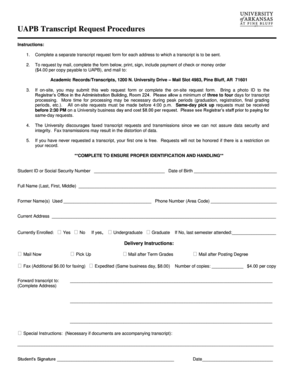
Get Uapb Transcript Request Procedures - Uapb
How it works
-

Open form follow the instructions
-

Easily sign the form with your finger
-

Send filled & signed form or save
How to fill out the UAPB Transcript Request Procedures online
This guide provides a step-by-step approach for completing the UAPB Transcript Request Procedures online. It is designed to assist users in accurately filling out the form to ensure their transcript requests are efficiently processed.
Follow the steps to complete your transcript request online.
- Click the ‘Get Form’ button to access the transcript request form and open it for editing.
- Complete a separate transcript request form for each address to which you wish to send a transcript. Ensure that all necessary information is filled out accurately.
- Enter your Student ID or Social Security Number and your Date of Birth to confirm your identity.
- Provide your Full Name, including Last, First, and Middle names. If applicable, include any Former Names used.
- Fill in your Phone Number, specifying the Area Code, and Current Address to facilitate communication regarding your request.
- Indicate whether you are currently enrolled by selecting 'Yes' or 'No.' If yes, specify whether you are an Undergraduate or Graduate student.
- If not currently enrolled, provide the last semester you attended.
- Choose your Delivery Instructions, such as 'Mail Now,' 'Pick Up,' 'Fax,' or specify an address for forwarding. Indicate whether you need your transcript mailed after term grades or after posting your degree.
- Specify the Number of copies you are requesting, being aware of the fee of $4.00 per copy.
- If you have special instructions or if documents are to accompany your transcript, describe them in the designated area.
- Sign the form, providing your Student’s Signature and Date to certify your request.
- Once all sections are completed, save your changes. You can then download, print, or share the filled-out form as necessary for submission.
Start filling out your transcript request form online today to ensure timely processing.
The Office of Admissions accepts transcripts through a variety of services, including Triand, Parchment, eScript, and Clearinghouse. You can also send high school transcripts directly to the office by email to uofa@uark.edu, or fax to 479-575-7515.