Al) Read the Form N-400 Instructions before you decide whether or not you would like to legally change your name. Yes Would you like to legally change your name? No If you answered ''Yes," type or print the new name you would like to use in the spaces provided below. Family Name (Last Name) 5. Given Name (First Name) U.S. Social Security Number (if applicable) 6. USCIS Online Account Number (if any) ► ► 7. Middle Name (if applicable) 8. Gender Male Female 9. Date of Birth (mm/.
Loading

Open form follow the instructions

Easily sign the form with your finger

Send filled & signed form or save
How to fill out the USCIS N-400 online
This guide provides clear and comprehensive instructions for individuals looking to complete the USCIS Form N-400, Application for Naturalization, online. Users can follow this step-by-step approach to ensure that they provide all necessary information accurately and efficiently.
Follow the steps to fill out your USCIS N-400 online successfully:
- Press the ‘Get Form’ button to access the form and open it for completion.
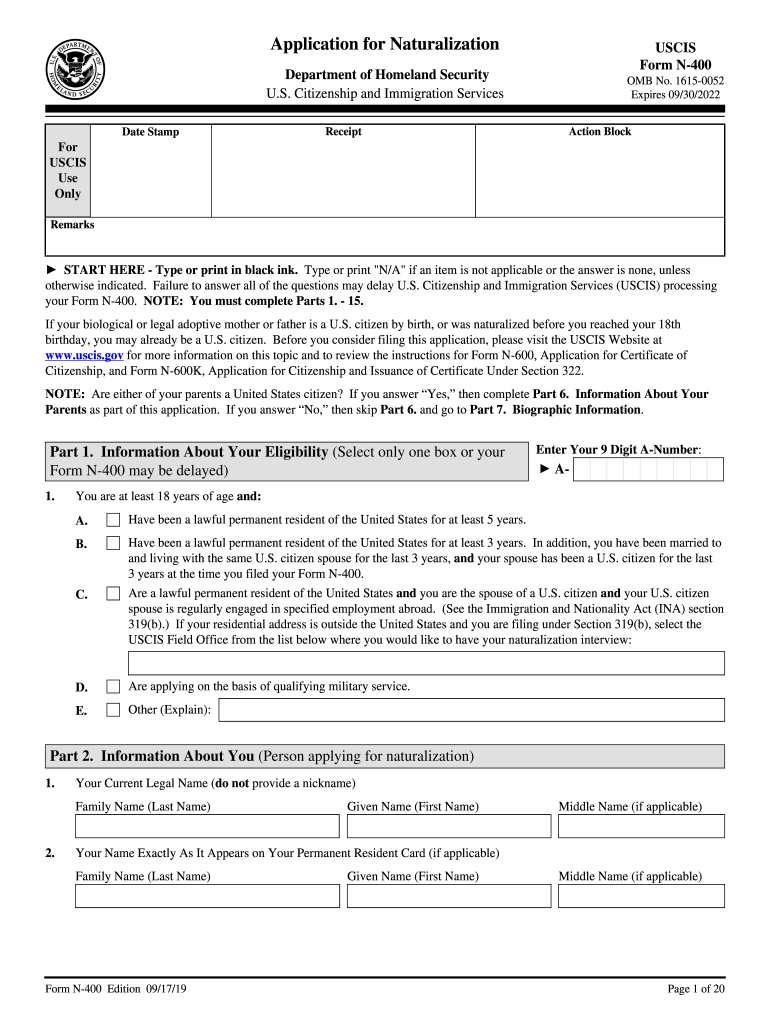
- Complete Part 1 by selecting your eligibility criteria for naturalization. Make sure to enter your 9-digit A-Number in the designated field.
- Fill out Part 2 with your current legal name, details about previous names, social security number, and USCIS online account number, if applicable.
- When prompted in Part 3, indicate if you require accommodations due to disabilities. Provide specific details if applicable.
- In Part 4, provide your contact information including your daytime, evening, and mobile telephone numbers, along with your email address.
- Detail your residence history in Part 5, listing all addresses where you have lived during the last five years.
- If applicable, complete Part 6 to provide information about your parents, including their citizenship status.
- Fill out Part 7 with your biographic information including ethnicity, race, height, weight, and hair color.
- In Part 8, input details regarding your employment or schooling in the last five years.
- Provide information about travel outside the United States in Part 9, including the duration and countries visited.
- Complete Part 10 with your marital history and information about your spouse, if married.
- List your children’s information in Part 11, covering all biological and legally adopted children.
- Answer additional questions regarding personal history in Part 12, ensuring to provide explanations for any affirmative responses.
- Submit your applicant statement in Part 13, confirming the accuracy of your information and signing where required.
- If you had assistance with the form, complete Part 14 and 15 providing interpreter or preparer information.
- Once all parts are completed, review your entries for accuracy, and save the form by downloading or printing it for your records.
Begin filling out your USCIS N-400 online today for a smoother application experience!
Experience a faster way to fill out and sign forms on the web. Access the most extensive library of templates available.
Related content
Form N-400 is an Application for Naturalization, used to apply for US citizenship. If your...
N-400, Application for Naturalization. Family Based Forms. I-129F, Petition for Alien...
The key concepts in Form N-400 are: Naming Conventions, Addresses, Family Relationships...
Get answers to your most pressing questions about US Legal Forms API.
Do I need to send photographs with my N-400 application?
Yes, you must include passport-style photographs with your USCIS N-400 application. Typically, you need to submit two identical photographs that meet the specific requirements set by USCIS. Including these photographs correctly is important, as they are part of the identity verification process for your citizenship journey.
What tax documents do I need for N-400?
For the USCIS N-400 application, you must include tax documents to establish your compliance with U.S. tax laws. Be prepared to submit copies of your tax returns for the past five years or proof of filing taxes if you are required to do so. This documentation demonstrates your commitment to fulfilling your obligations as a resident and is a critical part of the application process.
What documents do I need to submit with N-400?
Submitting the correct documents with your USCIS N-400 application is crucial for a successful application. You will need to provide copies of your Permanent Resident Card, passport-style photographs, and documentation proving your residency and marital status, if applicable. Ensuring you have all necessary documents will help the USCIS process your application efficiently.
How many documents should you bring with you to your Form N-400 interview?
When you attend your Form N-400 interview, it is essential to bring several key documents. You should carry your Permanent Resident Card, your state-issued ID, and any additional evidence that supports your eligibility for citizenship. Having these documents organized and ready will make the process smoother and demonstrate your preparedness for the USCIS N-400 interview.
Can Form N-400 be filed online?
Yes, Form N-400 can indeed be filed online through the USCIS website. This option streamlines the application process and helps you avoid common mailing issues. When you file online, you can also manage your application easily by uploading supporting documents and checking your application status at any time. If you need assistance with the online filing, platforms like US Legal Forms can guide you through each step of submitting your USCIS N-400 efficiently.
Is it better to file N-400 online or by mail?
Filing your USCIS N-400 online generally offers several advantages over mailing a paper application. When you choose to apply online, you receive instant confirmation of your submission, reducing anxiety about application delivery. Moreover, online applications often experience faster processing times, allowing you to proceed to your naturalization interview sooner. Consider these benefits when deciding whether to file your N-400 online or by mail.
Can you file Form N-400 electronically?
Yes, you can file Form N-400 electronically through the USCIS website. Using the online system simplifies the application process and allows you to track your application status in real time. Additionally, electronic filing often results in quicker processing times compared to paper submissions. If you are comfortable with technology, electronic filing can be a great option for submitting your USCIS N-400 application.
Can you apply for naturalization on your own?
Yes, you can apply for naturalization by yourself using the USCIS N-400 form. Many individuals find success in managing their own application process. However, if you encounter barriers or need expert assistance, uslegalforms offers resources to simplify your application, ensuring you meet all the requirements.
What evidence do I need to submit with N-400?
When submitting your USCIS N-400 application, you will need to provide specific evidence to support your case. This may include documents like your permanent resident card, proof of residence, and evidence of good moral character. Providing thorough documentation can strengthen your application and help the review process go smoothly.
Can I file my own N-400?
Certainly, you have the option to file your own USCIS N-400 application. This approach is common and allows you to manage your own timeline and documents. Just be sure to follow the instructions carefully and check all your forms for accuracy. If you have concerns, consider platforms like uslegalforms to access reliable resources and guidance.
Use professional pre-built templates to fill in and sign documents online faster. Get access to thousands of forms.
If you believe that this page should be taken down, please follow our DMCA take down process here.