Loading
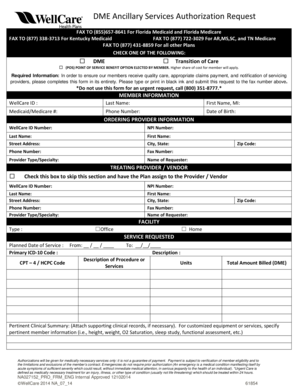
Get Dme Ancillary Services Authorization Request
How it works
-

Open form follow the instructions
-

Easily sign the form with your finger
-

Send filled & signed form or save
How to fill out the DME Ancillary Services Authorization Request online
Completing the DME Ancillary Services Authorization Request is essential to ensure that members receive appropriate services and that claims are processed smoothly. This guide will provide you with clear, step-by-step instructions on how to fill out the form effectively online.
Follow the steps to complete the authorization request form accurately.
- Click ‘Get Form’ button to obtain the DME Ancillary Services Authorization Request form and open it in your preferred editor.
- In the member information section, enter the required details including the WellCare ID, last name, first name, Medicaid or Medicare number, phone number, and date of birth.
- Proceed to the ordering provider information section. Fill in the WellCare ID number, NPI number, last name, first name, street address, city, state, phone number, fax number, provider type or specialty, name of requester, and zip code.
- If applicable, complete the treating provider/vendor section. You can check the box to skip this section and have the Plan assign a provider/vendor, or fill in the details as needed.
- Select the type of facility where services will be provided, choosing either 'Office' or 'Home'.
- In the service requested section, fill out the planned date of service, primary ICD-10 code, CPT-4 or HCPC code, and descriptions of the requested procedure or services, including units if necessary.
- Provide a total amount billed for DME and include a pertinent clinical summary. Attach any supporting clinical records if necessary and include specific member information for customized equipment or services.
- Review all entries for accuracy before finalizing the form. Once satisfied, you can save changes, download the form, print it, or share it as needed.
Complete your DME Ancillary Services Authorization Request online today to ensure timely and appropriate care.
edit the Y-range to include the remaining columns too, for example, change $B3:$N3 to $B3:$W3 . Press <RET> . Your first graph should now show all data points. repeat this for all other graphs (X might be automatically ok, but Y needs to be adjusted.
Industry-leading security and compliance
US Legal Forms protects your data by complying with industry-specific security standards.
-
In businnes since 199725+ years providing professional legal documents.
-
Accredited businessGuarantees that a business meets BBB accreditation standards in the US and Canada.
-
Secured by BraintreeValidated Level 1 PCI DSS compliant payment gateway that accepts most major credit and debit card brands from across the globe.