Loading
Form preview
  • US Legal Forms
  • Form Library
  • Foreign Forms
  • Foreign Philippines Other Forms
  • Pag Ibag Members Data Form 2013

Get Pag Ibag Members Data Form 2013-2026

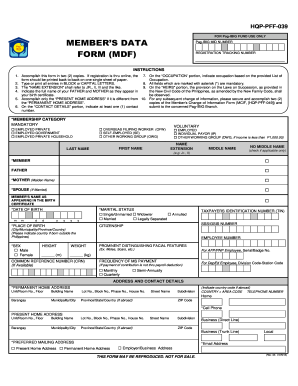
PREFERRED MAILING ADDRESS Present Home Address Local *Email Address Permanent Home Address Employer/Business Address THIS FORM MAY BE REPRODUCED. NOT FOR SALE. (Rev. 02, 01/2013) PRESENT EMPLOYMENT DETAILS (If with more than one (1) employer, use separate sheet and follow format below) *EMPLOYER/BUSINESS NAME MONTHLY INCOME Basic + *EMPLOYER/BUSINESS ADDRESS Unit/Room No., Floor Allowances/Others Building Name Lot No., Block No., Phase No. House No. = Total Mo. Income Street Name .

How it works

  1. Open form

    Open form follow the instructions

  2. Easily sign form

    Easily sign the form with your finger

  3. Share form

    Send filled & signed form or save

How to fill out the pag ibag members data form online

Filling out the pag ibag members data form online is a straightforward process that requires careful attention to detail. This guide will provide you with clear and concise instructions to ensure your form is completed accurately.

Follow the steps to successfully complete the form

  1. Click ‘Get Form’ button to access the pag ibag members data form and open it in the editing interface.
  2. Begin by completing the 'Name' section. Ensure to include your full name as it appears in legal documents, with any applicable name extensions such as JR., II, or III.
  3. Fill in your 'Date of Birth' in the specified format. Verify that it is correct to maintain consistency with your identification documents.
  4. Provide your 'Address and Contact Details.' Include both your permanent and present home addresses if they differ. Ensure that you also include at least one contact number and an email address.
  5. In the 'Membership Category' section, select the category that best describes your current employment status—options include employed private, employed government, overseas Filipino worker, and more.
  6. Complete the 'Present Employment Details' section, including your employer's name, business address, and details regarding your occupation, employment status, and income.
  7. If applicable, provide information about previous employment using the designated fields. You may need to add additional sheets if you have had multiple employers.
  8. Fill out the 'Heirs' section, which is necessary in case of any future benefits distribution. Include details of your heirs.
  9. Review all sections of the form to ensure completeness and accuracy. Remember that fields marked with an asterisk (*) are mandatory.
  10. Once you have filled out the form, you can save changes, download a copy, print it, or share it as needed.

Complete your pag ibag members data form online today to ensure proper registration and access to benefits.

Get form

Experience a faster way to fill out and sign forms on the web. Access the most extensive library of templates available.
Get form

Related content

USAID Development Assistance Specialist (Project...
membership to Philippine Social Security System, PhilHealth and Home Development. Mutual...
Learn more
M-009-020-001 Hiring Policy MAY ...
4.11.6​ Pag-IBIG Member's Data Form (Pag-IBIG Fund M1-2). 4.11.7​ Pag-IBIG Member's...
Learn more
1623648320-2016-sec17a
PDF 1623648320-2016-sec17a. COVER SHEET 2 0 5 7 3 SEC Registration Number ME T R O P O L I...
Learn more

Related links form

Employee Action Request Form Catofashions Com Online 2020 Lesson 4 Extra Practice Proportional And Nonproportional Relationships Answer Key 2020 Army Verification

Questions & Answers

Get answers to your most pressing questions about US Legal Forms API.

Contact support

To update your MDF form in Pag-IBIG, first, download the latest version of the Members Data Form from their website. Complete the form with accurate information and submit it at a Pag-IBIG branch or via online submission if available. This process guarantees your details are up-to-date, helping you enjoy all benefits associated with your Pag-IBIG membership.

Yes, you can retrieve your Pag-IBIG member data form online by visiting the official Pag-IBIG website. They provide an option for members to download their Members Data Form securely from their portal. Taking this step ensures that your information remains up-to-date and accessible when needed.

To update your Members Data Form in Pag-IBIG, you will need to fill out the MDF with your new information. You can submit this updated form either online or at your nearest Pag-IBIG branch. Remember, keeping your data current is vital to access the benefits and services offered by Pag-IBIG smoothly.

You can easily access your Pag-IBIG MDF form online through the official Pag-IBIG website. Look for the section dedicated to members, where you’ll find the Members Data Form available for download. By using this convenient method, you can ensure that your membership details are correctly documented without needing to visit a branch.

Retrieving your Pag-IBIG membership involves verifying your information, which can be accomplished by visiting the Pag-IBIG website or contacting their customer service. You may need to provide personal identification details to access your membership record. To streamline the process, having your Members Data Form handy can significantly help.

To obtain a copy of the Members Data Form for Pag-IBIG, you can visit the official Pag-IBIG website or their nearest branch. The form is typically available for download in PDF format, allowing you to fill it out at your convenience. If you require additional assistance, utilizing the USLegalForms platform can provide you with easy access to legal and form-related resources.

The Home Development Mutual Fund (HDMF) and the Members Data Form (MDF) serve different purposes within the Pag-IBIG Fund system. HDMF is the government agency that manages savings and housing loans for its members, while the MDF is essential for documenting your membership information. Essentially, the MDF allows you to update your personal details with Pag-IBIG so they can provide you with the services you need.

You can get a copy of your Pag-IBIG data form by downloading it from the Pag-IBIG Fund's official website in the Forms section. This section provides access to several essential documents, including the members data form. If you need additional help navigating this process, consider using US Legal Forms, which offers user-friendly templates and support for your documentation needs.

To obtain a copy of your Pag-IBIG member's data form, visit the Pag-IBIG Fund website and access the files there. You can find downloadable versions of various forms, including the members data form, which you can print and fill out. If you encounter difficulties, online resources like US Legal Forms can provide templates and guidance, ensuring you have the right documentation.

The members data form, or MDF, is a crucial document used by Pag-IBIG Fund to collect and maintain your personal information. It includes details such as your name, address, and employment history, which help the organization better serve you. Ensure you provide accurate information on this form to facilitate smooth transactions in the future. This form is essential for any member who intends to access Pag-IBIG services.

Get This Form Now!

Use professional pre-built templates to fill in and sign documents online faster. Get access to thousands of forms.
Get form
If you believe that this page should be taken down, please follow our DMCA take down processhere.
Get pag ibag members data form
Get form
  • Adoption
  • Bankruptcy
  • Contractors
  • Divorce
  • Home Sales
  • Employment
  • Identity Theft
  • Incorporation
  • Landlord Tenant
  • Living Trust
  • Name Change
  • Personal Planning
  • Small Business
  • Wills & Estates
  • Packages A-Z
  • Affidavits
  • Bankruptcy
  • Bill of Sale
  • Corporate - LLC
  • Divorce
  • Employment
  • Identity Theft
  • Internet Technology
  • Landlord Tenant
  • Living Wills
  • Name Change
  • Power of Attorney
  • Real Estate
  • Small Estates
  • Wills
  • All Forms
  • Forms A-Z
  • Form Library
  • Legal Hub
  • About Us
  • Help Portal
  • Legal Resources
  • Blog
  • Affiliates
  • Contact Us
  • Delete My Account
  • Site Map
  • Industries
  • Forms in Spanish
  • Localized Forms
  • State-specific Forms
  • Forms Kit
  • Real Estate Handbook
  • All Guides
  • Notarize
  • Incorporation services
  • For Consumers
  • For Small Business
  • For Attorneys
  • USLegal
  • FormsPass
  • pdfFiller
  • signNow
  • altaFlow
  • DocHub
  • Instapage
Form Packages
  • Adoption
  • Bankruptcy
  • Contractors
  • Divorce
  • Home Sales
  • Employment
  • Identity Theft
  • Incorporation
  • Landlord Tenant
  • Living Trust
  • Name Change
  • Personal Planning
  • Small Business
  • Wills & Estates
  • Packages A-Z
Form Categories
  • Affidavits
  • Bankruptcy
  • Bill of Sale
  • Corporate - LLC
  • Divorce
  • Employment
  • Identity Theft
  • Internet Technology
  • Landlord Tenant
  • Living Wills
  • Name Change
  • Power of Attorney
  • Real Estate
  • Small Estates
  • Wills
  • All Forms
  • Forms A-Z
  • Form Library
Customer Service
  • Legal Hub
  • About Us
  • Help Portal
  • Legal Resources
  • Blog
  • Affiliates
  • Contact Us
  • Delete My Account
  • Site Map
  • Industries
  • Forms in Spanish
  • Localized Forms
  • State-specific Forms
  • Forms Kit
Legal Guides
  • Real Estate Handbook
  • All Guides
Prepared for you
  • Notarize
  • Incorporation services
Our Customers
  • For Consumers
  • For Small Business
  • For Attorneys
Our Sites
  • USLegal
  • FormsPass
  • pdfFiller
  • signNow
  • altaFlow
  • DocHub
  • Instapage
Social Media
Call us now toll free:
+1 833 426 79 33
As seen in:
© Copyright 1999-2026 airSlate Legal Forms, Inc. 3720 Flowood Dr, Flowood, Mississippi 39232
  • Your Privacy Choices
  • Terms of Service
  • Privacy Notice
  • Content Takedown Policy
  • Bug Bounty Program