Loading
Get Pag-ibig Fund - Pagibigfund Gov
How it works
-

Open form follow the instructions
-

Easily sign the form with your finger
-

Send filled & signed form or save
How to fill out the Pag-IBIG FUND - Pagibigfund Gov online
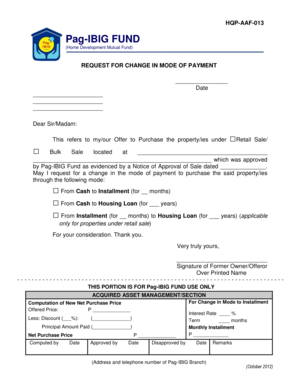
This guide provides a comprehensive overview of filling out the Pag-IBIG FUND Request for Change in Mode of Payment form online. By following these steps, users can smoothly navigate the process and ensure all necessary information is accurately submitted.
Follow the steps to successfully complete your request.
- Click ‘Get Form’ button to retrieve the form and access it in your preferred editor.
- Begin by entering the date at the top of the form to clarify when the request is made.
- Address the letter to the appropriate department or official at Pag-IBIG Fund by using 'Dear Sir/Madam.'
- In the first paragraph, state the purpose of your request regarding the change in payment mode for your purchased property by indicating the method you initially chose.
- Specify the property you are referring to by entering its location details into the designated areas.
- Choose the new mode of payment by marking the appropriate box for either switching from cash to installment, cash to housing loan, or changing an installment to housing loan.
- Include the applicable months or years under each selection where indicated.
- Conclude the request by expressing appreciation and signing your name at the bottom of the form with your printed name below it.
- Complete the section labeled for Pag-IBIG Fund use only, entering necessary computations, and getting the authorized personnel signatures.
- After filling out the form, review all entries for accuracy, then you may save changes, download, print, or share the form as needed.
Complete your Pag-IBIG Fund documents online today.
Open the Virtual Pag-IBIG website and click “Be a Member.” Then select “Verify MID No.” Enter your registration tracking number (RTN), last name, and date of birth in YYYY-MM-DD format. Click “SUBMIT.”